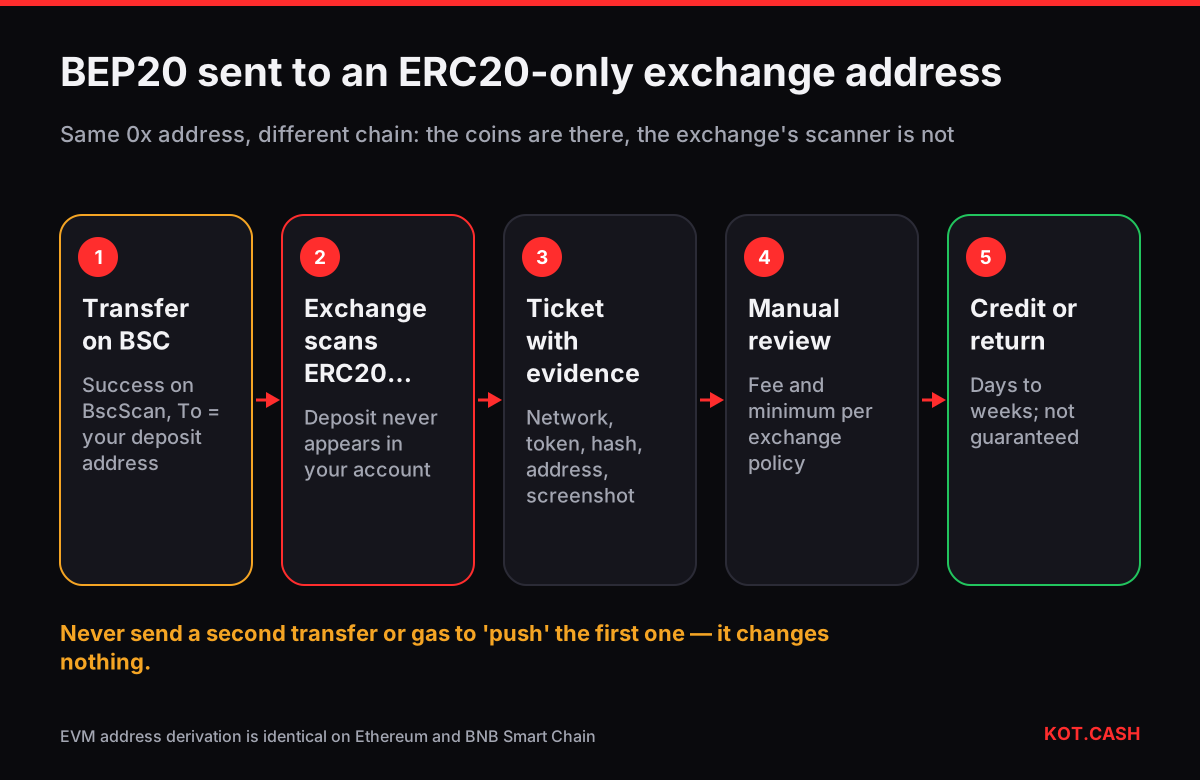
When you send BEP20 tokens to an exchange deposit address that the exchange only watches on Ethereum, the coins arrive on BNB Smart Chain at the same 0x address — and the exchange simply does not see them. They are not burned and not lost. The address is controlled by the exchange's keys on every EVM chain, so the exchange can technically move them. Whether it will, how long it takes and what it costs is a matter of the exchange's policy, and that is what this guide helps you navigate.
This is narrower than the general case covered in sent crypto to the wrong network: here the receiving side is a custodial service with its own keys, so your job is to give support everything they need to process a manual recovery.
Why the deposit is visible on-chain but not credited
Ethereum and BNB Smart Chain share the address format and the way addresses are derived from keys. An exchange that generates a deposit address 0xABC… for you on Ethereum automatically owns 0xABC… on BSC, Polygon, Arbitrum and every other EVM chain. Its deposit scanner, however, only watches the networks it lists on the deposit screen. A BEP20 USDT transfer to that address is a valid, confirmed transaction on BSC; the exchange's ledger just never records it.
Check it yourself: open the hash on BscScan. If the status is Success and the To address equals your deposit address, the coins are there. If the transaction hash identifier shows the hash is not found on BSC, check whether you actually sent from another chain.
What to send to the exchange's support
- Open a ticket from inside your account, not by email to an address you found on a forum. Choose a category like Deposit not credited or Wrong network.
- Give the network you actually used (BNB Smart Chain / BEP20), the token and its contract address, the amount and the transaction hash.
- Paste the deposit address and say which network the exchange showed for it (for example ERC20).
- Attach a screenshot of the BscScan page with the status and the To address.
- Ask for the recovery fee and expected time before you agree to anything; some exchanges ask you to confirm in writing.
What exchanges usually do
| Situation | Common outcome | What decides it |
|---|---|---|
| Token and chain both listed by the exchange, just not for this deposit | Manual credit after review | Amount above the exchange's recovery minimum |
| Chain listed, token not listed | Sometimes returned to the sending address | Whether they hold gas on that chain |
| Chain not supported at all | Often refused or very slow | Internal tooling for that chain |
| Amount below a few hundred dollars | Often refused | Recovery fee would exceed the amount |
Recovery fees for wrong-network deposits are commonly a flat amount or a percentage, and processing ranges from days to several weeks. Exchanges are not obliged to recover such deposits; their terms usually say the user bears the risk of choosing the wrong network. Polite persistence with the hash and screenshots works better than repeated new tickets.
If the receiver was a swap service or a payment processor
The same logic applies to any service that gives you a one-time deposit address. On KOT.CASH an order shows the coin and the network next to the deposit address, and the provider credits only that network. If you sent on another chain, write to support with the order link and the hash. Whether a manual return is possible depends on the liquidity provider and the chain; support will tell you what is visible and what the options are.
How to choose the network correctly next time
- Read the network name under the deposit address, not just the token name. ERC20, BEP20 and TRC20 USDT are the same token issued on different chains.
- On the sending side choose exactly that network. Exchanges often default to the cheapest one, which is how BEP20 ends up going to an ERC20 address.
- If the two sides have no network in common, swap or move the coins first; moving USDT between TRC20, ERC20 and BEP20 shows how.
- For a new route, send a test amount and wait until it is credited.
Fees differ a lot between the three USDT networks, which is why the cheaper one is tempting; the stablecoin fee comparison shows the current gap, and the deposit confirmations table shows how many blocks each network needs before a service credits it.
FAQ
Are my BEP20 tokens lost if the exchange only supports ERC20?
No. They sit at the same address on BNB Smart Chain, and the exchange controls that address. Recovery depends on the exchange's policy, not on technology.
How long does a wrong-network recovery take?
From a few days to several weeks, depending on the exchange's queue and the chain. Some exchanges process it only above a minimum amount.
Will the exchange charge a fee?
Usually yes, a flat fee or a percentage. Ask before you confirm the request.
Can I recover the tokens myself?
Not from an exchange address: you do not have its keys. You can only recover by yourself if the address belongs to a wallet you control.
I sent BEP20 to an ERC20 address in my own wallet. What now?
Add BNB Smart Chain to the wallet; the same address shows the tokens. See the guide on recovering tokens sent on the wrong EVM chain.