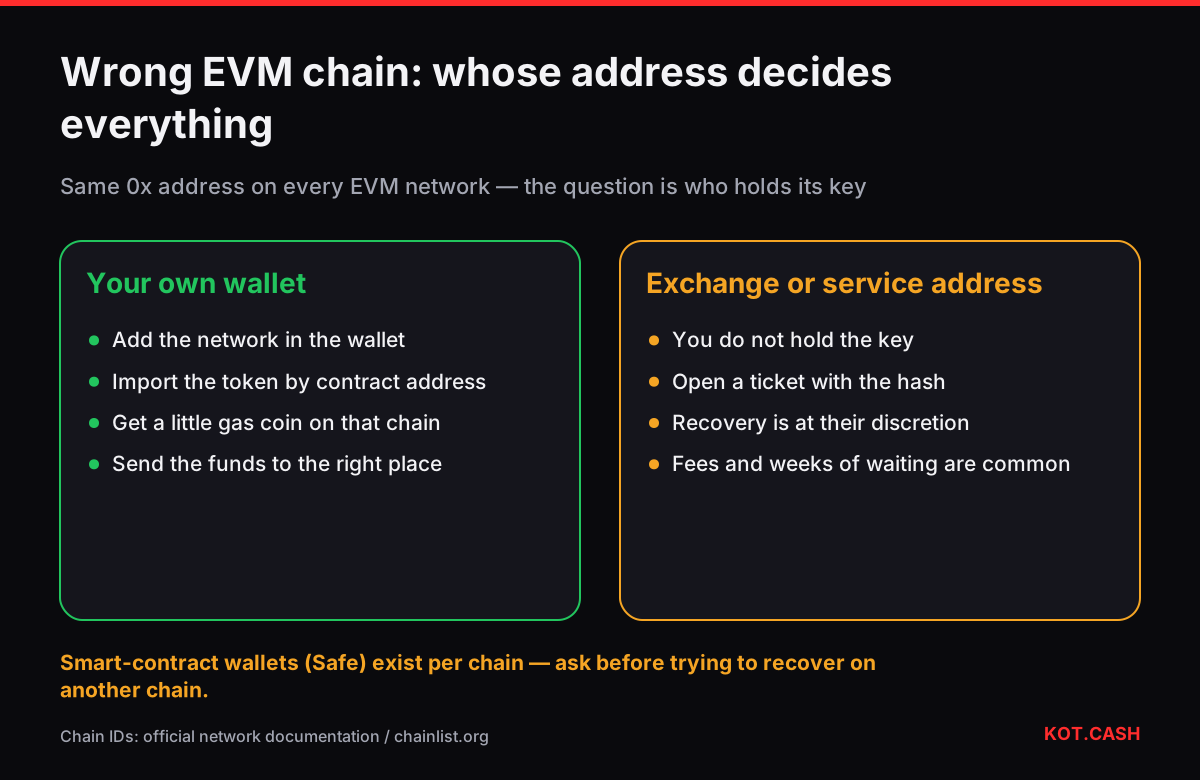
If the recipient address is a wallet you control — MetaMask, Trust Wallet, Rabby, a Ledger account — tokens sent on the 'wrong' EVM chain are not lost at all. Your private key controls the same 0x address on Ethereum, BNB Smart Chain, Polygon, Arbitrum, Base, Optimism, Avalanche C-Chain and the rest. The wallet just is not showing that network or that token. Add the network, add the token, get a little gas on that chain, and you can move the funds wherever they should have gone.
Compare: your wallet vs someone else's
Before you start, make sure this guide applies. The deciding factor is who holds the key to the receiving address, not which networks are involved. If the address belongs to an exchange or a swap service, read BEP20 sent to an ERC20-only exchange instead — only they can move the coins.
- Applies: a seed-phrase wallet, a hardware wallet, a browser extension where you can export or already hold the key.
- Applies with care: a smart-contract wallet (Safe and similar). Contract wallets exist only on chains where they were deployed; on another chain the same address may be empty code, so recovery needs the Safe team's guidance.
- Does not apply: exchange deposit addresses, custodial wallets, any address from an order page.
Step 1. Find which chain the transaction is on
Paste the hash into the transaction hash identifier: an EVM hash looks the same on every chain, so the tool lists the explorers to try. Open it in Polygonscan, BscScan, Arbiscan, Basescan and so on until one shows Success. Note the token contract address in the transfer line — you will need it in step 3.
Step 2. Add the network to the wallet
Most wallets already include the major EVM chains; you only need to switch them on. In MetaMask, open the network selector and enable the chain from the popular list. Use the official network settings, not values from a random website. These are the chain IDs to check against:
| Network | Chain ID | Gas coin |
|---|---|---|
| Ethereum | 1 | ETH |
| BNB Smart Chain | 56 | BNB |
| Polygon PoS | 137 | POL |
| Arbitrum One | 42161 | ETH |
| Optimism | 10 | ETH |
| Base | 8453 | ETH |
| Avalanche C-Chain | 43114 | AVAX |
Step 3. Import the token
If the coins are the network's gas coin (ETH on Arbitrum, BNB on BSC), they appear as soon as the network is added. Tokens need to be imported: choose Import token, paste the contract address you copied from the explorer, and the wallet reads the symbol and decimals. Never import a token by name search alone — scam tokens copy names like USDT. If the balance looks absurd (for example 1000000 times too large), the decimals are wrong; the token decimals converter shows the real amount from the raw value in the explorer.
Step 4. Get gas on that chain
To move tokens on Polygon you need POL, on BSC you need BNB, on Arbitrum, Base and Optimism you need ETH on that layer 2. A dollar or two of gas is usually enough for a token transfer. Options: withdraw the gas coin from an exchange directly on that network, ask a friend to send a small amount, or swap into it. The gas fee calculator estimates what a token transfer costs on each chain.
Step 5. Move the funds where they belong
- If the final destination supports this chain, just send there.
- If not, swap or move the asset to the right network. For USDT, see moving USDT between TRC20, ERC20 and BEP20.
- Keep a little gas coin on the chain in case other tokens arrive there later.
Hardware wallets and Ledger Live
Ledger Live and Trezor Suite show only the networks they support as separate accounts. If the chain is missing there, connect the hardware wallet to MetaMask or Rabby: the derivation path is the same, so the same address appears, and you sign with the device. Check the receive address on the device screen before moving anything.
When the address is the same but the funds still are not there
Occasionally the explorer shows the transfer on a chain, yet the address in the To field differs from yours by a few characters. That is not a wrong-chain problem: you sent to another address, possibly one planted in your history by an address-poisoning transfer. Compare the full address with your wallet's Receive screen. Another rare case is a wallet that derives a different address per network, such as some multichain wallets that use separate accounts for each chain; then look for the address shown in the explorer among the wallet's accounts before concluding anything. Once you find the right account, the steps above are the same.
FAQ
Why does my wallet show zero when the explorer shows the tokens?
The wallet is set to another network or has not imported that token. Balances live on the chain; the wallet only displays what it is told to look at.
Is the address really the same on Polygon and Ethereum?
Yes for normal key-based wallets. The address is derived from the key the same way on every EVM chain.
I have no gas on that chain. Can someone send it for me?
Yes, any small transfer of the gas coin to your address on that chain works. Do not accept 'help' that requires your seed phrase.
Does this work for TRON or Solana?
No. TRON and Solana are not EVM chains, and their addresses are different. This guide only covers EVM networks.
What about a Safe multisig?
A Safe is a contract deployed per chain. On a chain where it was not deployed, recovery may require deploying it with the same parameters; ask the Safe team before trying.