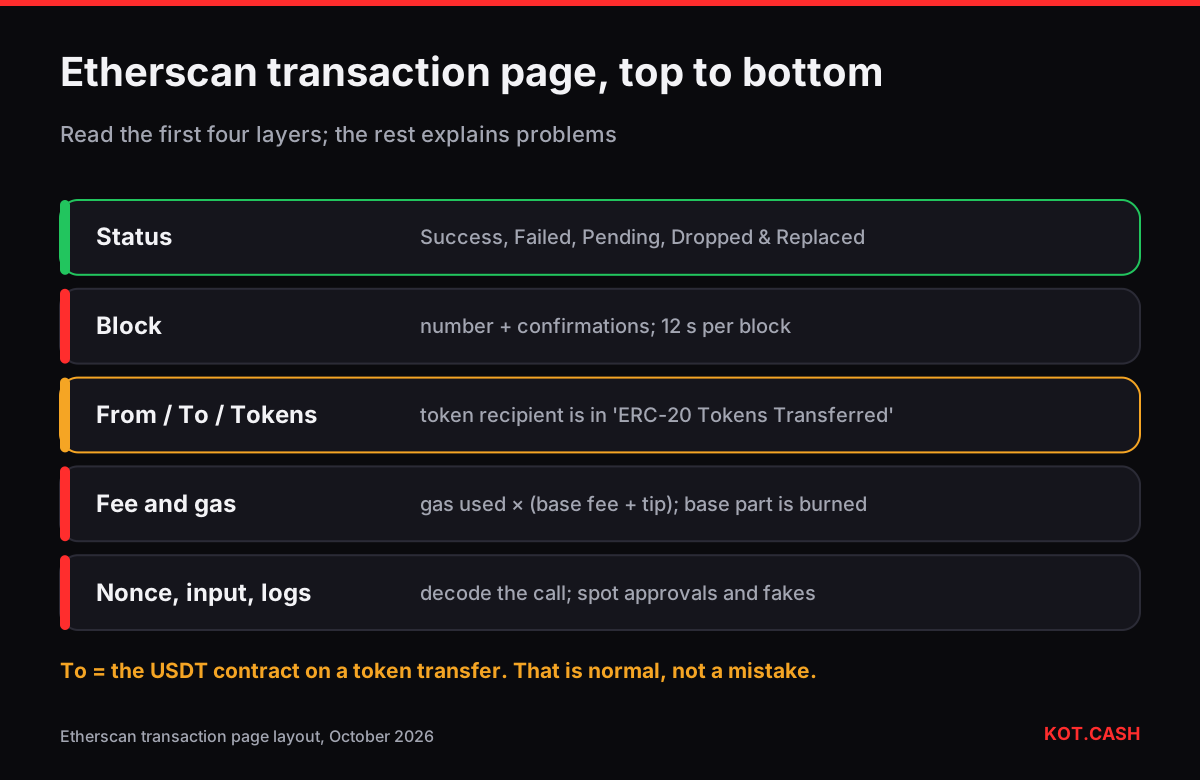
An Etherscan transaction page answers four questions, in this order: did it succeed (Status), is it final (Block and confirmations), who sent what to whom (From, To, Value and ERC-20 Tokens Transferred) and what it cost (Transaction Fee and the gas fields). Read those first; the rest of the page — nonce, input data, logs — matters when something looks wrong. This guide goes field by field as the page is laid out today.
If you only need to find a transaction by hash and see whether it went through, the shorter guide to checking a transaction hash covers that for all networks. Here we go deeper into Ethereum specifically.
The top block: status and finality
- Transaction Hash — the 0x… identifier. Bookmark this page, not the wallet's notification.
- Status — Success, Failed (shown with the revert reason when available), Pending, or Dropped & Replaced when another transaction with the same nonce confirmed instead.
- Block — the block number with a count of block confirmations. Ethereum blocks come every 12 seconds; the KOT.CASH liquidity provider credits ETH and ERC-20 deposits after 6 confirmations, and the chain itself finalises after about two epochs, roughly 13 minutes.
- Timestamp — when the block was produced, in UTC and relative time.
- Transaction Action — Etherscan's plain-language summary such as 'Transfer 500 USDT to 0x…'. Helpful, but always confirm against the token transfer lines below.
Who sent what to whom
From is the address that signed. To is either a person's address (for a plain ETH transfer) or a contract, shown as 'Interacted With (To)'. For a USDT transfer the To field is the USDT contract, not the recipient — the recipient appears in ERC-20 Tokens Transferred, a line of the form 'From A To B For 500 USDT'. People who read only the To field often panic that they 'sent to the token contract'; check the token transfer line first. The guide on tokens sent to a contract address covers the case when that really happened.
Value is the ETH amount sent along with the call. For token transfers it is 0 ETH, which is normal. Internal ETH movements made by contracts, such as a DEX paying out ETH, appear in the Internal Txns tab rather than in Value.
What it cost: fee and gas fields
| Field | What it means |
|---|---|
| Transaction Fee | What you actually paid: gas used × effective gas price |
| Gas Price | Effective price per gas unit, in Gwei: base fee + the tip you paid |
| Gas Limit & Usage by Txn | The limit you set and how much was used, e.g. 65,000 | 46,109 (70.9%) |
| Gas Fees: Base / Max / Max Priority | Base fee of the block, your max fee cap and your tip cap |
| Burnt & Txn Savings Fees | Base fee × gas used is burned; Savings = what your max fee would have allowed minus what was paid |
The difference between Max and what you paid is never charged. The EIP-1559 max fee calculator shows how the max fee, the base fee and the tip combine. A failed transaction still pays for the gas used up to the failure point, so it has a fee too.
The details that explain problems
- Nonce — the sender's transaction counter. A pending transaction with a lower nonce blocks all later ones; the pack article on a missing nonce explains how that delays a payment.
- Txn Type — 2 (EIP-1559), 0 (legacy) or 3 (blob transaction).
- Position In Block — order inside the block, rarely needed.
- Input Data — the encoded function call. Click 'Decode Input Data' for verified contracts, or paste the hex into the transaction input data decoder to see whether it was a transfer, an approve or something more dangerous.
- Logs tab — events emitted, including the Transfer and Approval events wallets rely on.
- State tab — balance changes per address, useful when several tokens moved.
Warning signs on the page
- A token transfer whose token has no logo and a name like 'USDT' but a different contract — likely a fake token. Compare the contract with the official one on the token's page.
- Incoming transfers of 0 USDT from an address that resembles one you use — address poisoning; never copy addresses from history.
- An 'Approve' or 'Set Approval For All' in the Transaction Action that you did not intend — revoke the approval.
FAQ
Why does the To field show the USDT contract instead of the recipient?
A token transfer is a call to the token contract. The recipient appears in the ERC-20 Tokens Transferred line.
What does Dropped & Replaced mean?
Another transaction from the same address with the same nonce was confirmed instead, typically a speed-up or cancel from your wallet.
How many confirmations are enough on Ethereum?
Services decide: the KOT.CASH provider credits after 6 confirmations. The chain finalises after about two epochs, roughly 13 minutes.
Why did a failed transaction cost a fee?
Gas used before the failure is paid to the network. Only the unused part of the limit is not charged.
What are Burnt fees?
Under EIP-1559 the base fee part of every transaction is burned rather than paid to validators. Etherscan shows that amount.