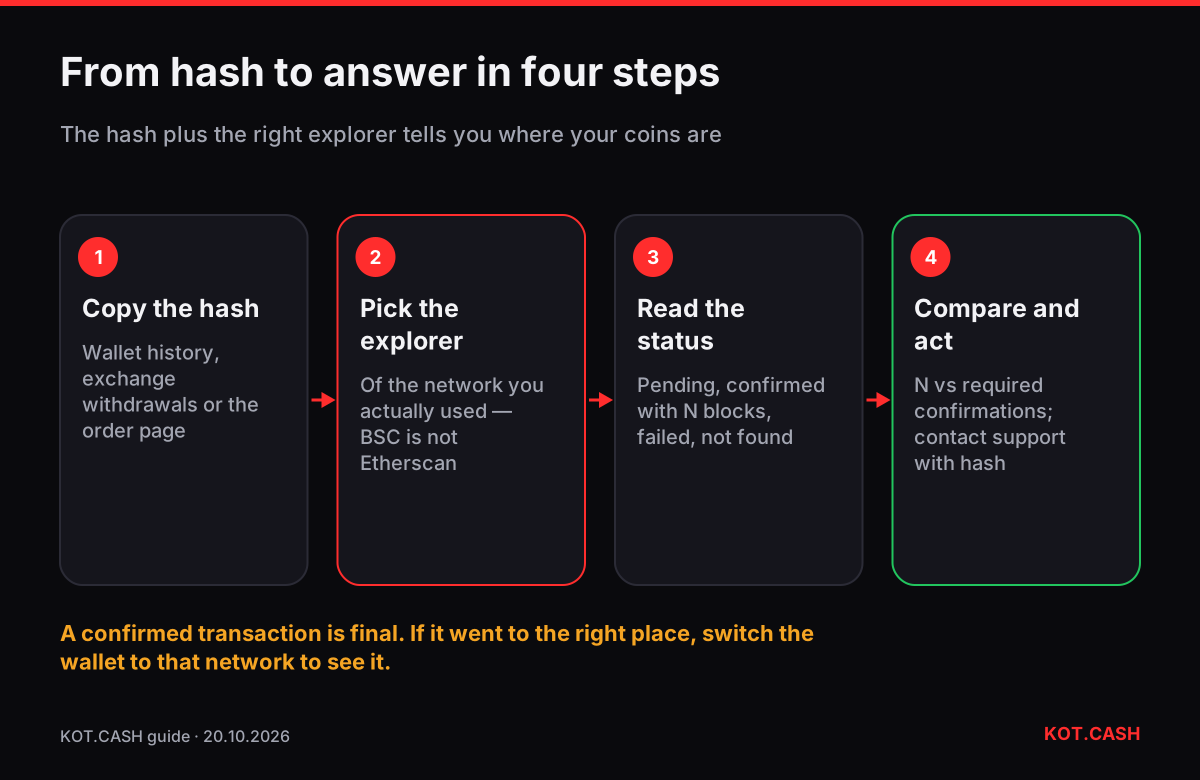
A transaction hash (also TxID or transaction ID) is the unique identifier of a blockchain transaction. Paste it into the block explorer of the network the transaction was sent on, and you see whether it is pending or confirmed, how many confirmations it has, the amount, the fee and both addresses. It is the single most useful thing to have when a swap or a withdrawal seems slow, and the first thing support will ask for.
Where to find the hash
- Your wallet: open the transaction in the history; most wallets have "View on explorer" or a copy button for the TxID.
- An exchange withdrawal: the withdrawal history shows the TxID once the exchange has broadcast it. If there is no hash yet, the exchange has not sent the transaction.
- A KOT.CASH order: the order page shows the hash of the payout once it is sent; the hash of your deposit is in your own wallet.
Hashes look different by network: Bitcoin and most UTXO chains use 64 hexadecimal characters, Ethereum and EVM chains 0x plus 64 hex characters, Solana a longer base58 string. A hash is public information; sharing it is safe.
Which explorer to use
| Network | Explorer | What to look for |
|---|---|---|
| Bitcoin | mempool.space | Confirmations, fee rate in sat/vB, RBF flag |
| Ethereum | etherscan.io | Status Success/Pending, block confirmations, token transfers tab for USDT |
| TRON | tronscan.org | Result SUCCESS, confirmed, energy and bandwidth used |
| BNB Smart Chain | bscscan.com | Status, token transfers for BEP20 |
| Solana | solscan.io | Result, slot, token balance changes |
| XRP Ledger | livenet.xrpl.org | Result tesSUCCESS, destination tag |
| Litecoin / Dogecoin | the network's own explorer, e.g. litecoinspace.org | Confirmations |
Open the hash on the explorer of the network you actually used. A USDT transaction sent on BNB Smart Chain will not appear on Etherscan, even though the addresses look the same — that alone answers many "where is my USDT" questions.
Reading the result
- Pending / unconfirmed / in mempool: the network has the transaction but no block contains it yet. On Bitcoin this usually means the fee rate is below what blocks are taking right now.
- Confirmed with N confirmations: it is in a block and N−1 blocks were built on top. Compare N with what the receiving service requires; the deposit confirmations lookup lists those numbers.
- Failed / reverted (EVM, TRON): the transaction was mined but did not execute — for example, out of gas or energy. No tokens moved; the fee was still paid.
- Not found: wrong network, wrong explorer, a typo, or the transaction was never broadcast.
For tokens, check the token transfer line, not only the main value field: a USDT transfer on Ethereum shows 0 ETH as value and the USDT amount under token transfers.
What it means for a swap
- Deposit pending: wait, or raise the fee if your wallet supports Replace-By-Fee (Bitcoin) or speed-up (Ethereum). Do not send again.
- Deposit confirmed, fewer confirmations than required: the order is waiting for more blocks. The order page shows the provider's counter.
- Deposit confirmed with enough confirmations, order not moving after ten minutes or so: check that the receiving address and network match the order; then contact support with the order link and hash.
- Payout hash shown on the order page: open it on the payout network's explorer. If it is confirmed, the coins are in your wallet — switch the wallet to the right network or add the token if you do not see them.
Example: reading a Bitcoin deposit on mempool.space
Paste the hash into mempool.space. At the top you see the status: Unconfirmed with an ETA, or Confirmed with the block height and the number of confirmations. Below are the inputs (the coins your wallet spent) and outputs: one goes to the deposit address of your order, usually another returns change to your wallet. Check that the output to the deposit address matches the order amount.
The Fee line shows the total in sats and the rate in sat/vB. If the transaction is unconfirmed, compare that rate with the current next-block estimate on the same page. Much lower means a long wait. If the page shows an RBF badge, your wallet can replace it with a higher fee; if it does not, a child transaction (CPFP) from the change output is the other way to speed it up.
For a KOT.CASH order the provider needs 1–2 confirmations on a BTC deposit. Once mempool.space shows that and the order page has not moved for ten minutes or so, contact support with the order link and the hash.
What a hash cannot tell you
An explorer shows what happened on-chain, not who controls an address. It cannot tell you whether an exchange credited your account, whether a memo was matched, or whether an address belongs to the person you think it does. For those you need the receiving service. And no explorer can reverse a transaction; confirmed transfers are final.
FAQ
What is a TxID?
The unique identifier of a blockchain transaction, also called transaction hash. It lets anyone look the transaction up in a block explorer.
Is it safe to share my transaction hash?
Yes. It is public information. Never share your seed phrase or private key.
Why does Etherscan not find my USDT transaction?
It was probably sent on another network such as BNB Smart Chain or TRON. Use that network's explorer.
My transaction says 'Success' but the exchange has not credited it.
Check confirmations against the exchange's requirement and whether a memo was needed, then contact the exchange with the hash.
Where is the hash of my KOT.CASH payout?
On the order page, once the payout has been sent.