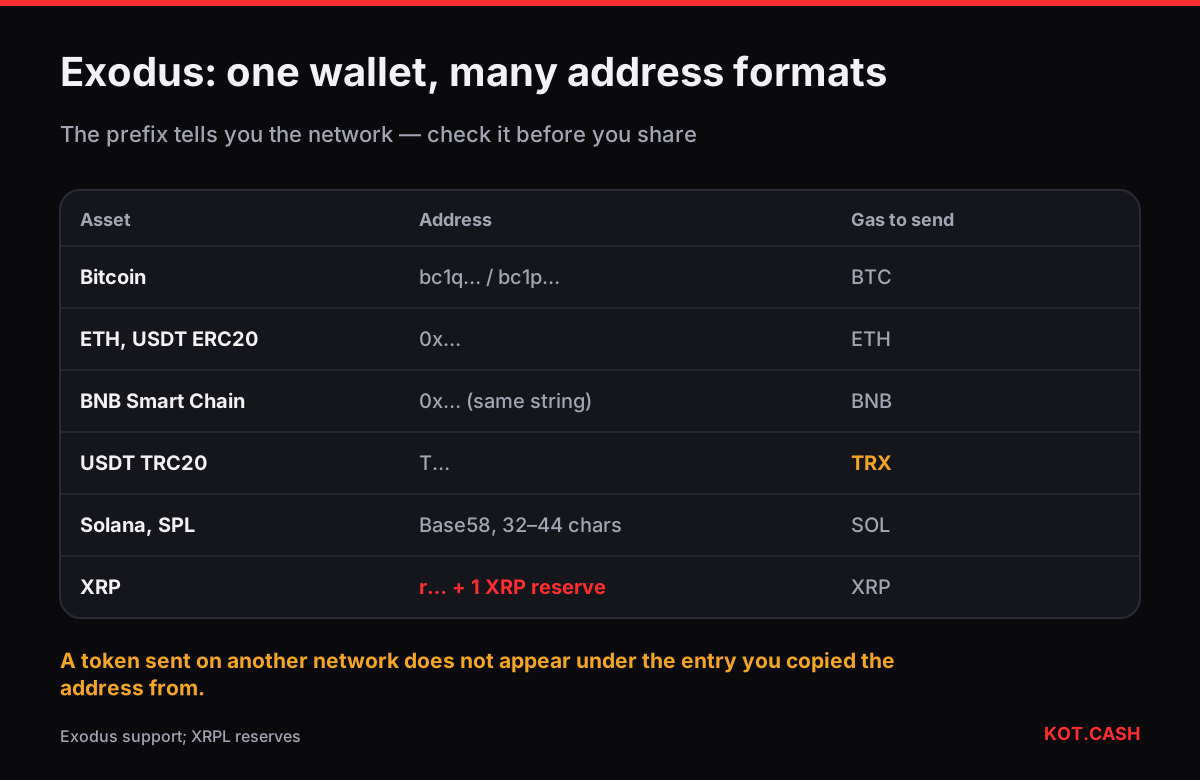
In Exodus every asset has its own receive address: open the asset (Bitcoin, Ethereum, Tether and so on), press Receive, and the wallet shows the address and a QR code for that asset on that network. For tokens that exist on several networks, such as USDT or USDC, Exodus lists each network as a separate asset or asks you to choose the network on the Receive screen. Copy the address with the copy button and check its prefix: it tells you which network you are on.
The Receive flow in recent versions
- On desktop open Wallet, on mobile the main portfolio list, and select the asset you want to receive.
- Press Receive. If the asset exists on more than one network, pick the network first — Exodus labels them, for example Tether USD (Ethereum), Tether USD (Tron), Tether USD (Solana).
- Copy the address or show the QR code to the sender.
- For networks that use a memo or destination tag, Exodus does not need one for your own address — leave the memo empty when you withdraw from an exchange to Exodus.
Exodus describes the same steps in its support articles and warns that sending a token on a network the asset entry does not represent will not show up in that entry. Treat the network label as part of the address.
What the address should look like
| Asset / network | Starts with | Notes |
|---|---|---|
| Bitcoin | bc1q… (or bc1p… / 3… / 1… if you switch type) | Several address types can belong to one wallet |
| Ethereum and ERC20 tokens | 0x… | Same address for ETH, USDT ERC20, USDC ERC20 |
| BNB Smart Chain | 0x… (same string) | Separate balance; gas in BNB |
| Tron and TRC20 | T… | Needs TRX to send TRC20 |
| Solana and SPL | Base58, 32–44 characters | Token accounts created automatically |
| XRP | r… | No tag for your own wallet; 1 XRP reserve |
| Litecoin | ltc1… or M… / L… | Native SegWit cheaper to spend |
| Dogecoin | D… | No memo |
If a sender says your address is invalid, the first thing to check is that the network on their side matches the prefix. A T-address will never pass an ERC20 address check and a 0x address will never pass a Tron one. The address validator checks the format and checksum of common networks.
Bitcoin addresses in Exodus
Exodus uses native SegWit (bc1q…) by default for Bitcoin. In recent versions you can also display other address types for the same wallet — Taproot (bc1p…) and legacy formats — for senders that cannot pay to bc1 addresses, which today is rare. All of them belong to your wallet and show in one BTC balance. Exodus can also reuse one address or show a fresh one; a fresh address for each incoming payment is better for privacy, because anyone you give an address to can look up its whole history.
Tokens on several networks
USDT is the case that causes the most support tickets. In Exodus USDT on Ethereum, USDT on Tron and USDT on Solana are different entries with different addresses (0x…, T… and a Base58 string). When you withdraw USDT from an exchange to Exodus, the exchange's network selector must match the Exodus entry you copied the address from. When KOT.CASH pays out USDT, pick the same network in the widget as the Exodus entry you pasted from.
Each network also needs its own gas coin to send: ETH for ERC20, TRX for TRC20, SOL for SPL tokens, BNB on BNB Smart Chain. Exodus shows a warning when the gas balance is insufficient; the fix is to receive a little of the gas coin on the same network.
Memos and tags
XRP, Stellar, Cosmos, Hedera and a few others use a memo or destination tag so that one exchange address can serve many customers. Your Exodus address is yours alone, so you do not need a tag to receive. The reverse matters: when you send from Exodus to an exchange, copy the exchange's tag into the memo field. The memo and tag checker lists every coin and network that uses one.
Before the first deposit
- Write down and test the 12-word secret phrase backup before you receive anything significant. Exodus is self-custodial: without the phrase there is no recovery.
- Send a small test amount on a new network, wait until it appears, then send the rest.
- Check the first and last characters of the pasted address against Exodus — clipboard malware swaps addresses.
- Confirmation time depends on the network, not on Exodus. The deposit confirmations lookup shows how many blocks swap services wait for on each one.
FAQ
Why does Exodus show a different address for USDT on Tron and on Ethereum?
They are different networks with different address formats: Tron uses T-addresses, Ethereum uses 0x addresses. Each network entry has its own balance.
Does my Exodus Bitcoin address change?
Exodus can show a new address for each payment or keep one. All addresses belong to the same wallet and old ones keep working.
Do I need a memo to receive XRP in Exodus?
No. Leave the tag empty when you withdraw from an exchange to your own Exodus XRP address.
Can I receive BEP20 tokens at my Exodus Ethereum address?
The string is the same, but the funds land on BNB Smart Chain. Enable the BNB Smart Chain asset in Exodus to see them.
Exodus says I do not have enough to cover the fee. Why?
Sending a token needs the network's gas coin: ETH, TRX, SOL or BNB. Receive a small amount of it on the same network.