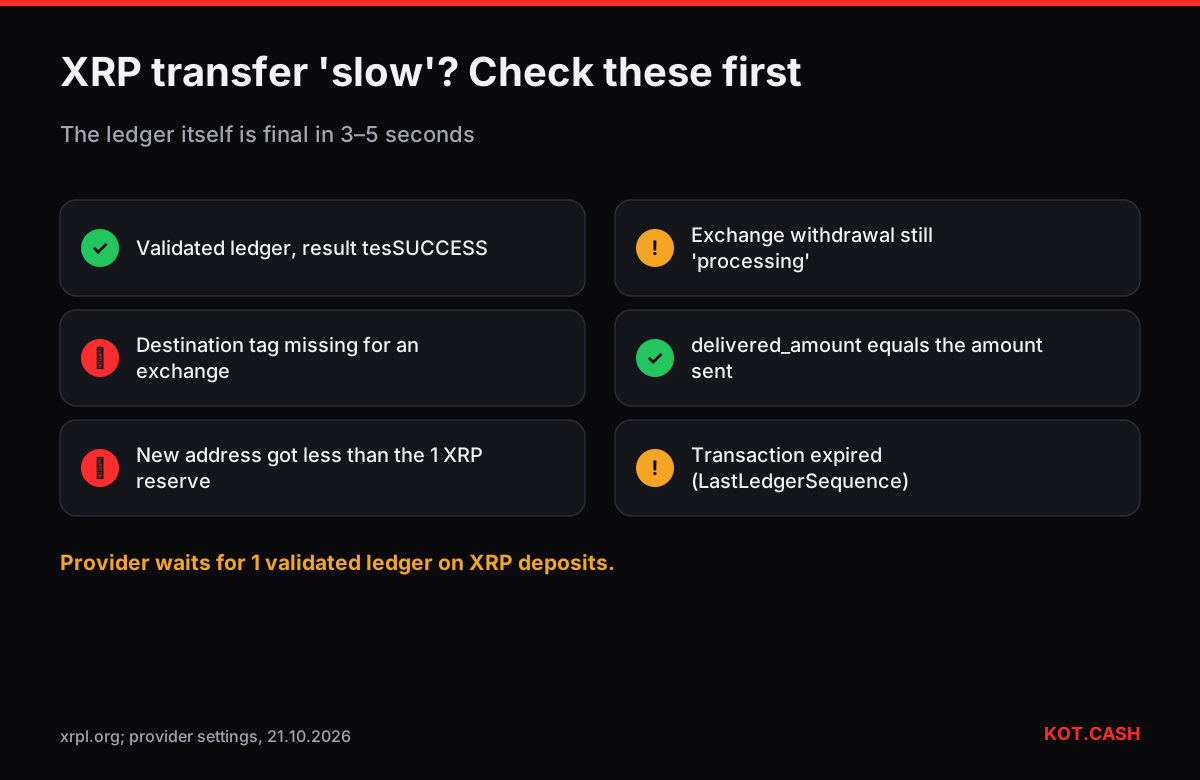
An XRP payment is final within 3–5 seconds: the XRP Ledger closes a new ledger version every few seconds, and once your transaction is in a validated ledger it cannot be reversed. There are no confirmations to count — the provider behind KOT.CASH waits for exactly one validated ledger. When an XRP transfer 'takes hours', the ledger is not the reason. It is almost always a missing destination tag, an account that is not activated, an exchange processing queue, or a transaction that expired before it was submitted.
Why XRP has no confirmation count
The XRP Ledger does not use mining or block proposals by a single producer. Validators exchange proposals and agree on the set of transactions for the next ledger through the XRP Ledger consensus protocol. A ledger version is validated when a supermajority of trusted validators (80% of each node's UNL) agrees on it. That takes a few seconds, and validated ledgers are not reorganised. One validated ledger is therefore as final as XRP gets.
Before you blame the network: a checklist
- Was the destination tag included? Exchanges and swap services share one XRP address and identify deposits by tag. Without it the payment arrives in seconds but nobody knows whose it is. The memo and tag checker lists coins with this requirement.
- Is the destination account activated? A new XRP address only exists once it holds the base reserve of 1 XRP (since December 2024; it was 10 XRP before). Sending less to a new address fails with
tecNO_DST_INSUF_XRP. - Did the transaction expire? Wallets set a LastLedgerSequence a few ledgers ahead. If the transaction is not included by then — rare, but it happens when the wallet loses connection — it can never be included and the wallet reports failure.
- Has the exchange actually sent it? A withdrawal stuck at 'processing' on an exchange has no XRPL transaction yet.
- Was the amount delivered in full? Payments with the partial-payment flag can deliver less than the stated amount. Look at
delivered_amountin the explorer, not justAmount.
The reserve in practice
Every XRP account keeps a reserve that cannot be sent: 1 XRP base plus 0.2 XRP for each object it owns, such as a trust line, an open offer or an escrow. A wallet with two trust lines therefore locks 1.4 XRP. If you try to send your entire balance, the payment fails with an 'unfunded' error, and the fee — a few drops — is still charged. The XRP reserve calculator shows the spendable amount for your account.
Fees and why they almost never cause delay
The standard transaction cost is 10 drops (0.00001 XRP). Under load the ledger raises the required cost for new transactions, and wallets follow automatically. Transactions paying the reference cost are queued and included within a few ledgers; the cost is destroyed, not paid to anyone. In practice fee-related delays on XRP are measured in seconds.
Reading the status in an explorer
On XRPScan or the XRPL Explorer, look for three fields: the result code (tesSUCCESS means it applied; codes starting with tec mean it was included but failed and the fee was charged), the ledger index with the word Validated, and the DestinationTag. If the result is tesSUCCESS, the ledger is validated and the tag matches what the recipient gave you, your part is done in full. The guide on using XRPScan walks through a real transaction page.
Exchange withdrawals of XRP
Many exchanges process XRP withdrawals in batches or after an internal review, so the time between pressing Withdraw and seeing a hash can be minutes to hours. The XRPL part is still seconds once the exchange signs the payment. Two settings on the exchange side matter more than speed: the destination tag field, which you must fill in when sending to another exchange or a swap, and the withdrawal minimum, which for XRP is often above 1 XRP because of the reserve rule on new accounts. If the exchange offers XRP only on the XRP Ledger, that is the right network; a 'BEP20 XRP' option is a wrapped token on BNB Smart Chain and will not reach an XRP Ledger address.
XRP in a swap
When you send XRP to an XRP to USDT order, the order page shows the deposit address and a destination tag; copy both. The deposit is registered within seconds of validation, and the provider's processing estimate for XRP pairs is a few minutes. The payout side then depends on the coin you receive — USDT on TRON takes another minute, BTC another block.
FAQ
How long does an XRP transfer take?
3–5 seconds to be in a validated ledger, which is final.
How many confirmations does XRP need?
One validated ledger. There is no further confirmation count on the XRP Ledger.
Why did my XRP transfer to a new address fail?
A new address must receive at least the 1 XRP base reserve to be activated; smaller payments fail with tecNO_DST_INSUF_XRP.
My XRP arrived but the exchange did not credit it. Why?
Most often the destination tag was missing or wrong. Contact the exchange with the transaction hash.
How much is the XRP network fee?
Usually 10 drops, 0.00001 XRP, rising only briefly under heavy load.