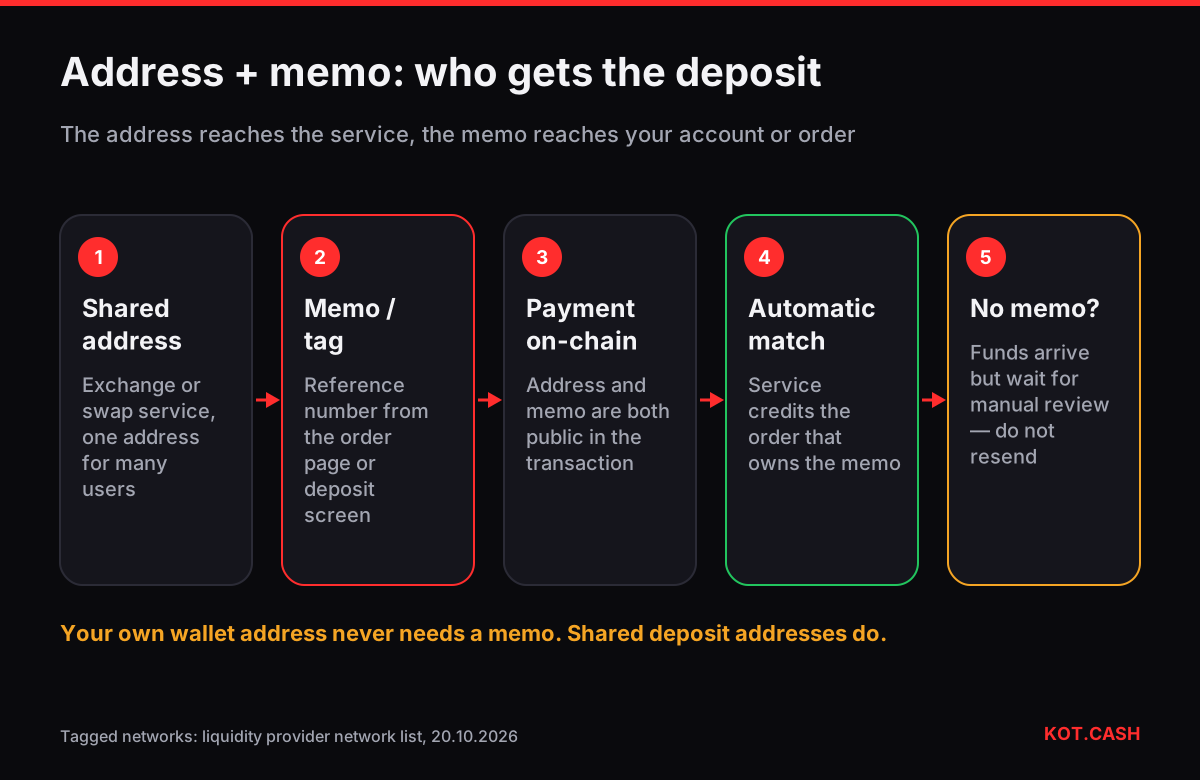
A memo, destination tag or comment is a short extra field that some blockchains attach to a payment. You need it when the receiving address is shared by many users — an exchange, a custodial wallet or a swap service — and the field tells the service whose deposit it is. You do not need it when you send to your own wallet. The networks that use one include XRP (Destination Tag), Stellar, Cosmos Hub, Hedera and several Cosmos-based chains (Memo) and TON (comment). Our memo and tag checker lists every coin and network in the liquidity provider's list that uses such a field.
Why some networks need a memo and others do not
On Bitcoin, Ethereum, TRON or Solana, creating a new address is free and instant, so an exchange simply gives every customer their own deposit address. On account-based ledgers such as XRP and Stellar, every account has to hold a reserve and creating one costs money, so exchanges keep a single address and tell customers apart with a tag. Cosmos chains and Hedera work the same way for exchange deposits. The tag is not a security feature; it is a reference number, like the payment reference on a bank transfer.
| Coin / network | Field name | Needed when |
|---|---|---|
| XRP (XRP Ledger) | Destination Tag (number) | sending to an exchange or swap deposit |
| RLUSD (XRP Ledger) | Destination Tag | same as XRP |
| XLM (Stellar) | Memo | sending to a shared address |
| ATOM (Cosmos Hub) | Memo | sending to an exchange or swap deposit |
| HBAR, USDC on Hedera | Memo | sending to a shared address |
| USDT, NOT, DOGS and other TON tokens | Memo (comment) | sending to a shared address |
| INJ, TIA, DYDX, KAVA, RUNE, STX and others | Memo | sending to an exchange or swap deposit |
How it works on a KOT.CASH order
When the coin you send uses a tag, the order page shows it next to the deposit address. Copy both. In your wallet, the field may be called Destination Tag, Tag, Memo, Comment or Note; some exchange withdrawal forms call it Address Tag. Paste the number or text exactly, without spaces. The payout side is different: if you receive XRP, XLM or ATOM, send it to your own wallet, where no tag is needed. The standard swap form has no field for a payout memo; the Multi-Hop and Split Swap forms do, if you need to receive straight to an exchange that requires one.
What happens if you forget the memo
The coins arrive at the correct address — the blockchain does not reject the payment — but the receiving service cannot credit them automatically. They sit in the service's wallet until someone matches them by hand. This is recoverable in most cases, but slower and sometimes with a fee.
- Do not send the same amount again with the memo. That creates a second payment; it does not fix the first one.
- Find the transaction hash in your wallet or on a block explorer (for XRP, an XRP Ledger explorer; for Stellar, a Stellar explorer; for Cosmos, Mintscan).
- Write to the receiving service's support with the hash, amount, time, the address you sent to and your account or order ID.
- For a KOT.CASH order, contact support through the site chat, Telegram or e-mail with the order link and the hash.
- Expect manual review. Exchanges often take days and may charge a recovery fee; the outcome is up to the service holding the funds.
Where the memo field is in popular wallets
- Xaman (XRP): on the send screen, below the destination address, there is a Destination Tag field; Xaman also warns when the destination account requires a tag.
- Ledger Live (XRP, XLM, ATOM, HBAR): the field appears in the send flow as Tag or Memo after you enter the address.
- Lobstr (Stellar): the Memo field is on the send screen; choose the memo type the recipient asked for (usually text or ID).
- Keplr and Leap (Cosmos chains): the Memo field is on the send screen, often collapsed under advanced options.
- Tonkeeper (TON): the Comment field on the send screen is the memo for TON and TON tokens.
- Exchange withdrawal forms: the field may be called Tag, Memo, Address Tag or MEMO/Tag, and some forms hide it until you choose the network.
If your wallet has no such field for a coin that needs it, do not use that wallet for the payment. Move the coins to a wallet that supports the field, or ask the recipient for a dedicated address without a tag if they offer one.
Common mistakes
- Using the tag from an old order. Each order has its own tag. A tag from yesterday's order does not match today's.
- Typing the tag into the address field. Some wallets accept an address with a tag appended (an X-address on XRP). If your wallet does not, keep them in separate fields.
- Assuming every token on TON needs a comment. Your own TON wallet does not; shared deposit addresses do.
- Adding a memo where none exists. Bitcoin, Ethereum, TRON, BNB Smart Chain and Solana deposits are identified by address alone. A memo there is ignored at best.
A memo is not a secret
People sometimes hesitate to share a memo with support, thinking it works like a password. It does not: anyone can see it on the blockchain next to your transaction. What you should never share is your seed phrase or private key; no support team ever needs those.
FAQ
Does XRP always need a destination tag?
Only when sending to a shared address such as an exchange or swap deposit. Sending to your own XRP wallet does not need one.
Does USDT need a memo?
Not on TRON, Ethereum, BNB Smart Chain or Solana. USDT on the TON network uses a memo (comment) for shared deposit addresses.
What if I sent ATOM to an exchange without the memo?
Contact the exchange's support with the transaction hash; untagged deposits are handled manually.
Is a memo the same as a payment ID in Monero?
No. Modern Monero wallets use integrated or subaddresses instead; the provider's list does not mark XMR as a tagged network.
Can a wrong memo send funds to another person?
It can credit another account at the same exchange if that tag exists. That is why you copy the tag rather than type it.