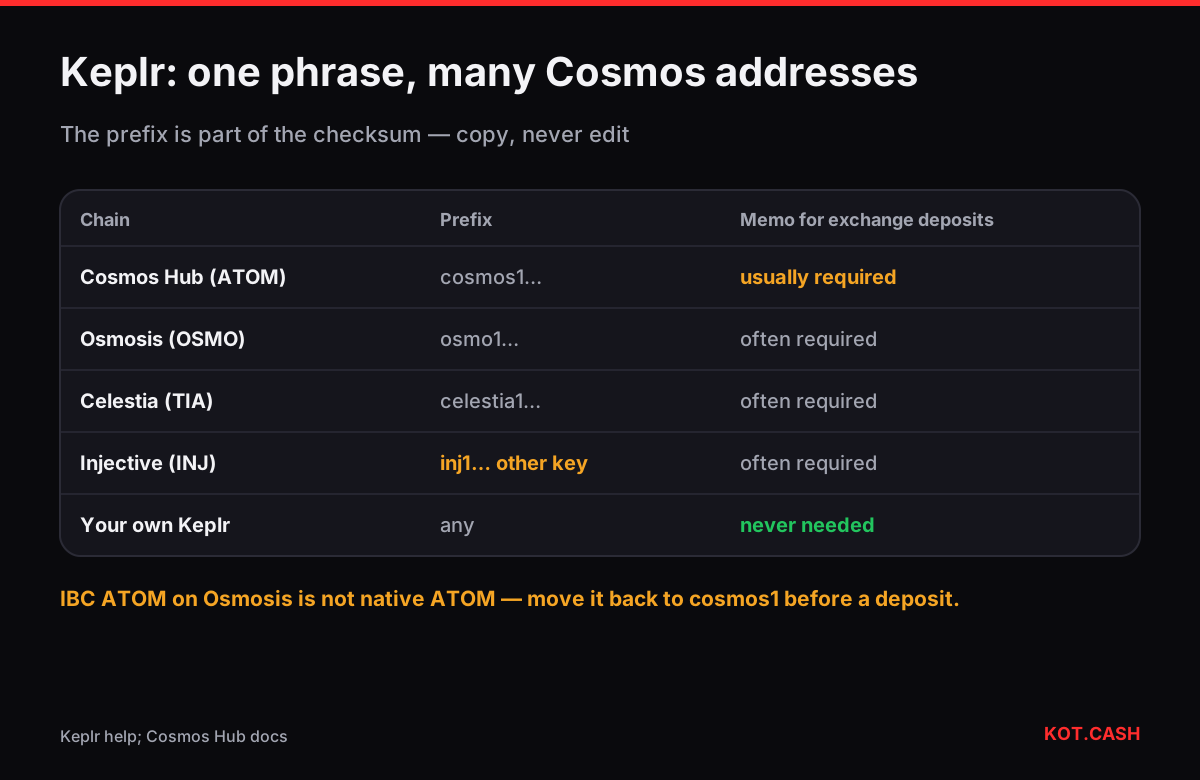
Your ATOM address in Keplr starts with cosmos1 and is about 45 characters long. Open Keplr, find Cosmos Hub in the list of chains and press Deposit or Copy address; that is the address for ATOM on the Cosmos Hub. Other chains in Keplr — Osmosis, Celestia, Injective and dozens more — show their own addresses with their own prefixes (osmo1, celestia1, inj1). They are not interchangeable even when they come from the same recovery phrase.
Why every chain has a different prefix
Cosmos chains use Bech32 addresses: a human-readable prefix, the separator 1 and an encoded body with a checksum. For most chains Keplr derives the same key from your phrase (coin type 118), so the body of the address is identical and only the prefix changes: cosmos1abc… and osmo1abc… belong to the same key. The checksum covers the prefix too, so an address with the prefix swapped by hand fails validation.
| Chain | Prefix | Coin | Same body as cosmos1? |
|---|---|---|---|
| Cosmos Hub | cosmos1 | ATOM | — |
| Osmosis | osmo1 | OSMO | Yes (coin type 118) |
| Celestia | celestia1 | TIA | Yes (coin type 118) |
| Akash | akash1 | AKT | Yes (coin type 118) |
| Injective | inj1 | INJ | ('No — Ethereum-style key (coin type 60)', 'amber') |
| Evmos-type chains | varies | — | ('No — Ethereum-style key', 'amber') |
The practical rule: copy the address from the exact chain row you need. Do not edit prefixes, and do not paste a cosmos1 address into a withdrawal for Osmosis.
Getting the address step by step
- Open Keplr (browser extension or mobile app) and unlock it.
- In recent versions the home screen lists your balances across chains; use Deposit (or Receive) and search for Cosmos Hub.
- Copy the cosmos1… address or show its QR code.
- If you use a Ledger with Keplr, open the Cosmos app on the device; Keplr can show the address on the Ledger for verification.
When a memo is needed
Exchanges usually give all customers the same cosmos1 deposit address and tell them apart by a memo. When you withdraw ATOM from Keplr to an exchange, paste the exchange's memo exactly; without it the deposit arrives but is not credited automatically. When you receive to Keplr, no memo is needed — your address is yours alone. The liquidity provider's network list marks ATOM on the COSMOS network as a memo network for deposits, and the KOT.CASH order page shows the memo next to the deposit address when one is required. The memo and tag checker lists every such coin.
IBC tokens
Tokens moved between Cosmos chains travel over IBC. ATOM sent from the Cosmos Hub to Osmosis becomes an IBC voucher on Osmosis, displayed by Keplr as ATOM but stored under a denomination like ibc/27394F…. That voucher is still backed by real ATOM on the Hub, but most exchanges and swap services accept only native ATOM on the Cosmos Hub. Before depositing ATOM somewhere, send it back over IBC to your cosmos1 address.
Staked ATOM is not spendable
ATOM delegated to a validator stays at your address but is locked. Undelegating starts an unbonding period of 21 days on the Cosmos Hub; during that time the ATOM earns nothing and cannot be sent. Plan swaps around that, and check periods for other chains in the unbonding period lookup. Staking rewards, on the other hand, can be claimed and sent at any time.
Fees and confirmation
Sending on the Cosmos Hub costs a small fee in ATOM, typically a fraction of a cent to a few cents, which Keplr estimates for you; keep a little ATOM for it. Blocks come every few seconds and transactions are final once included, but swap providers still wait a number of blocks before crediting: the current list says 65 for ATOM deposits, roughly six to seven minutes. The deposit confirmations lookup shows the figure for every coin.
Checking a deposit on an explorer
Every Cosmos transfer has a hash you can open in Mintscan or another Cosmos explorer. The transaction page shows the sender, the recipient, the amount, the fee, the block height and — important for exchange deposits — the memo field exactly as it was sent. If an exchange says it cannot find your deposit, that page is the evidence: a missing or mistyped memo is visible there at a glance. A status of "Success" means the ATOM is at the recipient address; Cosmos transactions are final once in a block and cannot be reversed or re-routed by anyone.
Swapping ATOM from Keplr
For ATOM to USDT the ATOM to USDT page creates an order with a cosmos1 deposit address and, if required, a memo; Keplr's send form takes both. In the other direction, paste your cosmos1 address as the payout address — no memo for your own wallet.
FAQ
Is my Osmosis address the same as my Cosmos address?
The body is the same for most chains, but the prefix differs (osmo1 vs cosmos1) and the checksum depends on it. Always copy the address for the exact chain.
Do I need a memo to receive ATOM in Keplr?
No. Memos are only for shared deposit addresses at exchanges and swap services.
I deposited ATOM to an exchange without the memo. What now?
Contact the exchange with the transaction hash. The funds are at its address; crediting is a manual process.
Why can't I send my staked ATOM?
Delegated ATOM is locked. After undelegating you wait 21 days on the Cosmos Hub before it is spendable.
Can I swap IBC ATOM from Osmosis directly?
Most services accept only native ATOM on the Cosmos Hub. Transfer it back over IBC to your cosmos1 address first.