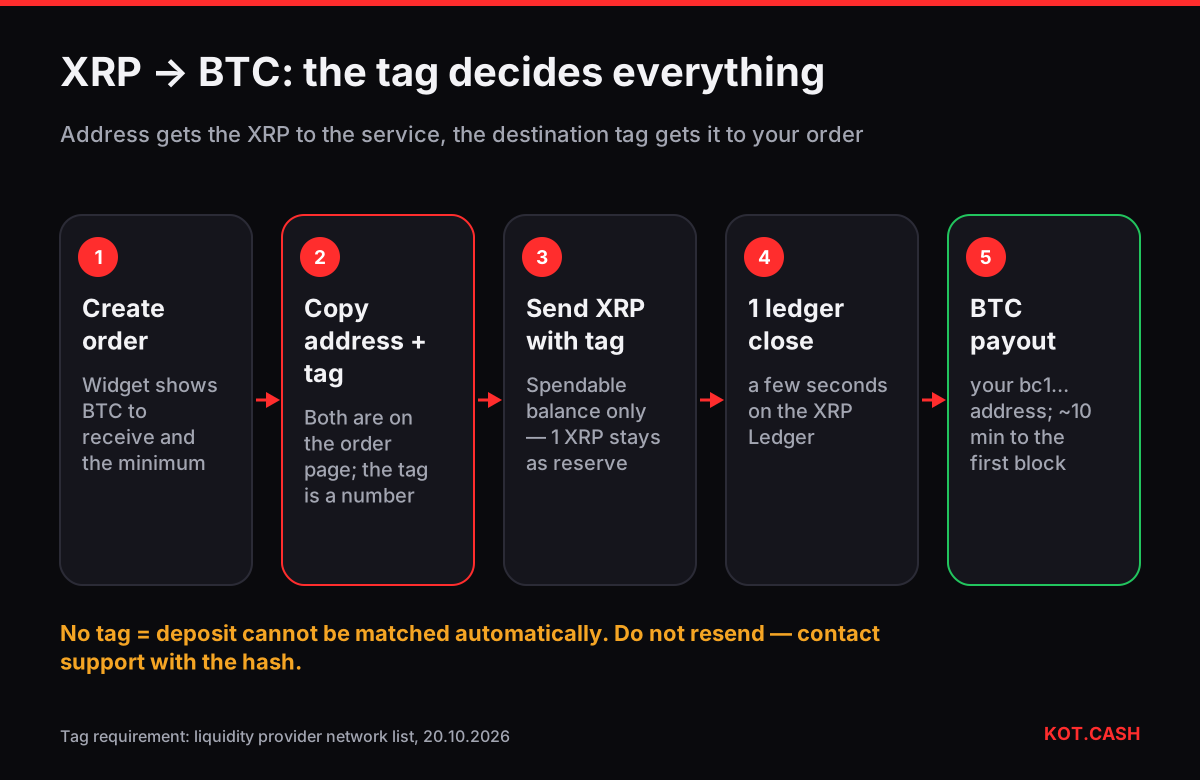
An XRP to BTC swap is fast on the XRP side and only as slow as one Bitcoin block on the other — but it has one rule that does not exist for most coins: the XRP deposit must carry the destination tag shown on the order page. Send XRP with the address and the tag, and BTC arrives at your own Bitcoin address. On KOT.CASH you start on the XRP to BTC page; the widget shows the BTC amount before you send, and no account is needed for a standard swap.
Why the deposit needs a destination tag
On the XRP Ledger, exchanges and swap services receive deposits from many customers on one shared address. The destination tag — a number attached to the payment — tells the service which order the XRP belongs to. Without it, the XRP reaches the right address but cannot be matched automatically to your order. The liquidity provider's network list marks XRP as a tagged network, and the order page shows the tag right next to the deposit address.
Most XRP wallets (Xaman, Ledger Live, exchange withdrawal forms) have a field called Destination Tag, Tag or Memo. Paste the number there exactly. If a wallet does not offer a tag field at all, do not use it for this payment. The memo and tag checker lists every coin and network that uses such a field.
How much BTC you get for XRP
With XRP at about $1.31 and BTC at about $82,000, 100 XRP is worth about 0.0016 BTC and 1,000 XRP about 0.016 BTC. The widget quote includes the 1% float-rate fee (1.5% for fixed) and the Bitcoin network fee for the payout, so the BTC it shows is what you will receive. For a live figure use the table on the pair page or the crypto converter.
| You send | ≈ BTC at market | ≈ after 1% |
|---|---|---|
| 50 XRP | 0.0008 BTC | 0.00079 BTC |
| 100 XRP | 0.0016 BTC | 0.00158 BTC |
| 500 XRP | 0.008 BTC | 0.0079 BTC |
| 1,000 XRP | 0.016 BTC | 0.0158 BTC |
The XRP reserve: why you cannot send everything
Every XRP Ledger account must keep a base reserve that cannot be sent; at the time of writing it is 1 XRP, plus a small owner reserve for each trust line or offer the account holds. Wallets subtract it automatically, which is why "send max" leaves a little behind. Plan the swap amount around the spendable balance your wallet shows, not the total.
Step by step
- Open XRP to BTC, enter the XRP amount and check the minimum and the BTC you will receive.
- Paste your Bitcoin receive address (bc1q…, bc1p…, 3… or 1…) from your own wallet.
- Create the order. Copy the deposit address and the destination tag — both are on the order page.
- Send exactly the shown XRP amount with the tag. If you withdraw from an exchange, fill in the exchange's Tag/Memo field and make sure the amount after its fee matches the order.
- XRP settles in a few seconds; the provider needs one ledger confirmation.
- BTC is sent automatically. Follow the payout hash on the order page until the first Bitcoin block, usually around ten minutes.
Sending XRP from an exchange account
Most XRP for swaps comes straight from an exchange, and the withdrawal form is where tags get lost. Exchanges label the field differently — Tag, Destination Tag, Memo, sometimes "XRP Tag (optional)". For a deposit to a swap order it is not optional. Some exchanges also require you to whitelist a new withdrawal address first and hold the withdrawal for a few hours or a day; in that case create the order only when the withdrawal is ready to go, because an unpaid order expires after about an hour.
Two more details. Exchanges deduct a flat XRP withdrawal fee, so type the order amount plus the fee if the form subtracts it. And the minimum for XRP to BTC was 23.02 XRP in the provider's quote on 20 October 2026, with a Bitcoin payout fee of 0.000057 BTC already built into the amount you receive — small swaps of a few dozen XRP are possible, but the payout fee is a noticeable share of them.
If you forgot the destination tag
Do not send the XRP again. The first payment is on the ledger and can be traced. Find its transaction hash in your wallet or in an XRP Ledger explorer, then contact support with the order link, the hash, the amount and the time. A missing tag needs manual handling, which takes longer than an automatic swap; the result depends on the provider's review. The same applies in reverse: if you ever withdraw XRP to an exchange, its deposit tag is mandatory there too.
Other mistakes to avoid
- Sending XRP as a BEP20 or ERC20 token. Some exchanges list wrapped XRP on other chains. This pair accepts native XRP on the XRP Ledger only.
- Paying an expired order. Unpaid orders expire after about an hour. The tag of an old order is not valid for a new one.
- A Bitcoin address typed by hand. Copy and compare, or run it through the address validator.
- Assuming the payout needs a tag. Bitcoin has no tags or memos; only the XRP deposit does.
XRP to BTC or XRP to USDT?
If the goal is to leave XRP's volatility rather than to buy Bitcoin, XRP to USDT pays a stablecoin on TRON, Ethereum, BNB Smart Chain or Solana and settles faster, because there is no Bitcoin block to wait for. If you already know you want BTC, a direct swap avoids converting twice and paying the fee twice.
Standard swaps on KOT.CASH do not require documents. The liquidity provider runs AML checks and can, in some cases, ask about the source of funds before completing an order.
FAQ
Do I need a destination tag to send XRP to a swap?
Yes. The order page shows a destination tag next to the deposit address; the XRP payment must include it.
How long does XRP to BTC take?
XRP settles in seconds and needs one ledger confirmation; most of the time is the Bitcoin payout, usually 10–20 minutes in total.
How much BTC is 1,000 XRP?
About 0.016 BTC at $1.31 per XRP and $82,000 per BTC, before fees. Check the live table on the pair page.
Why can't I send my whole XRP balance?
XRP Ledger accounts keep a base reserve (1 XRP at the time of writing) plus owner reserves; wallets leave it behind automatically.
I sent XRP without the tag. What now?
Do not resend. Contact support with the order link and the transaction hash; untagged deposits are handled manually.