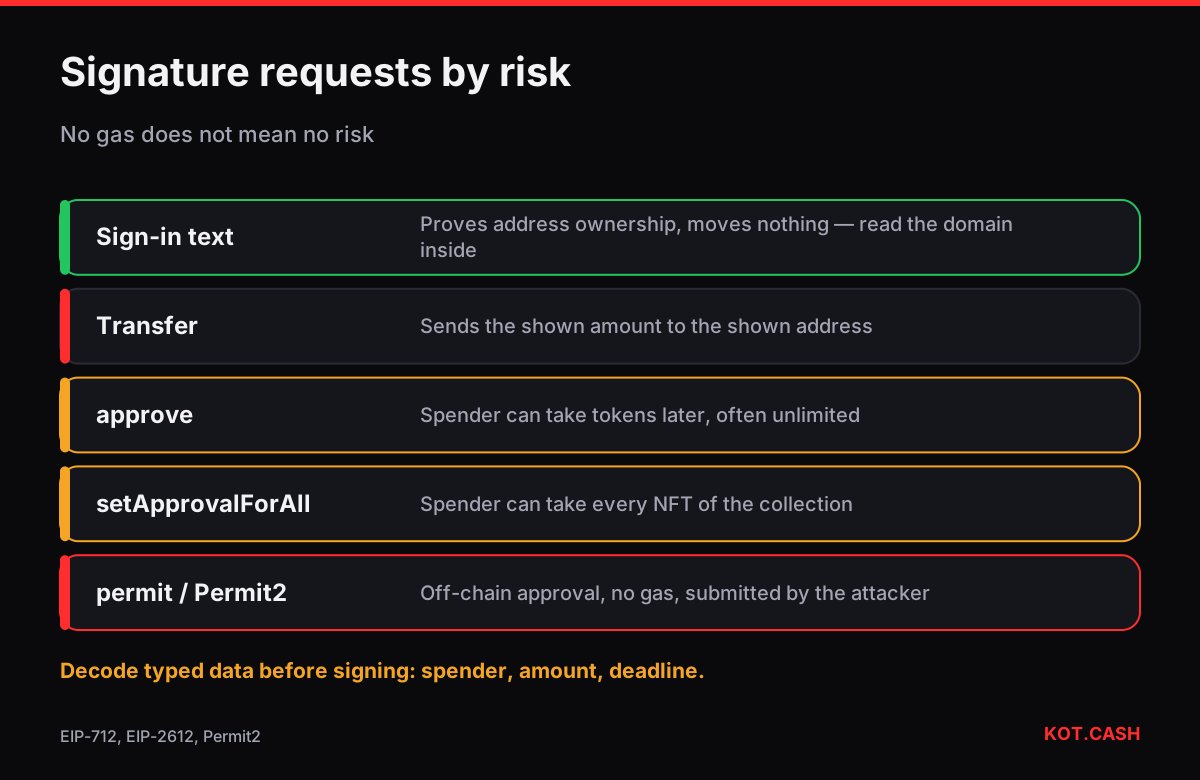
A wallet drainer is a phishing website that gets you to sign something which hands your tokens to the attacker. The dangerous requests are usually not ordinary transfers: they are token approvals, NFT “set approval for all” calls, and off-chain signatures such as EIP-2612 permit or Uniswap’s Permit2. An off-chain signature costs no gas and does not show up as a transaction, which is exactly why people sign it without thinking. The attacker then submits it and moves the tokens.
Four kinds of signature request, from least to most dangerous
Wallets show several types of request. Knowing which one is on screen tells you what is at stake.
| Request | Costs gas? | What it can do |
|---|---|---|
| Sign-in message (plain text, “Sign in with Ethereum”) | No | Proves you own the address; moves nothing |
| Transfer of a coin or token | Yes | Sends the stated amount to the stated address |
| approve / setApprovalForAll | Yes | Lets a spender take tokens or all NFTs of a collection later, until revoked |
| permit / Permit2 typed data (EIP-712) | No | Off-chain approval: anyone holding the signature can submit it and spend up to the amount before the deadline |
The last two rows are what drainers want. An approval with an amount of 115792089237316195423570985008687907853269984665640564039457584007913129639935 (2²⁵⁶−1) is “unlimited”. A permit with a deadline years ahead and that amount is the same thing without a transaction.
Why gasless signatures work so well for attackers
People have learned that a transaction costs money and deserves attention. A signature pop-up without a fee looks harmless, like logging in. Drainers exploit that: the page asks for a “free claim” signature, and the wallet window shows a long block of structured data that few people read. Because nothing is sent to the network, there is no pending transaction to notice and no fee to make you hesitate. The attacker can also wait hours or days before using the signature, so the loss is not linked in your mind to the site you visited.
How drainer sites get you there
- Fake mints and airdrops: “claim your tokens” pages promoted by hijacked X or Discord accounts. See fake airdrop token scams.
- Search ads that sit above the real result for a DeFi app or bridge.
- Compromised front-ends of real projects. In December 2023 a malicious version of Ledger’s Connect Kit library was published and briefly injected a drainer into several dApps that loaded it.
- Messages from “support” telling you to “validate” or “unlock” your wallet — see fake support scams.
Reading a request before you sign
- Check the site domain first. A drainer works from a look-alike or an unrelated domain; the phishing link checker flags common tricks.
- Look at the request type in the wallet. If it says permit, Permit2, PermitSingle, PermitBatch or shows a spender and an amount, it is an approval even if no gas is shown.
- Read the spender. It should be the contract of the app you are using, not a random address. Copy the typed data and paste it into the EIP-712 signature decoder to see the spender, amount and deadline in plain words.
- For on-chain requests, paste the transaction data into the transaction input decoder. It recognises
approve,transferFrom,setApprovalForAlland multicall wrappers and flags unlimited amounts. - If the wallet says it cannot decode the request (raw hex, “eth_sign”), do not sign it. Modern dApps do not need blind signatures.
Habits that limit damage
- Keep a separate “hot” wallet with small balances for new dApps and mints, and keep savings in a wallet that never connects to them.
- Approve exact amounts instead of unlimited when the dApp lets you.
- Review approvals monthly and revoke what you no longer use — how to revoke token approvals.
- On a hardware wallet, avoid enabling blind signing permanently; see blind signing explained.
If you signed a drainer request
- Revoke the approval immediately on the affected network (revoke.cash or the explorer’s token approval checker). A permit that has not been submitted yet can be neutralised by using it or by revoking the allowance it would set, but speed matters.
- Move remaining tokens to a fresh address. If you entered a seed phrase anywhere, the whole wallet is lost — create a new one on a clean device.
- Report the drainer domain to the wallet provider and to phishing databases, and file a police report with the transaction hashes.
A plain swap on KOT.CASH does not involve any of these requests: you send coins or tokens with an ordinary transfer to the order’s deposit address, and the site never asks you to connect a wallet, approve a spender or sign typed data. If a page that looks like KOT.CASH asks for a wallet connection or a signature, you are not on kot.cash.
FAQ
Can signing a message without gas steal my tokens?
Yes, if it is a permit or Permit2 typed-data signature. It is an approval that someone else can submit later.
Is “Sign in with Ethereum” dangerous?
A plain-text sign-in message moves nothing. Read it: it should name the site and contain no spender or amounts.
Does revoking cancel a permit I already signed?
If the permit has not been used, revoking or changing the allowance with a transaction makes the old signature fail in most implementations. If it has been used, the tokens are already gone.
Are drainers only on Ethereum?
No. Similar tricks exist on BNB Smart Chain, Polygon, Arbitrum and Base, on Solana through malicious transactions, and on TRON through approvals.
Does KOT.CASH ask me to connect a wallet?
No. A swap is an ordinary transfer to a deposit address shown on the order page.