Rabby is an EVM-only wallet: it shows one 0x address that works on Ethereum and every EVM network it supports, and it switches network automatically to whatever chain a dApp asks for. Your balance view adds up all chains at once. What sets it apart in daily use is that it simulates each transaction before you sign and shows the expected balance changes and security warnings. To receive, copy the address from the top of the extension; to receive on a specific network, simply tell the sender which one — the address is the same.
Networks without a network selector
MetaMask historically made you pick a network before acting; Rabby instead reads the chain from the dApp request and switches for you, and it lists balances across all supported chains in one dashboard. That removes the classic mistake of signing on the wrong network. It does not remove the need to know where your tokens are: USDC on Arbitrum is still a different balance from USDC on Base, and a swap service or exchange still needs to be told which network to pay on.
Custom networks can be added from Rabby's settings with a chain ID and RPC — the same parameters as in any EVM wallet. Take them from the network's own documentation; the chain ID is what the signature is bound to (EIP-155).
Before you sign: what the pre-check shows
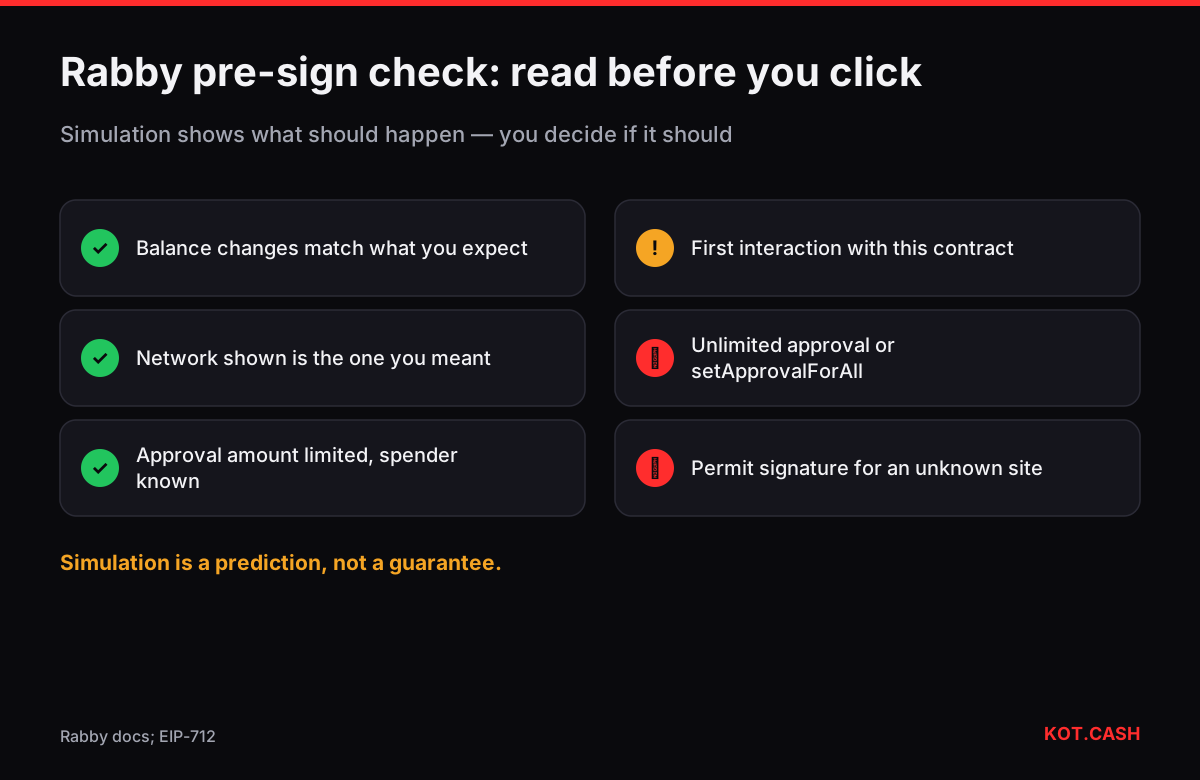
- Balance changes. Rabby lists what leaves and what arrives if the transaction executes now. A swap that sends 1,000 USDC and receives nothing is a red flag, however the site describes it.
- The recipient or spender. Rabby marks addresses you have never interacted with, contracts that are very new, and approvals that go to a plain wallet address instead of a known contract.
- The network. The chain the dApp requested is shown in the signing window. If you expected Base and see Ethereum mainnet, stop.
- Approvals. Rabby shows the approved amount; unlimited approvals are labelled. You can edit the amount down before signing.
Reading a signature request
Two kinds of request drain wallets most often. Approvals (approve, increaseAllowance, setApprovalForAll) let another contract move your tokens later; an unlimited approval to an unknown address is the classic drainer setup. Off-chain signatures (EIP-712 typed data such as Permit or Permit2) look harmless because they cost no gas, but they can authorise a transfer that someone else submits. Rabby labels these, but it helps to understand them yourself. Paste raw call data into the transaction input decoder or typed-data JSON into the EIP-712 decoder to see the spender, amount and deadline in plain words.
Importing and hardware wallets
Rabby can import a seed phrase or private key from another wallet — the addresses stay the same because EVM derivation is standard — and it works with Ledger, Trezor, Keystone, GridPlus and other devices. With a hardware wallet, Rabby prepares and simulates the transaction, and the device signs it; check that the destination and amount on the device screen match what Rabby showed.
Gas
On every network you pay gas in that network's coin: ETH on Ethereum, Arbitrum, Base and Optimism, BNB on BNB Chain, POL on Polygon. Rabby estimates the fee and lets you choose a speed; the gas fee calculator converts gwei and gas units into dollars if you want to check the estimate yourself. If a balance shows on a chain where you have no gas coin, you will need to bring some before moving the tokens.
Receiving a swap payout in Rabby
For a KOT.CASH payout of ETH, USDT or USDC on an EVM network, paste your Rabby 0x address and select the payout network in the widget. Rabby's dashboard picks up the incoming tokens on that chain automatically. Rabby does not support non-EVM networks such as Bitcoin, Solana or Tron — for those payouts use a wallet for that network.
Cleaning up old approvals
Rabby includes an approvals view that lists the token allowances and NFT approvals your address has granted on each chain, with an option to revoke them. Revoking is itself an on-chain transaction and costs a little gas on that network. Doing it once in a while — especially after using a new dApp or after a protocol you used was exploited — closes the door that drainers rely on. A detailed walkthrough is in revoking token approvals.
Where Rabby fits
Rabby suits people who interact with DeFi on several EVM chains and want more context before signing. It is not a custody solution by itself: the keys are still in a browser extension unless you pair a hardware wallet. Many users keep long-term holdings on a hardware wallet and use Rabby as the interface.
FAQ
Does Rabby have a different address for each network?
No. It uses one 0x address on all EVM networks; balances are separate per chain.
Can Rabby hold Bitcoin, Solana or Tron?
No. Rabby supports EVM networks only.
What does Rabby's transaction simulation do?
It runs the transaction against the current chain state and shows the expected balance changes and risk warnings before you sign.
Can I import my MetaMask wallet into Rabby?
Yes, with the seed phrase or private key; the 0x addresses will be the same.
Is a clean simulation a guarantee the transaction is safe?
No. It is a prediction. Keep approvals limited and avoid signing for unknown contracts.