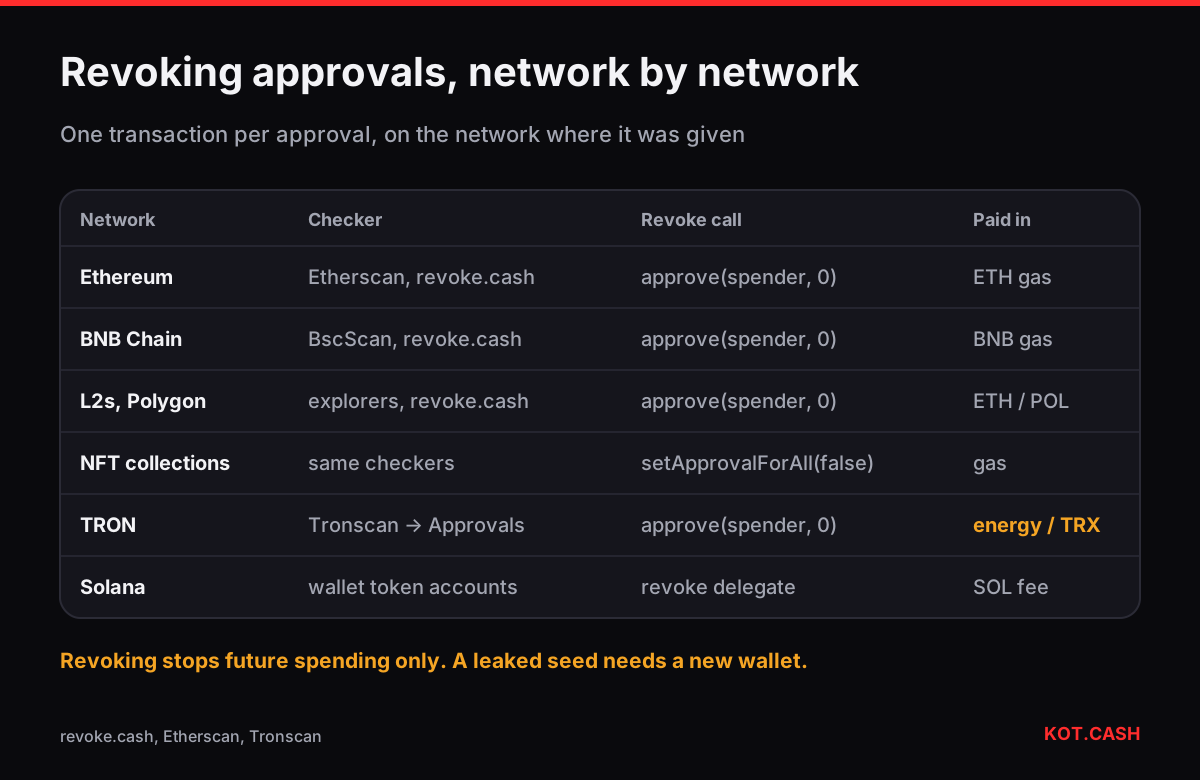
To revoke a token approval you send a transaction that sets the spender’s allowance back to zero. Tools such as revoke.cash or the Token Approval Checker on Etherscan, BscScan and similar explorers list every approval your address has given and build that transaction for you. It costs ordinary gas on the network concerned, it must be done separately on each network, and it only stops future spending — tokens already taken do not come back.
Why old approvals are a risk
When you use a DEX, a bridge or an NFT marketplace, you usually approve its contract to move a token on your behalf. Many apps ask for an unlimited amount so you do not need to approve again. That approval stays active forever. If the contract is later exploited, or the approval was given to a phishing site, the spender can take the full balance of that token at any time, without asking you again.
Approvals do not expire, do not show in your balance and are easy to forget. A wallet that has been used for two years of DeFi can easily hold dozens of them across several networks.
Where to check approvals, by network
| Network | Where to look | Notes |
|---|---|---|
| Ethereum | etherscan.io/tokenapprovalchecker, revoke.cash | Revoke costs ~45,000 gas |
| BNB Smart Chain | bscscan.com/tokenapprovalchecker, revoke.cash | Cheap gas, same steps |
| Polygon, Arbitrum, Base, Optimism | polygonscan, arbiscan, basescan, optimistic.etherscan; revoke.cash | Approvals are per network — check each |
| TRON | Tronscan → account → Approvals | Revoking uses energy or burns TRX |
| Solana | Wallet’s token account view; delegate tools | SPL tokens use a delegate per token account, not an allowance per spender |
Step by step on an EVM network
- Open the checker by typing its address yourself or from a bookmark. Fake revoke sites exist and are a favourite drainer disguise.
- Paste your address to see the list without connecting anything. Sort by value at risk: an unlimited USDT approval matters more than one for a dead token.
- Connect the wallet only on the checker you trust, pick an approval and press Revoke. Your wallet shows an
approve(spender, 0)call — for NFTs,setApprovalForAll(operator, false). - Check in the wallet that the request is an approve with amount 0 to the token contract. You can paste the data into the transaction input decoder to confirm.
- Repeat on every network where you used DeFi. Keep a little of the native coin (ETH, BNB, POL) for gas — the gas fee calculator estimates the cost.
Which approvals to revoke first
- Unlimited approvals for stablecoins and large balances: USDT, USDC, DAI, WETH, WBTC.
- Approvals to contracts you do not recognise or to plain addresses (a person, not a contract, as spender is a strong warning sign).
- Approvals to apps that were exploited or shut down — the checker often labels known exploited contracts.
- NFT setApprovalForAll for collections you still hold, given to marketplaces you no longer use.
- Everything on an address that once connected to a site you now suspect.
TRON and Solana
On TRON, USDT and other TRC-20 tokens use the same approve model as Ethereum. Tronscan lists approvals on the account page; revoking is a contract call that consumes energy, so if you have no staked energy it burns some TRX. On Solana there are no unlimited allowances: an SPL token account can have one delegate with an amount. Malicious Solana transactions more often transfer tokens directly or change the account owner, so the protection there is reading what you sign, not revoking later.
What revoking does not fix
- Tokens already moved by the spender — revoking only blocks the next move.
- A leaked seed phrase or private key. If someone has the key, they do not need approvals; move to a new wallet.
- Approvals on another address. Each address has its own list, even inside the same wallet app.
- A pending, unsigned-by-you transaction — there is nothing to revoke until the approval exists on-chain.
A routine that keeps the list short
- Approve exact amounts when the app offers it, especially for stablecoins.
- Use a separate address for experiments; savings never approve anything.
- Check approvals monthly and after any “weird” site you connected to.
- Read the wallet drainer and permit guide — most dangerous approvals come from signatures people did not recognise as approvals.
A swap on KOT.CASH never creates an approval: you send tokens with a normal transfer to the order’s deposit address, so there is nothing to revoke afterwards.
FAQ
How much does it cost to revoke an approval?
One ordinary transaction per approval: roughly 45,000 gas on Ethereum, a few cents on BNB Chain, Polygon or layer-2 networks, energy or a little TRX on TRON.
Can I revoke without connecting my wallet?
You can view approvals without connecting. Revoking is a transaction, so the wallet must sign it.
Will revoking return stolen tokens?
No. It only prevents further spending by that spender.
Should I revoke approvals for apps I still use?
Not necessarily. Lower unlimited approvals to what you need, and revoke only unused or suspicious ones.
Are fake revoke sites a thing?
Yes. Type the address of the checker yourself; a revoke site found through an ad or a DM can be a drainer.