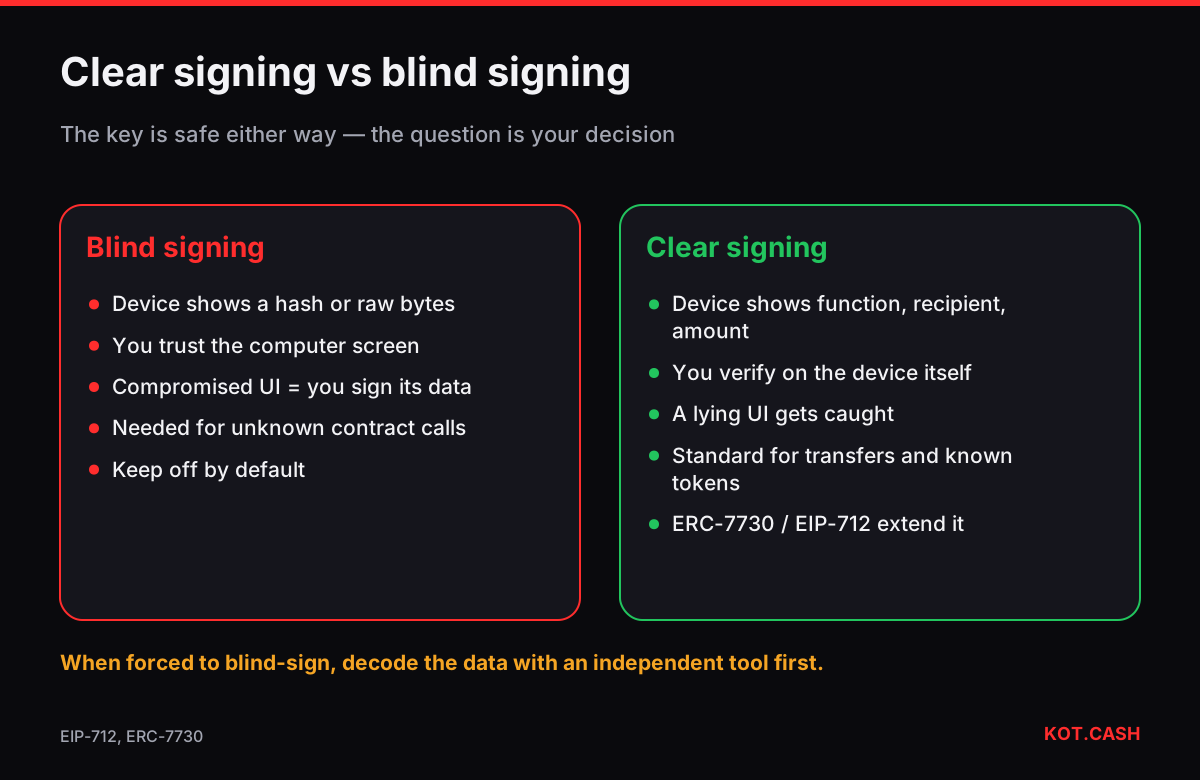
Blind signing is approving a transaction or message that your hardware wallet cannot show in readable form. Instead of “Send 500 USDT to 0x…”, the screen shows a hash or raw data, and you confirm without seeing what it does. The device still protects your private key, but it no longer protects your decision: if the computer or the website lies about the transaction, you will sign whatever it sent. That is why wallets disable blind signing by default and why it should be enabled only briefly, for apps you trust.
Why hardware wallets sometimes cannot decode
A hardware wallet shows what it understands. Plain coin transfers and well-known token transfers are easy: the device parses the recipient and the amount. Smart-contract calls are different: each contract has its own functions and parameters, and the device needs a description (an ABI or a plug-in) to turn the bytes into words. When it has none — a new DeFi protocol, an unusual NFT marketplace call, complex typed data — it can only show a hash of the data.
On Ledger devices the Ethereum app has a “Blind signing” setting (earlier called “Contract data”); with it off, such transactions are rejected. Trezor shows raw data for unknown contract calls. Solana and other apps have similar options for transactions the device cannot interpret.
Blind signing vs clear signing
“Clear signing” is the opposite: the device decodes the action and shows the human-readable meaning — function, recipient, amounts, spender. The industry is moving that way: Ledger proposed the ERC-7730 standard in 2024 so dApps can publish machine-readable descriptions of their contract calls, and EIP-712 typed data already lets devices display structured fields for signatures such as permits.
- Clear signing: you see “Approve USDC, spender 0x1111…, amount unlimited” and can say no.
- Blind signing: you see “Hash 0x7a3f…” and must trust the screen of your computer.
What the risk looks like in practice
Two well-documented incidents show it. In December 2023 a compromised version of Ledger’s Connect Kit library injected a drainer into dApps that loaded it, prompting users to sign malicious transactions. In February 2025 the signers of Bybit’s Safe multisig approved what their interface presented as a routine transfer; the data they actually signed handed control of the wallet’s contract to attackers, and about $1.5 billion in ETH was taken. In both cases the private keys stayed safe; the decision was hijacked.
How to sign safely
- Keep blind signing off. Turn it on only for a specific action on an app you trust, then turn it off again.
- Before approving, decode the data on a second, independent tool. Paste calldata into the transaction input decoder or typed data into the EIP-712 signature decoder and compare the result with what the dApp claims.
- Prefer wallets and dApps that support clear signing for the actions you use most.
- Use transaction simulation in a browser wallet as an extra signal — not as the only one.
- For large funds, split responsibility: a multisig where each signer verifies independently, ideally with different software.
- Keep savings in an address that only does simple transfers, which devices always clear-sign.
Verifying a hash when you must blind-sign
Some devices show a hash of the data even in blind mode, and some tools compute the same hash from the transaction. For a Safe multisig the interface shows a “safeTxHash”; independent tools can recompute it from the transaction fields. If the hash on the device matches the hash computed independently from the data you expect, you know the device is signing that data. If you cannot make that comparison, you are trusting the computer completely — a reason to wait or ask a second person to check.
Which actions usually need it
| Action | Usually clear? | Note |
|---|---|---|
| BTC, LTC, DOGE transfer | Yes | Address and amount on screen |
| ETH or ERC-20 transfer | Yes | Known tokens shown by name |
| Swap on a major DEX | Often | Depends on plug-in support |
| New DeFi protocol call | No | Blind signing required |
| Permit / Permit2 typed data | Partly | Fields shown; meaning must be read |
| Safe multisig transaction | Partly | Verify the Safe tx hash independently |
Swaps without contract signatures
Sending coins to a KOT.CASH order is a plain transfer: your device shows the deposit address and the amount, which you compare with the order page. No contract call and no blind signing are involved, which is one of the reasons plain transfers are the safest way to move funds between services.
FAQ
Is blind signing always dangerous?
It removes the device’s protection of your decision. With a trusted app and an independent check it can be acceptable, but it should be the exception.
Why does my Ledger ask me to enable blind signing?
The transaction calls a smart contract the Ethereum app cannot decode. Enable it only for that action and disable it after.
What is clear signing?
The device shows the decoded action — function, recipient, amounts — so you can verify it on the device screen.
Can I check a blind-signed transaction another way?
Yes. Decode the calldata or typed data with an independent tool and compare the hash shown on the device.
Does a swap on KOT.CASH need blind signing?
No. You make an ordinary transfer to the deposit address, which hardware wallets display in full.