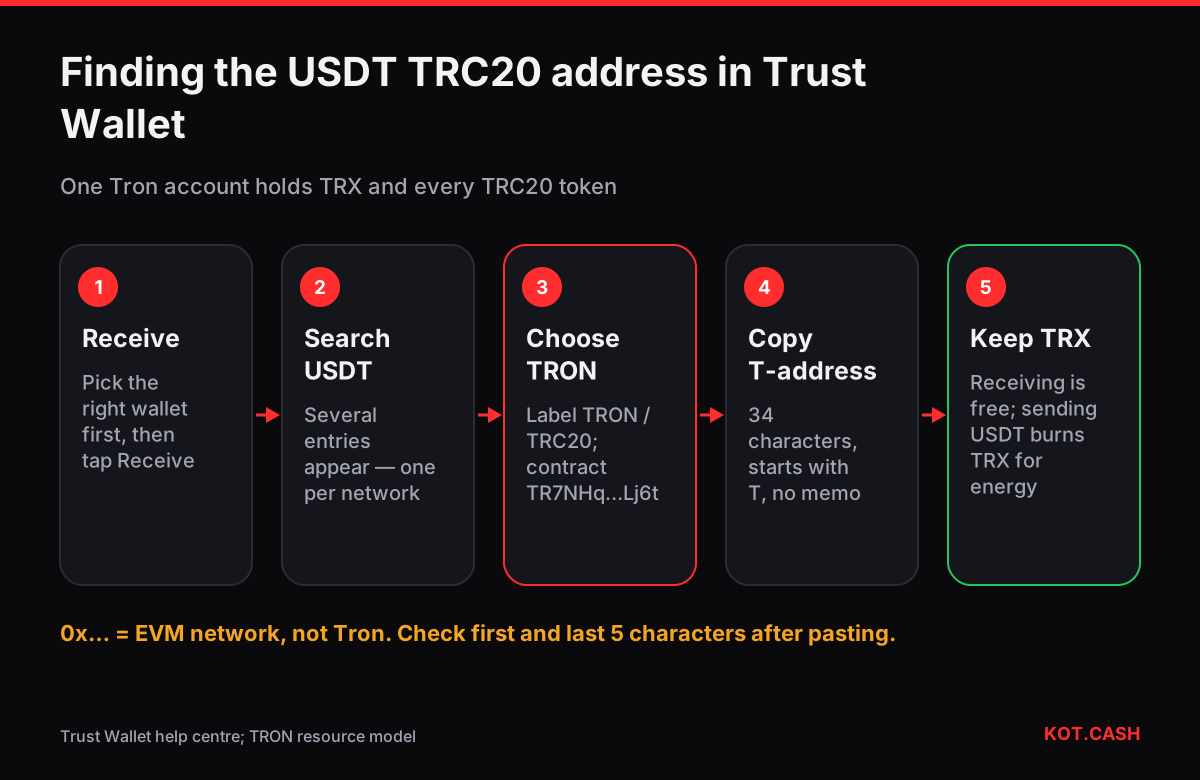
Your USDT TRC20 address in Trust Wallet is the address of your Tron account: open the wallet, tap Receive, search for USDT and pick the entry marked TRON (sometimes shown as TRC20). The address starts with a capital T and is 34 characters long, for example TQ… followed by letters and digits. The same address receives TRX and every TRC20 token, so there is no separate "USDT address" — it is one Tron account derived from your recovery phrase.
Step by step in recent versions
- Open Trust Wallet and make sure the right wallet is selected at the top (people with several wallets often copy from the wrong one).
- Tap Receive. A search list of assets opens.
- Type
USDT. You will see several entries: USDT on Ethereum, BNB Smart Chain, Tron, Solana, Polygon and others. Choose the one whose network label says TRON or TRC20. - The screen shows a QR code and the address. Tap Copy or Share — do not retype it by hand.
- If USDT on Tron is not in the list, add it first: search for it in the token manager and enable the toggle for Tether USD (TRC20). Check the contract on the token details screen: the official USDT contract on Tron is
TR7NHqjeKQxGTCi8q8ZY4pL8otSzgjLj6t.
Trust Wallet's own help centre describes the same flow: the Receive screen is per asset and per network. That detail matters, because the Ethereum and BNB Smart Chain entries show a 0x address, and pasting that into a form that expects TRC20 will fail or, worse, send funds to a network the recipient does not watch.
How to tell a TRC20 address from the others
| Network label | Address looks like | Gas paid in |
|---|---|---|
| TRON (TRC20) | T + 33 characters, Base58 | TRX (energy and bandwidth) |
| Ethereum (ERC20) | 0x + 40 hex characters | ETH |
| BNB Smart Chain (BEP20) | 0x + 40 hex — same as Ethereum | BNB |
| Solana (SPL) | 32–44 Base58 characters, no prefix | SOL |
| Polygon | 0x + 40 hex — same as Ethereum | POL |
If the address you copied starts with 0x, you are on an EVM network, not Tron. If it starts with T, it is Tron. The address validator checks the Base58Check checksum of a TRON address, which catches a typo or a truncated paste.
Receiving is free, sending needs TRX
Anyone can send USDT to your T-address even if the wallet holds no TRX. The problem appears later, when you want to move that USDT out. A TRC20 transfer is a smart-contract call, and the Tron network charges for it in energy. Without staked or rented energy the network burns TRX from your balance instead: roughly 6–7 TRX when the recipient already holds USDT, and about twice that when the recipient address has never held USDT (the contract has to create a new balance entry). If your wallet has 0 TRX, Trust Wallet will not let the transfer go through.
So before you rely on a fresh Tron address for USDT, put some TRX on it. Fifteen to thirty TRX covers a couple of outgoing transfers at current parameters. The USDT TRC20 fee calculator shows the exact burn for your case, and this guide on energy explains where the number comes from.
Using the address for an exchange or a swap
When KOT.CASH pays out USDT TRC20, the order form asks for a payout address on the Tron network. Paste your T-address there. Choose the USDT option that the widget labels TRC20 — choosing the ERC20 option with a T-address is rejected by address validation, and choosing TRC20 with a 0x address is rejected too. Tron needs no memo, so there is no extra field to fill in for your own wallet.
For deposits from an exchange the rule is the same in reverse: withdraw with the network called TRC20 or TRON. Exchanges charge a flat withdrawal fee in USDT for this network, so the amount that arrives is the amount you typed minus that fee.
Check before you send a large amount
- Compare the first five and last five characters of the pasted address with what Trust Wallet shows. Clipboard malware replaces addresses after you copy them.
- Do not copy your address from your own transaction history in an explorer: address-poisoning scammers send tiny transfers from look-alike addresses so that a wrong one appears in your history.
- For a first deposit, send a small test amount, check that it shows up under USDT (TRON), then send the rest.
- On Tronscan you can search your address and see the USDT balance and every TRC20 transfer — handy if the wallet app has not refreshed yet.
When USDT does not show up
Three causes cover almost every case. The sender used another network (an ERC20 withdrawal to a 0x address lands under USDT Ethereum, not Tron). The token is hidden — enable Tether USD (TRC20) in the token list. Or the transfer has not been confirmed yet: Tron produces a block every three seconds and services usually wait for about 20 confirmations, so it should appear within a minute or two. If an explorer shows the transfer as successful to your address, the funds are there regardless of what the app displays.
FAQ
Does Trust Wallet give a different address for USDT and TRX on Tron?
No. One Tron account holds TRX and all TRC20 tokens, so the USDT TRC20 address and the TRX address are the same T-address.
Can I receive USDT TRC20 without TRX in the wallet?
Yes, receiving is free for you. To send that USDT later you need TRX (or energy) to pay the network.
My USDT address starts with 0x. Is that TRC20?
No. A 0x address belongs to Ethereum, BNB Smart Chain, Polygon or another EVM network. TRC20 addresses start with T.
Do I need a memo to receive USDT TRC20 in Trust Wallet?
No. Tron does not use memos for personal wallets. Memos only matter for some exchange deposit addresses on other networks.
Which contract is the real USDT on Tron?
TR7NHqjeKQxGTCi8q8ZY4pL8otSzgjLj6t. Tokens with the same name but another contract are not Tether.