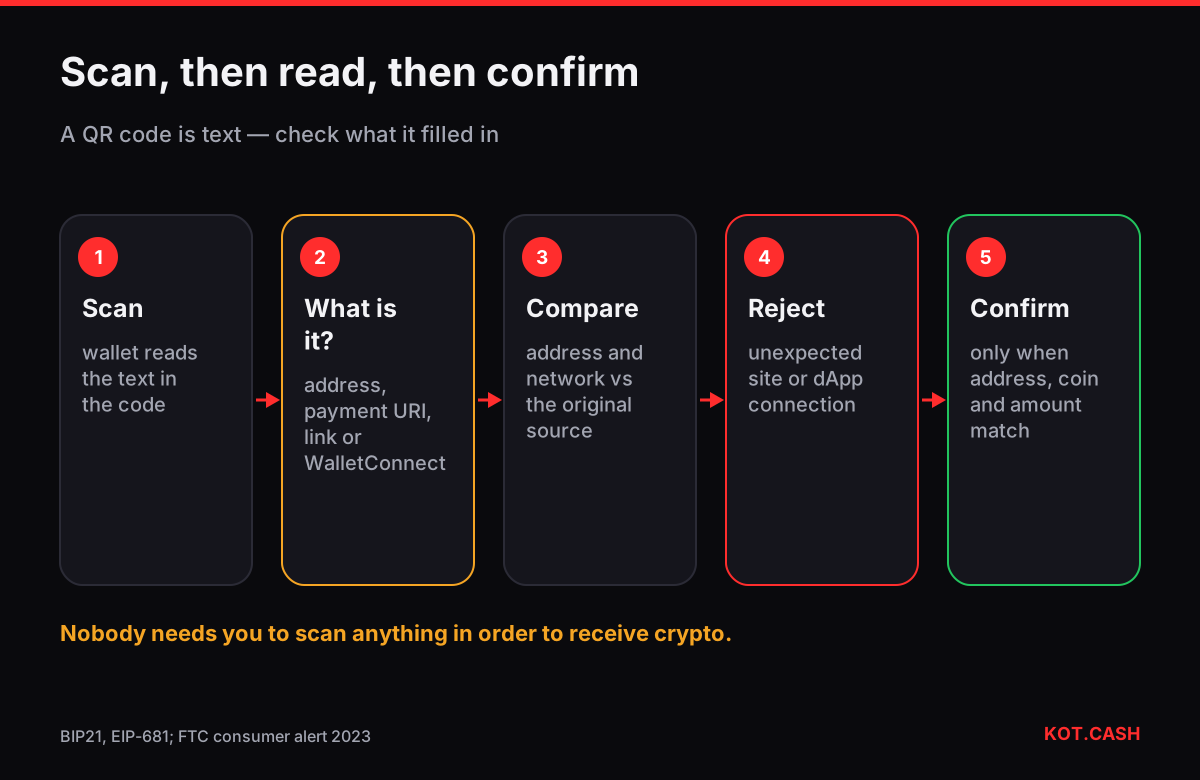
A QR code is just text in a picture, so a scam QR code is any code that contains something other than what you expect: a different address, a phishing link, or a request to connect your wallet to a malicious app. Before you confirm anything after scanning, read what the wallet shows — address, amount, network or website — and compare it with a source you trust. Scanning is safe; approving without reading is not.
What a crypto QR code can contain
| Content | Looks like | What happens |
|---|---|---|
| Plain address | bc1q…, 0x…, T… | Fills the recipient field |
| Payment URI | bitcoin:bc1q…?amount=0.01 | Fills address and amount |
| Token payment link | ethereum:0x…@1/transfer?address=… | Fills a token transfer — some wallets misread it |
| Website link | https://… | Opens a page — possibly phishing |
| WalletConnect pairing | wc:…@2?relay-protocol=… | Connects your wallet to a dApp, which can request signatures |
The last two rows are where most QR scams sit. A pairing code from a fake dApp lets it ask your wallet for approvals and drainer signatures; a link leads to a login or “claim” page. A wrong address in the first two rows sends the payment to someone else.
Typical QR scams
- Swapped stickers. A sticker with the scammer’s QR placed over a donation, a merchant’s payment code or a crypto ATM receipt.
- QR in e-mails and letters (“quishing”). A message from an “exchange” asks you to scan a code to verify your account or claim a refund; the QR opens a phishing site. The FTC warned about QR codes hiding harmful links in 2023.
- “Scan to receive.” In P2P deals or support chats, someone sends a QR “so you can receive money”. It is a payment request or a WalletConnect pairing, and scanning it leads you to send or sign — see P2P scams.
- Edited screenshots. An invoice image with the QR replaced, sent in a chat that was compromised.
Check before you confirm
- After scanning, do not press Send immediately. Look at what the wallet filled in.
- Compare the address with the one from the original source — the order page, the merchant’s screen, the person’s message — at least the first six, last six and some characters in the middle. The address checker compares two addresses character by character.
- Check the network and coin: a USDT QR for TRON must not open an Ethereum transfer.
- If the QR opened a website, check the domain with the phishing link checker before entering anything.
- If the wallet asks to connect to a dApp you did not intend to use, reject it.
Reading a QR without opening it
If you are unsure what a code contains, scan it with the phone’s camera app instead of a wallet: the camera shows the decoded text or link as a preview and does nothing until you tap. A URL preview lets you read the domain first; a long string starting with wc: is a WalletConnect pairing; a string starting with bitcoin:, litecoin: or ethereum: is a payment request, and its address and amount are visible in the text. You can also paste the text into a notes app to read it calmly — the text itself is harmless.
Merchants and donation pages that show a code on screen usually also show the address as text. When the two differ even by a character, trust neither and ask the recipient through another channel.
How KOT.CASH payment QR codes work
On a KOT.CASH order page the QR code contains the deposit address of that order, generated for it. For BTC, LTC, DOGE, BCH and XMR you can switch the QR to include the amount as a standard payment URI. For tokens such as USDT on TRON, Ethereum or BNB Smart Chain the QR always contains only the address, because some wallets misread token payment links and may try to send to the token contract instead. Whatever the coin, the address under the QR is the reference: after scanning, compare your wallet’s recipient with it.
If you need a QR for your own invoices or donation page, make it from your wallet’s receive screen or with the crypto QR code generator, which works offline in the browser, and print it yourself instead of using codes made by others.
Protecting a printed QR code
- Print the address as text next to the QR so payers can compare.
- Check physical codes regularly for stickers placed on top.
- Use a fresh address per invoice where your wallet allows it; it also makes payments easier to match.
- Never put a seed phrase or private key into a QR code “for convenience”.
FAQ
Is scanning a QR code dangerous by itself?
No. The danger is in confirming what it fills in or opens without checking.
Why does the KOT.CASH QR for USDT not include the amount?
Some wallets misread token payment links and may send to the token contract. The QR therefore contains only the deposit address; enter the amount yourself.
What is a WalletConnect QR code?
A pairing code that connects your wallet to a website. Only scan it on the dApp you deliberately opened.
Can a QR code steal my wallet?
Not by itself. It can lead you to a phishing site or a malicious connection where you might sign something harmful.
Someone sent me a QR to receive a payment. What should I do?
Do not scan it. Send them your own address instead.