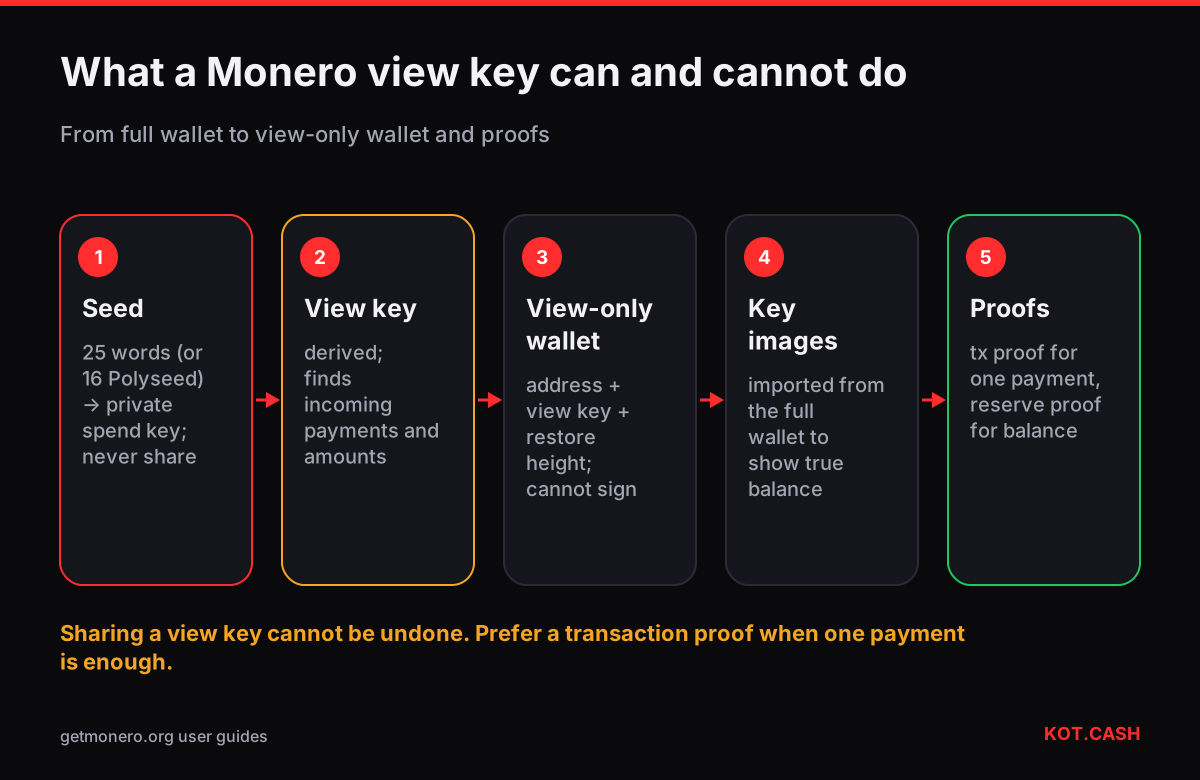
A Monero wallet has two key pairs: a spend key that authorises payments and a view key that lets the wallet find its incoming payments on the blockchain. The private view key can be shared without giving anyone the ability to spend: whoever has it sees every incoming payment to your address and its amount. That makes it useful for audits, accounting and point-of-sale systems, and it also means sharing it gives up the privacy of your incoming history to that party.
The four keys
| Key | Can spend | Can see incoming | Can see outgoing | Share? |
|---|---|---|---|---|
| Private spend key | Yes | with view key | Yes | Never |
| Private view key | No | Yes, with amounts | Not reliably | Only to trusted auditors or your own tools |
| Public spend key | No | No | No | Part of your address |
| Public view key | No | No | No | Part of your address |
Your 25-word mnemonic seed (or 16-word Polyseed in Feather and Cake Wallet) encodes the private spend key, from which the private view key is derived. Never type the seed into a website; a view key is a separate string that wallets can export on its own.
View-only wallets
A view-only wallet is created from your address and private view key. It scans the chain and shows incoming payments and their amounts. It cannot sign transactions. On its own it also cannot tell which of your outputs were spent, because spends are hidden among ring members; to show a correct balance it needs the key images of spent outputs, which the full wallet can export and the view-only wallet can import. This setup is common for watching a cold wallet from an online computer.
- In the full wallet, find the private view key (in the GUI under Settings → Seed & keys; in the CLI with the viewkey command).
- On another device, create a new wallet from keys and enter the primary address and the view key, leaving the spend key empty.
- Set the restore height to the block when the wallet was created, so scanning does not start from the genesis block.
- To see the true balance, export key images from the full wallet and import them into the view-only wallet.
Proving a single payment without the view key
Often you only need to prove that one payment happened — for a merchant dispute or a receipt. Monero supports transaction proofs: the sender's wallet produces a signature tied to the transaction ID and the recipient's address (get_tx_proof), and anyone can check it with check_tx_proof without learning anything else about either wallet. The older method uses the transaction private key (get_tx_key), which the recipient side can check with check_tx_key. Both reveal one payment, not the whole history.
Reserve proofs
A reserve proof (get_reserve_proof) shows that a wallet controls at least a given amount of unspent XMR at the time of the proof, without revealing the view key. Businesses use it to show solvency to auditors or partners. Like a transaction proof, it is a signed message that a verifier checks with the address; it exposes the outputs used in the proof, so it is not fully private either.
When sharing the view key makes sense
- Your own monitoring. A view-only wallet on a phone or a server to watch payments to a cold wallet.
- Merchants. Payment processors can run with the view key to detect incoming payments while the spend key stays offline.
- Accountants and auditors. When you need to show all incoming payments for a period, a view key with a restore height gives them exactly that.
- Tax reporting. Some tax advisers ask for it; a list of transaction proofs is often a more limited alternative.
Subaddresses and the view key
All subaddresses of a wallet share the same private view key. A view-only wallet therefore sees payments to every subaddress, including ones you gave to different people. If you need separate disclosure for different activities, use separate wallets, each with its own seed and view key, rather than subaddresses of one wallet.
Keeping records of Monero payments
Because amounts and addresses are hidden on-chain, a Monero payment cannot be checked later by anyone without data from one of the wallets. If you receive XMR for goods or services, save the transaction ID, the amount, the address you gave and, where needed, a transaction proof at the time of the payment. A payment receipt generator can turn those details into a document. For a swap on KOT.CASH the order page keeps the deposit and payout details, and the order link is what support needs.
FAQ
Can someone steal my XMR with my view key?
No. The view key cannot sign transactions. It reveals incoming payments and their amounts.
Does the view key show my outgoing payments?
Not reliably. A view-only wallet needs key images exported from the full wallet to know which outputs were spent.
How do I prove I paid someone in Monero?
Create a transaction proof with get_tx_proof (or share the tx key); the other party verifies it without your view key.
Is the view key the same for all subaddresses?
Yes. All subaddresses of a wallet share one private view key.
Where do I find my private view key?
In the wallet's keys section, for example Settings → Seed & keys in the Monero GUI, or the viewkey command in the CLI.