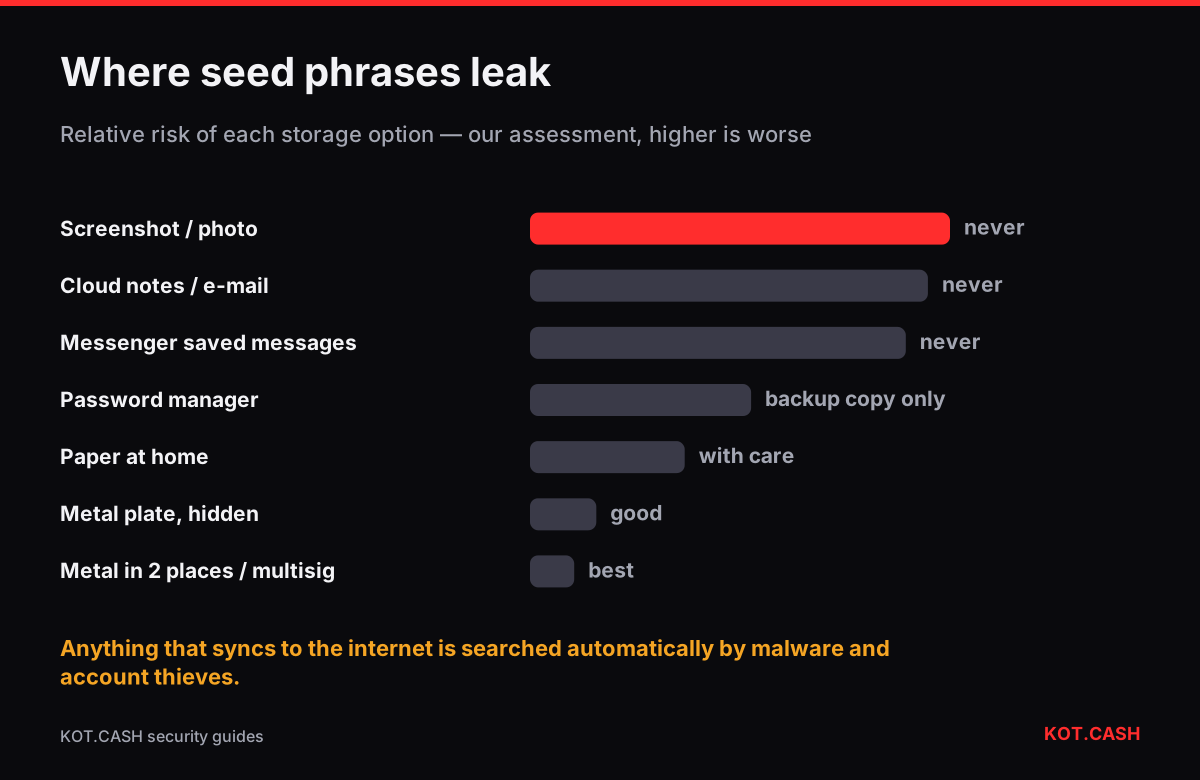
Do not store a seed phrase anywhere that syncs to the internet: not as a photo or screenshot, not in a notes app, not in an e-mail draft, not in “Saved messages” of a messenger, and not in a cloud document. These are the places attackers search first, automatically and at scale. The safer default is offline: the words written on paper or stamped into metal, kept somewhere physically secure, ideally with a second copy in another location.
A seed phrase is the wallet. Anyone who reads the 12 or 24 words can rebuild every private key on any device in a minute, from anywhere in the world, and nothing on the blockchain can tell them apart from you. That is why its storage deserves more thought than a password’s: a stolen password can be reset, a leaked seed cannot.
Why each digital place is risky
Photos and screenshots
Phone galleries upload to iCloud Photos or Google Photos by default. Both, and many gallery apps, recognise text in images: on iPhone, Live Text makes words in photos selectable and searchable. Info-stealing malware on PCs and phones scans image folders for twelve- or twenty-four-word lists. A screenshot of a seed phrase is a file that exists on the phone, in the cloud and in every backup of both.
Notes, documents and e-mail
Notes apps and cloud documents sync to every device signed into the account. If the account is phished or the password is reused, the attacker gets the notes. Malware looks for files and notes containing BIP39 words in sequence. E-mail drafts and “send to myself” messages are kept on the provider’s servers indefinitely.
Messengers
Saved messages in Telegram or WhatsApp chats with yourself are stored in the cloud (Telegram regular chats) or in backups (WhatsApp to Google Drive or iCloud). Account takeover through SIM swap or a stolen session gives the attacker the whole history — see SIM swap and 2FA.
Password managers
A good password manager encrypts the vault with your master password, which is much better than plain notes. It is still an online target with a single key. After the 2022 LastPass breach, researchers linked a series of 2023 crypto thefts to seed phrases stored in stolen vaults that were cracked offline. If you use one, use a long random master password and consider it a convenience copy, not your only backup.
Storage options ranked
The ranking below is our assessment of how likely each option is to leak or be lost for an ordinary person. It is not a measurement, but the order matches how real losses happen.
| Where | Main way it fails | Verdict |
|---|---|---|
| Screenshot or photo | Cloud sync, text recognition, malware | Never |
| Notes app, cloud document, e-mail | Account takeover, malware | Never |
| Messenger saved messages | SIM swap, session theft, backups | Never |
| Password manager | Vault breach plus weak master password | Convenience copy at most |
| Paper at home | Fire, water, found by visitors | Acceptable with care |
| Metal plate in a safe place | Theft of the plate | Good |
| Metal, two locations or a multisig | Needs planning | Best for large sums |
A practical offline setup
- Write the words by hand on the card that came with the wallet or on plain paper, numbered 1–24, in the order shown. Check each word against the BIP39 word list — every valid word is in that list of 2,048, and the first four letters identify it uniquely.
- Verify the backup: most wallets let you re-enter the phrase or check selected words. Do it before sending funds.
- For anything you could not afford to lose, transfer the words to a steel plate or capsule. The metal backup planner works out how many letters you need to stamp.
- Store it out of sight, not labelled “crypto”. A second copy in another building protects against fire and burglary at one place.
- Decide who should be able to find it if something happens to you — the inheritance guide covers that.
Splitting the phrase: what works and what does not
Cutting a 24-word phrase into two halves and hiding them separately looks clever, but each half reduces the attacker’s search space dramatically; 12 known words out of 24 is a much weaker secret. If you want protection against one location being found, use a proper scheme instead: a BIP39 passphrase stored separately from the words (see the 25th word), Shamir backups where the wallet supports them (SLIP-39), or a multisig wallet.
When to assume the phrase is compromised
- It was ever photographed, typed into a computer or phone outside the wallet app, or stored in any cloud service.
- You entered it on a website or showed it to “support” — see fake support scams.
- The device where it was stored had malware such as a clipboard hijacker.
In any of these cases, create a new wallet on a clean device, write down the new phrase offline and move the funds. It costs a few network fees, which is cheap compared to waiting until someone else moves them.
FAQ
Is it safe to store a seed phrase in a password manager?
Safer than plain notes, but it is still an online target. Use it only as a second copy, with a long random master password.
Can I keep a photo of the seed phrase if my phone is encrypted?
No. Photos sync to cloud storage and backups, and malware on the phone can read them.
Should I split my seed phrase in two halves?
It weakens the secret. Use a passphrase stored separately, Shamir backup or multisig instead.
Does a hardware wallet remove the need for a backup?
No. If the device is lost or breaks, the seed phrase is the only way to restore the funds.
How do I check that my written words are correct?
Use the wallet’s backup check and compare each word with the BIP39 list of 2,048 words.