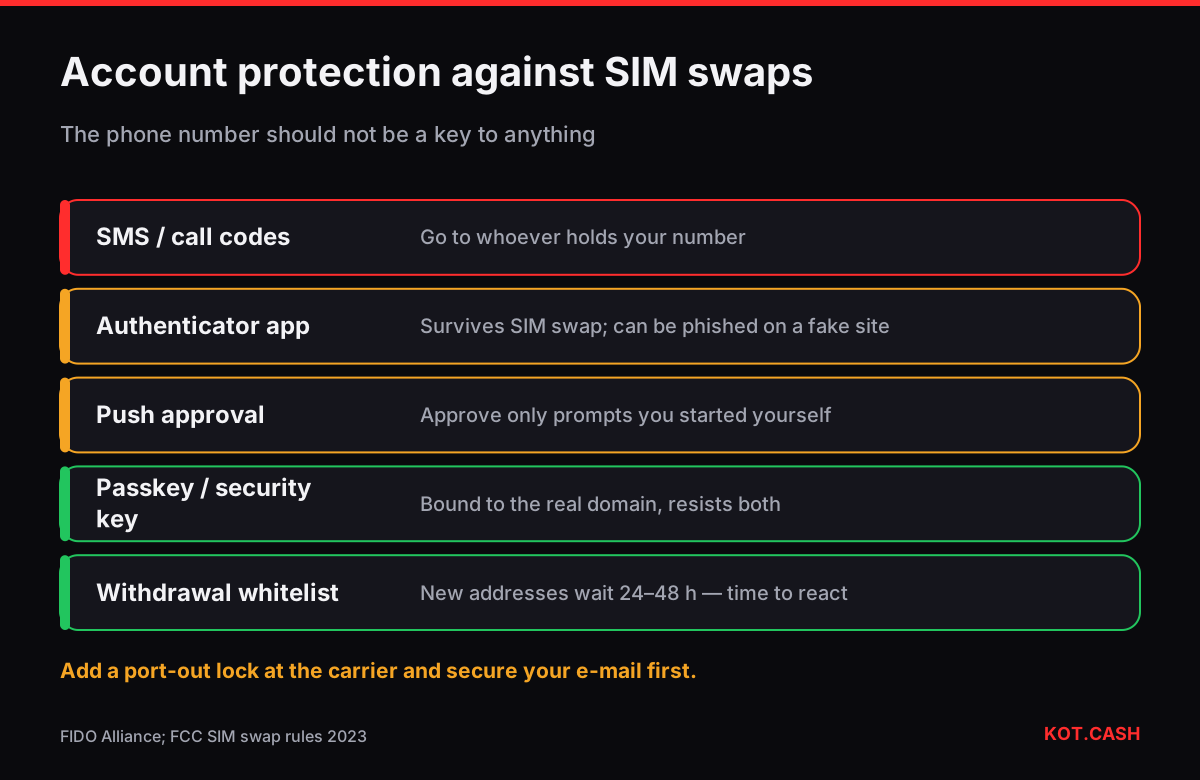
A SIM swap is when an attacker gets your mobile carrier to move your phone number to a SIM card they control. From that moment, calls and SMS codes go to them. If your exchange account, e-mail or messenger uses SMS for two-factor authentication or password reset, the attacker can take them over within an hour. The defence is to remove the phone number as a security factor: use an authenticator app, a passkey or a hardware security key, and lock your number at the carrier.
How a SIM swap happens
- The attacker collects your name, number, date of birth and address — from data leaks, social media or a phishing message.
- They contact the carrier as “you”, claiming a lost phone, or use an insider at a shop or call centre, and request a new SIM or an eSIM transfer. Port-out to another carrier works the same way.
- Your phone suddenly shows “No service” or “SOS only”. Their SIM is now active with your number.
- They reset the password of your e-mail via SMS, then of the exchange account, and withdraw. With e-mail they can also approve new withdrawal addresses.
This is not a theoretical risk. In January 2024 the US Securities and Exchange Commission’s account on X was hijacked through a SIM swap of the associated phone number and used to post a fake announcement about bitcoin ETFs. In the US the FCC adopted rules in 2023 requiring carriers to authenticate customers before SIM changes and port-outs and to notify them, but protection still varies by carrier and country.
2FA methods from weakest to strongest
Not all second factors are equal. What matters is whether someone who controls your phone number, or tricks you on a fake site, can still get in.
| Method | Survives SIM swap? | Survives phishing site? |
|---|---|---|
| SMS or call code | No | No |
| E-mail code | Only if e-mail itself is not SMS-recoverable | No |
| Authenticator app (TOTP) | Yes | No — the code can be relayed |
| Push approval in exchange app | Yes | Partly — beware approving prompts you did not start |
| Passkey / FIDO2 security key | Yes | Yes — bound to the real domain |
Securing an exchange account step by step
- Secure the e-mail first: it is the master key to everything else. Turn on an authenticator app or passkey for it, remove the phone number as a recovery option where the provider allows.
- On the exchange, switch 2FA from SMS to an authenticator app, a passkey or a security key. Remove the phone number from login and withdrawal confirmation if possible.
- Turn on withdrawal address whitelisting and, if offered, a delay for new addresses (often 24–48 hours). This gives you time to react even if the account is breached.
- Save the 2FA backup codes offline, on paper, next to — but not together with — your seed backups.
- Use a unique long password from a password manager. Reused passwords make SIM swaps unnecessary.
Passkeys in plain words
A passkey replaces the password and the code with a key pair stored on your phone, computer or a hardware security key. When you log in, the device signs a challenge for the exact domain it was registered on. A fake site on another domain gets nothing it can use, and there is no code to read out over the phone. If your exchange offers passkeys, add two — for example one on the phone and one on a hardware key kept at home — so losing one device does not lock you out.
Locking your number at the carrier
- Ask the carrier for a port-out PIN, “number lock” or “SIM protection”. Many carriers in the US, UK and EU offer it free in the account settings.
- Set a carrier account password that is not your date of birth or the last digits of an ID document.
- Consider a separate number, not published anywhere, for the few services that insist on SMS.
- Do not post your main number in public profiles or crypto chats.
What a SIM swap cannot reach
Self-custody wallets do not know your phone number. A hardware wallet or a mobile wallet protected by its own PIN and seed phrase cannot be taken over through the carrier. That is one reason to keep only trading balances on exchanges and the rest in your own wallet — see hot wallet vs cold wallet. A swap on KOT.CASH does not need an account at all: you paste your own payout address, so there is no login a SIM swapper could hijack to redirect funds. The KOT.CASH personal cabinet, for those who use one, requires an authenticator-app 2FA rather than SMS.
If you were SIM-swapped
- Call the carrier, report fraud, get your number back and add a port-out lock.
- From a clean device, change passwords of e-mail and exchanges, revoke sessions, replace 2FA.
- Contact the exchanges’ support through their official sites; ask to freeze withdrawals and to check new whitelisted addresses.
- Report to the police; in the US also to the FBI’s IC3 and the FCC, in the UK to Action Fraud.
FAQ
Is SMS 2FA better than nothing?
Yes, against password reuse. Against a targeted SIM swap it does not help. Switch to an authenticator app, passkey or security key.
Can a SIM swap steal from my hardware wallet?
No. Hardware and self-custody wallets do not use your phone number.
What is the strongest 2FA for an exchange?
A passkey or FIDO2 security key, because it works only on the real domain and cannot be phished or SIM-swapped.
Does an eSIM protect against SIM swaps?
Not by itself. An eSIM can also be transferred by the carrier. The protection is the carrier lock and not using SMS as a factor.
Does KOT.CASH use SMS codes?
No. Standard swaps need no account, and the personal cabinet uses an authenticator-app 2FA.