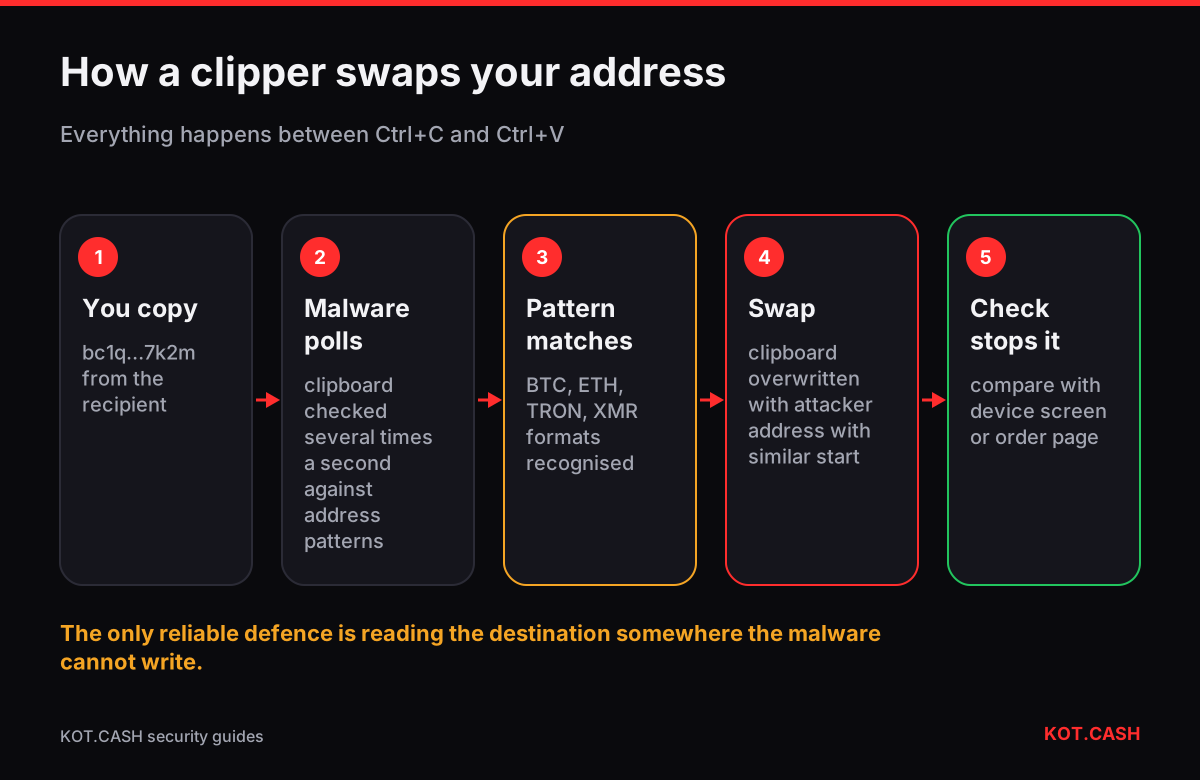
A clipboard hijacker, or “clipper”, is malware that watches your clipboard and replaces any crypto address you copy with an address controlled by the attacker. You copy bc1q…7k2m, you paste bc1q…9x4d, and unless you compare the two, you send your coins away. If you have ever noticed that a pasted address looks different from the one you copied, stop sending from that device: that is the classic symptom.
How a clipper decides what to replace
Clippers are small and simple. They poll the clipboard several times a second and test the text against patterns: 26–62 characters starting with 1, 3 or bc1 for Bitcoin; 0x followed by 40 hex characters for Ethereum and every EVM chain; T plus 33 characters for TRON; 4 or 8 plus 94 characters for Monero, and so on. When a pattern matches, the clipboard is overwritten with an attacker address of the same type.
Better clippers generate or pick an attacker address that shares the first few characters with the copied one, so a quick look at the start does not reveal the swap. This is the same trick as address poisoning, but performed locally and in real time. Some versions only activate for amounts or addresses above a threshold or after a delay, to avoid being noticed during a test.
How clippers get onto devices
- Cracked software, game cheats and “free” versions of paid programs, especially on Windows.
- Fake wallet or trading apps, browser extensions with crypto features, and “portfolio trackers” from unofficial sources. See fake wallet apps.
- Android apps installed from APK files outside Google Play; on older Android versions any app could read the clipboard in the background.
- Attachments and links in messages: “invoice.pdf.exe”, archives with scripts, macros in documents.
A two-minute test for a clipper
- Take a known address — for example your own receive address in your wallet.
- Copy it, paste it into a plain text editor, and paste it again into the address poisoning checker next to the original typed or read from the wallet screen.
- Repeat with an address of a different coin (an Ethereum 0x address and a TRON T address), because many clippers target only some formats.
- Wait a minute between copy and paste and try again; some clippers react only after a pause.
- If any character differs, the device is compromised. Do not send crypto from it until it is cleaned or reinstalled.
| Situation | Compare against | Why it works |
|---|---|---|
| Hardware wallet | Address on the device screen | Malware on the PC cannot change what the device displays |
| Mobile wallet | Address shown by the recipient (order page, invoice) | The recipient’s display is outside your phone |
| Desktop wallet | QR scanned with a second device | The clipboard is not involved |
| Exchange withdrawal | Saved whitelist address | New addresses need e-mail or 2FA confirmation |
Hardware wallets help — if you read the screen
A hardware wallet shows the destination address on its own display before you approve. That is the strongest protection against clippers, because the malware runs on the computer and cannot draw on the device. It only helps if you compare the screen with the address you meant to use. People who confirm without looking get no protection from the device.
Cleaning up after a clipper
- Disconnect the device from wallets and exchanges. Use another, clean device for anything urgent.
- Assume any secret typed or displayed on that machine is exposed: seed phrases, private keys, exchange passwords, 2FA backup codes. Clippers are often bundled with stealers.
- Move funds from wallets whose seed was ever on that device to a new wallet created on a clean device. Rotate exchange passwords and 2FA.
- Reinstall the operating system rather than relying on an antivirus scan alone. Then install wallets only from official sites and verify the download.
Phones: what Android and iOS changed
Since Android 10, apps can read the clipboard only while they are in the foreground or are the default keyboard, which killed many background clippers. Malicious keyboards and apps with accessibility permissions can still see and change what you paste, so an unknown keyboard app or an app that demands accessibility access for no clear reason is a red flag. iOS shows a banner such as “App pasted from Safari” whenever an app reads the clipboard; if that banner appears in an app you did not paste into, uninstall it.
Swaps and clippers
On KOT.CASH you paste two addresses: the payout address into the form and, later, the deposit address into your wallet. Both are exposed to a clipper. After creating an order, compare the payout address shown on the order page with your wallet’s receive screen, and compare the deposit address in your wallet’s send form with the one on the order page or its QR code. Scanning the order’s payment QR with your phone wallet avoids the clipboard on the sending side entirely.
FAQ
Why did my Bitcoin address change when I pasted it?
That is the main sign of clipboard-hijacking malware. Stop sending from that device and check it as described above.
Can a clipper work on iPhone?
It is much rarer: iOS apps cannot read the clipboard in the background and the system shows a paste notice. On Android and Windows clippers are common.
Does antivirus detect clippers?
Known families usually yes, new builds often not. A reinstall is more reliable than a scan.
Is typing the address by hand safer?
It avoids the clipboard but invites typos. Scanning a QR code or using an address book is safer than both.
Can a clipper steal my seed phrase?
A pure clipper cannot, but they are often bundled with info-stealers that can. Treat any seed that was on the device as exposed.