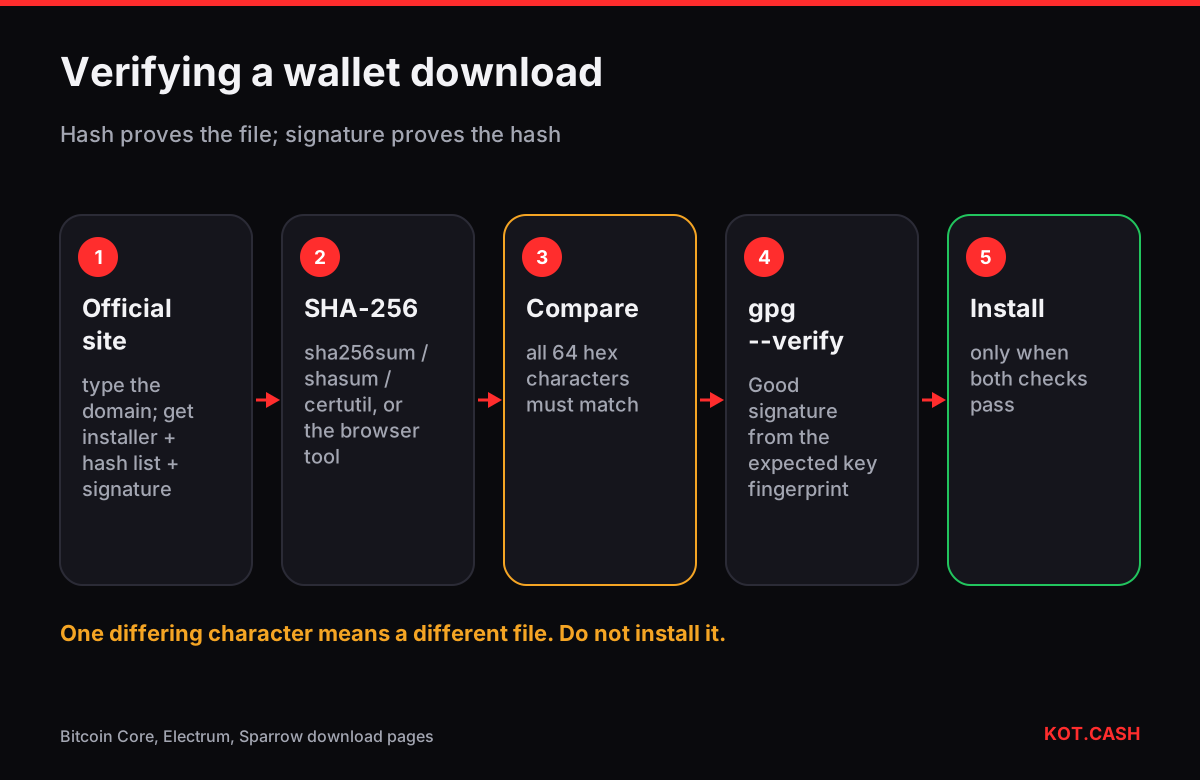
To verify a wallet download, compare the file’s SHA-256 hash with the hash the developers publish, and then check that the published list of hashes is signed by the developers’ key. The hash proves the file was not damaged or swapped; the signature proves the hash list itself came from the developers and not from whoever compromised the download page. For hardware wallets, the device checks its own firmware signature, and the vendor’s app runs an authenticity check — your job is to buy from the vendor and not skip those steps.
Why this matters
A wallet program holds or creates your keys. A modified installer can send the seed phrase to an attacker or replace receive addresses. Fake wallet sites rank in search ads, and download mirrors get compromised. Verification takes two minutes once you have done it the first time, and it is the only way to know the file is the one the developers built.
Step 1: get the file and the hashes from the official source
- Bitcoin Core: bitcoincore.org/en/download — the installer, a
SHA256SUMSfile andSHA256SUMS.ascwith signatures from several builders. - Electrum: electrum.org — each file has a
.ascsignature by the developers (ThomasV’s key and others). - Sparrow: sparrowwallet.com/download — a manifest of hashes and its signature by Craig Raw.
- Ledger Live, Trezor Suite, Exodus and others: only from the vendor’s own site or the official app store entry linked from it. See fake wallet apps.
Type the domain yourself or use a bookmark. Check it with the phishing link checker if you arrived from a link.
Step 2: compute the hash
You can compute SHA-256 with built-in commands or with the file checksum verifier, which hashes the file locally in your browser and compares it with the hash you paste — the file is not uploaded anywhere.
# Linux
sha256sum bitcoin-28.1-x86_64-linux-gnu.tar.gz
sha256sum --ignore-missing --check SHA256SUMS

# macOS
shasum -a 256 Sparrow-2.x.dmg

# Windows (PowerShell or cmd)
certutil -hashfile electrum-setup.exe SHA256
The hash is 64 hexadecimal characters. Compare the whole string; upper or lower case does not matter. One character off means a different file — do not install it.
Step 3: verify the signature on the hash list
An attacker who replaces the installer on a website can also replace the hash next to it. That is why serious projects sign their hash lists with PGP keys. With GnuPG installed:
- Import the developer’s public key from a source independent of the download page — for Bitcoin Core, the builder keys in the guix.sigs repository; for Electrum and Sparrow, the keys linked in their documentation and published on keyservers and GitHub.
- Run
gpg --verify SHA256SUMS.asc SHA256SUMS(orgpg --verify file.asc file). - Look for “Good signature” from the expected key fingerprint. A warning that the key is not certified by a trusted signature is normal if you have not signed it yourself; a “BAD signature” is not.
Hardware wallets: device and firmware
| Check | Who does it | What you do |
|---|---|---|
| Buy from vendor or authorised reseller | You | Avoid marketplaces and second-hand devices |
| Firmware signature on boot | Device bootloader | Never install firmware from files people send you |
| Genuine / authenticity check | Vendor app (Ledger Live, Trezor Suite) | Run it at setup; it fails on counterfeit chips |
| Seed generated on the device | Device | Reject any device that arrives with a pre-printed seed |
| Updates from the official app | You | Update only through the vendor app, from the verified download |
A device that comes with a recovery card already filled in, or with instructions to “use this seed”, is a scam regardless of packaging. A real hardware wallet always generates a new seed for you to write down.
Mobile wallets and auto-updates
On phones you cannot hash the app, so the checks shift to the source: install from the store page linked on the official site, and leave store auto-updates on so security fixes arrive. Android wallets that publish APKs on their own sites or GitHub (for example many open-source Bitcoin wallets) also publish the signing certificate fingerprint; apps such as AppVerifier compare it on the device. Be wary of “update” prompts inside an app that send you to a website — real updates come through the store.
After you install
- Create a wallet and write down the seed offline — see where not to store a seed phrase.
- Receive a small amount first and check the address on the device screen; then send a test transaction out before trusting the setup with savings.
- Keep the verified installer’s hash noted: when an update arrives, you repeat the same check.
FAQ
Is checking the SHA-256 hash enough?
It proves the file matches the published hash. If the website itself was compromised, both could be replaced, so also verify the signature on the hash list.
Where do I find the official hash?
On the developer’s download page or signed file (SHA256SUMS, .asc), reached by typing the official domain.
My hash does not match. What now?
Do not install the file. Delete it, download again from the official site, and check again. If it still differs, report it to the developers.
Do app store apps need verification?
You cannot hash them, but you can verify the developer name and open the store page from the link on the official website.
Can a hardware wallet be counterfeit?
Yes. Buy from the vendor, run the genuine check in the vendor app and reject any device with a pre-filled seed.