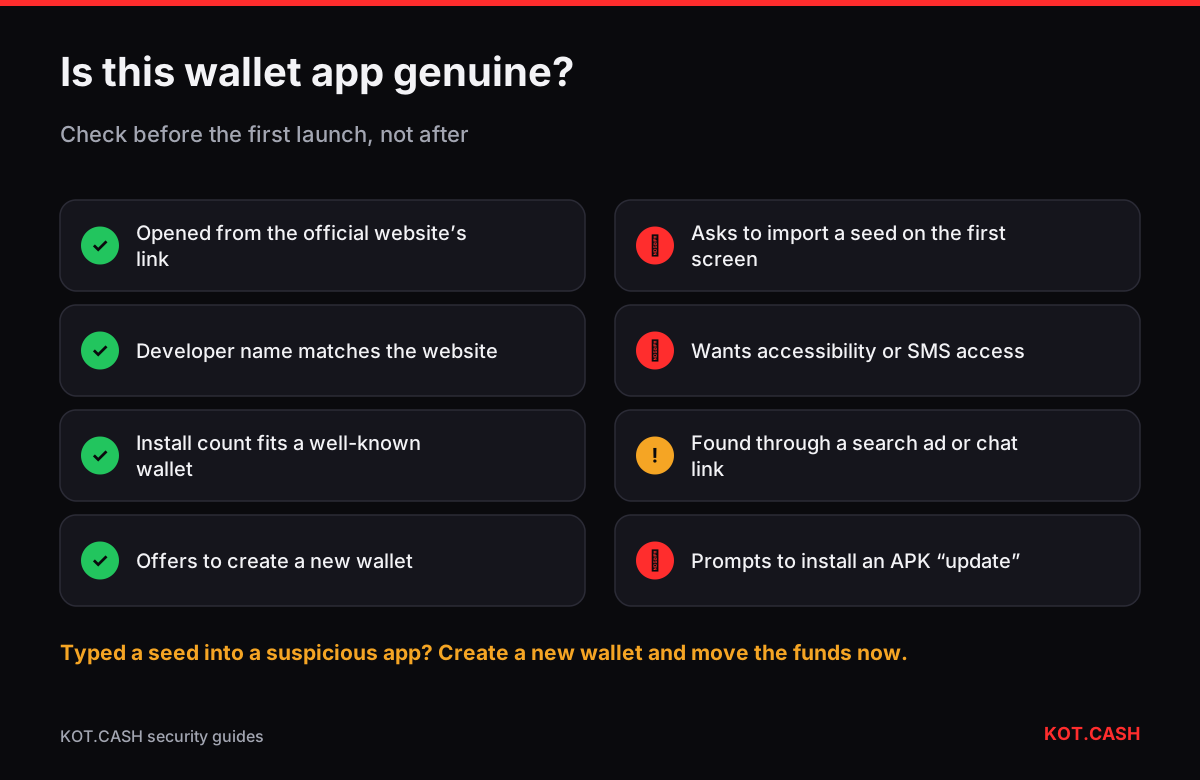
A fake wallet app copies the name, logo and screenshots of a real wallet and does one thing: on first launch it asks you to “import” or “restore” your wallet, then sends the seed phrase to the attacker. You avoid it by installing only through a link on the wallet’s official website, checking the developer name in the store, and treating any app that asks for an existing seed phrase before you created anything as suspect.
Where fake wallets appear
- Official app stores. Google Play, the Apple App Store and the Microsoft Store all remove fake wallets, but some get through review for days or weeks. In 2023 a fake “Ledger Live” app in the Microsoft Store collected seed phrases before it was taken down.
- Browser extension stores. Copies of MetaMask, Phantom, Rabby and other extensions are published under similar names; a few use paid reviews to look established.
- Search ads. An ad for “download Exodus” or “Trust Wallet desktop” can sit above the real result and lead to a look-alike domain.
- APK files and links in chats. “Pro” or “unlocked” versions shared in Telegram groups, often promoted by fake support.
Checks before you install
Each check takes seconds. Together they make it very hard for a copy to reach you.
- Start from the wallet’s official website, typed by hand or from a bookmark, and use its “Download” links to reach the store page. Check the domain with the phishing link checker.
- In the store, compare the developer (publisher) name with the one on the website: “MetaMask” is published by Consensys, “Trust Wallet” by DIGITAL ASSET HOLDINGS / Trust Wallet, “Ledger Live” by Ledger. A personal name or a random company is a warning.
- Look at the number of installs and the history of reviews. A few hundred installs for a wallet that claims to be famous, or a burst of five-star reviews in one week, is suspicious.
- For desktop installers, verify the download with the published hash and signature.
Behaviour that gives a fake away
| Real wallet | Copycat | |
|---|---|---|
| First screen | Create new wallet or restore | Only “Import wallet” / “Sync wallet” |
| Seed phrase | Generated by the app, you write it down | You are asked to type an existing one immediately |
| Permissions | Camera for QR, notifications | Accessibility, SMS, screen overlay without reason |
| After import | Balances load from the network | Error, “maintenance”, or an empty wallet |
| Updates | From the store or official site | Prompts to install an APK or a “patch” |
Why copies keep getting through
Store review checks for malware and policy violations, but a fake wallet often contains no malicious code: it shows a normal-looking form and sends what you type to a server, which is what many legitimate apps do too. Publishers rename apps after approval, buy aged developer accounts and run ads at night or on weekends, when takedowns are slower. Reports from users are the main signal stores act on, so reporting a copy really does shorten its life.
Browser extensions: extra cautions
- Open the extension store page from the wallet’s website, not by searching inside the store.
- Check the extension ID or publisher shown on the official site where projects publish it.
- Remove extensions you do not use. Any extension with permission to “read and change all your data on all websites” can tamper with wallet pages.
- Use a separate browser profile for crypto, without other extensions.
If you entered your seed phrase into a fake app
- Install the genuine wallet from the official site on a device you trust, create a new wallet and write down the new seed offline.
- Move everything from the exposed wallet to the new addresses immediately, starting with the largest balances. Attackers often sweep within minutes, sometimes later.
- Remove the fake app and report it in the store (“Report” / “Flag as inappropriate”) and to the wallet developer.
- Keep the transaction hashes if funds were taken and report the theft to the police — IC3 in the US, Action Fraud in the UK.
Fake exchange and swap apps
The same trick is used for exchanges and swap services: an app with a familiar name that shows fake balances or collects deposits. KOT.CASH works in the browser at kot.cash and can be installed as a web app from the site itself; there is no need to download a third-party “KOT.CASH” APK. See fake crypto exchange websites for checking the web version.
FAQ
How do I know a wallet app in Google Play is real?
Open the store page from the official website, check the developer name and install count, and make sure the app offers to create a new wallet.
Is a fake app dangerous if I never entered my seed phrase?
Usually less so, but it may show fake receive addresses. Do not use it to receive funds; uninstall it.
Do fake wallets exist on iPhone?
Yes, though less often. App Store review removes many, but copies have appeared. The same checks apply.
Can antivirus detect fake wallet apps?
Sometimes. They often contain no malware in the classic sense — they simply send what you type to a server.
Is there an official KOT.CASH app?
KOT.CASH runs at kot.cash in the browser and can be added to your home screen from there. Do not install APKs from chats.