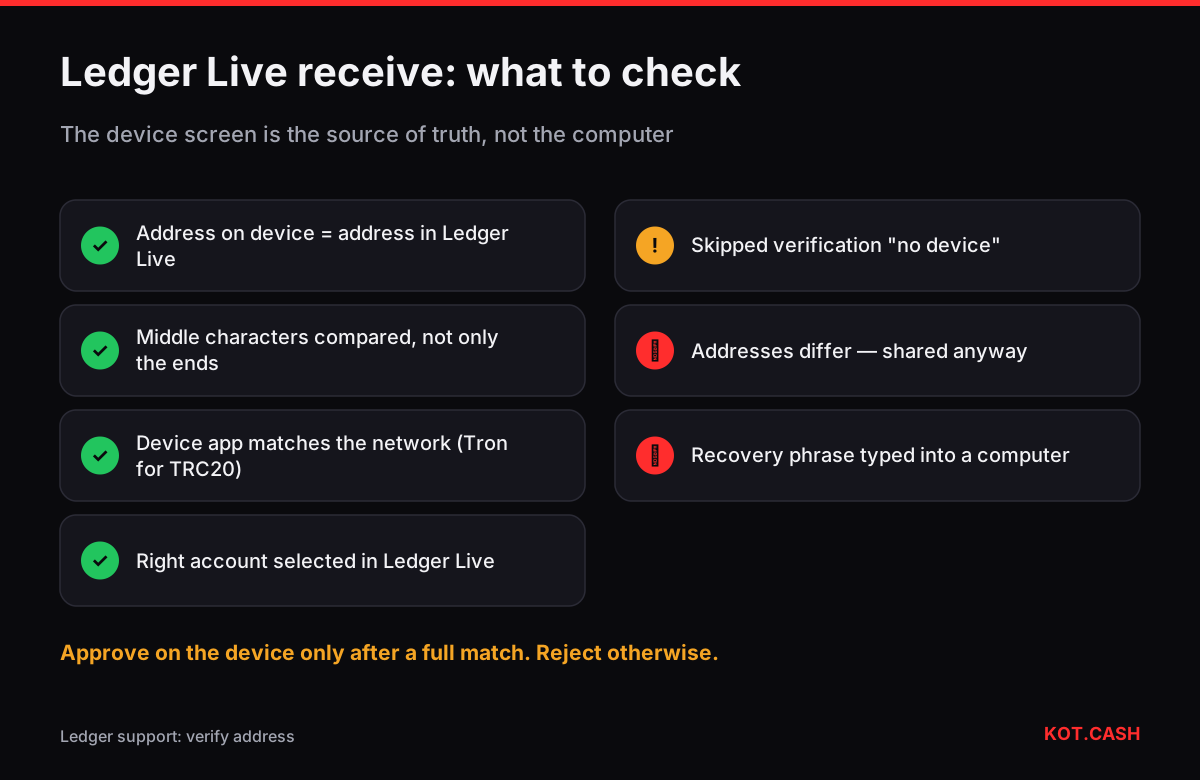
To receive crypto with a Ledger, open Ledger Live, press Receive, choose the asset and the account, connect and unlock the device, open the matching app on it (Bitcoin, Ethereum and so on) and compare the address on the Ledger screen with the one in Ledger Live. Approve on the device only if they match exactly. That comparison is the whole point of a hardware wallet: the computer can be compromised, the device screen is much harder to fake.
Why the screen check matters
Ledger Live runs on your phone or computer. If that machine has malware, the address it displays — or the address it puts on your clipboard — can be swapped for an attacker's. The Ledger device derives the address itself from the keys inside its secure element and shows it on its own screen. When the two match, you know the address you are about to share really belongs to your device. Ledger's support documentation calls this step address verification and recommends it for every receive, especially for large amounts.
Ledger Live lets you skip it ("Don't have your device?"), and then shows a warning. The address is still derived from your account's public key, so in normal conditions it is correct — but you have given up the one check that protects you from a manipulated host.
Step by step in recent versions
- In Ledger Live open Receive (on mobile the arrow button, on desktop the left menu).
- Choose the crypto asset, for example Tether USD. If it exists on several networks, Ledger Live asks which one — USDT on Ethereum and on Tron are separate accounts with different addresses.
- Choose the account (Ethereum 1, Bitcoin Native SegWit 1 and so on). New users first add an account in Accounts.
- Connect the Ledger (USB, or Bluetooth on Nano X, Stax and Flex), enter the PIN and open the app the screen asks for — the Ethereum app for ERC20 tokens, the Tron app for TRC20, the Bitcoin app for BTC.
- Ledger Live shows the address and the device shows the same address. Compare them character by character, at least the first and last eight characters plus a block in the middle. Press Approve on the device if they match; reject if they do not.
- Copy the address from Ledger Live and give it to the sender. Paste it once into a note and compare with the device again if the amount is large.
What to compare
- Full address, not only the ends. Address-poisoning attacks generate look-alikes that match the first and last four to six characters. Compare a block in the middle too.
- The network. The device app name (Bitcoin, Ethereum, Tron, Solana) must match the network the sender will use.
- The account. If you have several accounts, the account name in Ledger Live must be the one you expect to see the funds in.
- The device itself. Buy only from Ledger or authorised resellers, and run Ledger Live's genuine check after setup.
Accounts, networks and why the address can repeat
Ledger Live organises funds as accounts per network. An Ethereum account and a BNB Smart Chain or Polygon account with the same index usually share the same 0x address, because EVM networks use the same derivation path — the balances still live on different networks. Tokens are not separate accounts: USDT ERC20 sits inside your Ethereum account and is received at the Ethereum address. TRC20 tokens sit inside the Tron account, SPL tokens inside the Solana account.
Bitcoin is different. A Bitcoin account in Ledger Live has an address type — Native SegWit (bc1q…), Taproot (bc1p…), Nested SegWit (3…) or Legacy (1…) — and shows a fresh unused address for every receive. Older addresses keep working and still belong to the same account; Ledger Live scans them when it syncs.
| You receive | Ledger Live account | Device app | Address |
|---|---|---|---|
| BTC | Bitcoin (Native SegWit / Taproot) | Bitcoin | bc1q… / bc1p… |
| ETH, USDT ERC20, USDC ERC20 | Ethereum | Ethereum | 0x… |
| USDT BEP20, BNB | BNB Smart Chain | Ethereum or BSC app (as Ledger Live asks) | 0x… |
| USDT TRC20, TRX | Tron | Tron | T… |
| SOL, USDC SPL | Solana | Solana | Base58 |
| XRP | XRP | XRP | r… |
When the addresses do not match
Stop. Do not share the address and do not approve. Possible causes, from harmless to serious: you opened a different account on the device than in Ledger Live; the app on the device is outdated; or the host software is not genuine or is compromised. Close Ledger Live, download it again only from ledger.com, check the installer (Ledger publishes hashes of its releases — the file checksum verifier computes SHA-256 locally), update the device firmware from Ledger Live's My Ledger section and repeat the receive.
Receiving from a swap
For a KOT.CASH payout to a Ledger, verify the address on the device before you paste it into the order form — the form takes it once and the payout is final. Pick the payout network in the widget that matches the Ledger Live account you used: BTC to a Bitcoin account address, USDT TRC20 to the Tron account address, USDT ERC20 to the Ethereum account address. Then compare the pasted address in the form with the device one more time. The address poisoning checker highlights every differing character between two addresses.
FAQ
Do I have to connect my Ledger to get a receive address?
Ledger Live can show an address without the device, but then you cannot verify it on the device screen. For anything but tiny amounts, connect the device and verify.
Why is my Ledger Bitcoin address different every time?
Ledger Live shows a new unused address for each receive. All of them belong to the same account and keep working.
Is my Ledger USDT address the same as my ETH address?
For USDT ERC20, yes: tokens are received at the Ethereum account address. USDT TRC20 uses the separate Tron account address starting with T.
The address on the device and in Ledger Live differ. What now?
Do not use it. Check that the same account is open, reinstall Ledger Live from ledger.com, update the firmware and try again.
Which device app must be open to receive USDT TRC20?
The Tron app. ERC20 tokens use the Ethereum app, SPL tokens the Solana app.