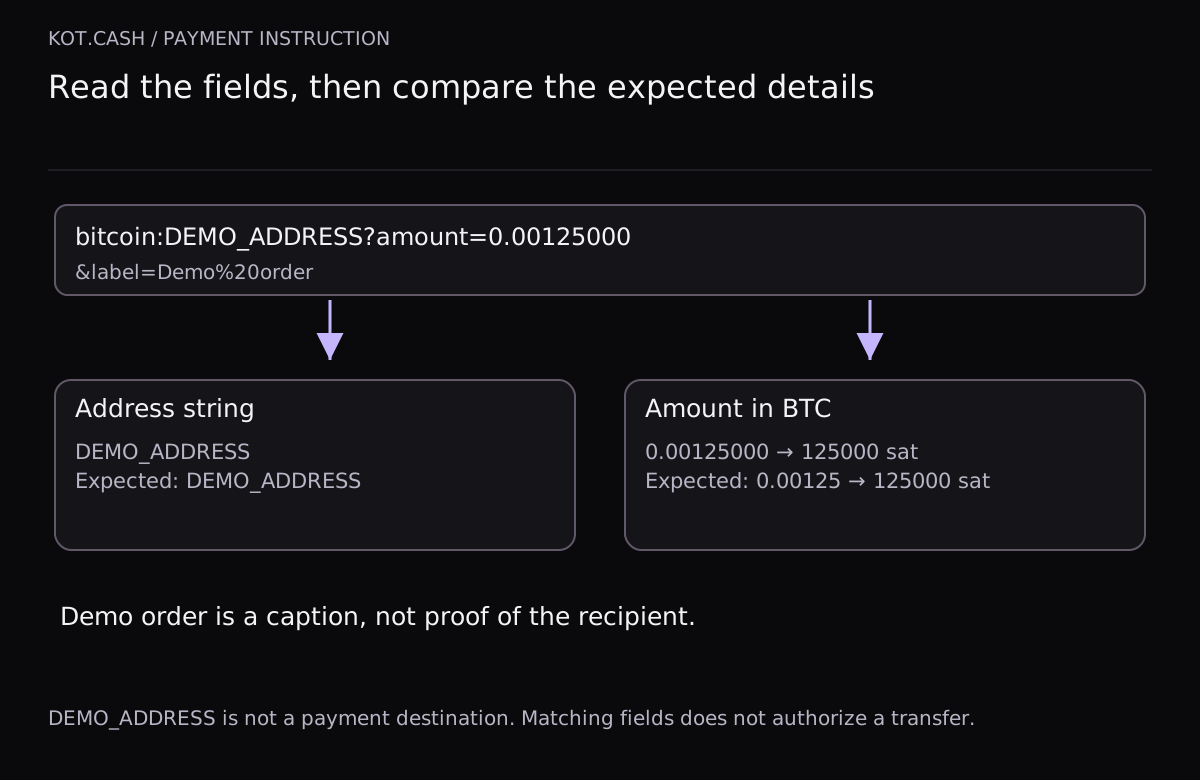
Scanning a QR code can fill in both a recipient address and a transfer amount in a wallet. That is useful when the details match a current payment request. The image itself, however, does not tell you whether it contains a plain address, a payment instruction or a web page. Before confirming, read the contents separately and compare them with a source you trust.
Identify what you received first
A string beginning with bitcoin: is a payment instruction in a particular format, not proof that an order exists. Parameters may follow the address component. BIP 321, which supersedes BIP 21, describes the modern instruction format; the historical BIP21 name still appears in interfaces. A familiar scheme does not establish that the sender is honest.
If scanning opens a website, that is a different situation: the page address and authenticity need examination. The tool below does not load websites or follow links. A plain address without the bitcoin: scheme is also outside its selected parsing model. A refusal by this tool does not mean that an ordinary address is incorrect.
| Component | Practical check | Limit of the conclusion |
|---|---|---|
| Address string | Full match with the address in the current request | A match neither identifies the owner nor checks the checksum |
| amount | An amount in BTC rather than a count of satoshis | This field does not calculate the network fee |
| label and message | Readable text after decoding | Anyone can enter a store name or an order number |
| Other parameters | Establish their purpose before using them | Matching familiar fields does not establish that the remaining ones are harmless |
Where to obtain the expected details
A comparison is meaningful when the expected address and amount come from an independent, current source, such as an active order page you opened yourself. Copying the expected address from the same questionable instruction achieves nothing. Two equal values would only show that you pasted the same string twice.
Also check the request's status and validity period. A saved QR image might belong to a previous swap or to terms that have changed. This local tool has no knowledge of current KOT.CASH orders and does not verify their validity. For an actual transfer, use the current instructions for that particular operation.
The same amount can have different written forms
In the demonstration instruction, amount=0.00125000 represents 125000 satoshis. The shorter form 0.00125 means the same amount: trailing zeros do not change the value. The tool converts both inputs into an integer number of satoshis, so the comparison does not depend on formatting or binary floating point arithmetic.
An instruction without an amount does not specify zero. It may expect manual entry, but an amount match cannot be established in that case. This demonstration accepts positive amounts with a decimal point and no more than eight decimal places. Comma decimals, exponential notation and smaller fractions are unsupported.
A limited inspection rather than a promise of full compatibility
Paste the text already decoded by your QR scanner and supply the expected address and amount separately. The supported subset requires a nonempty address component and permits optional amount, label and message fields. Scheme and parameter names are case-insensitive; the address string is preserved as entered. A repeated recognized parameter is rejected as an unsupported case.
Other parameters are displayed separately and put the instruction outside the supported subset. In particular, req- extensions must not silently be ignored during actual use. Modern instructions can express more than this model: the demonstration's limitation does not invalidate every other format. Lightning, additional payment methods and proof-of-payment requests are not executed here.
A caption does not verify the recipient
A label or message may look convincing without connecting the address to an organization. Do not substitute a familiar name for comparison. Likewise, an exact amount match does not prove that you have selected the correct network, that a recipient expects the funds or that a mistaken transfer can be recovered.
Address-format validation is a separate task with a separate tool on this website. Producing a QR image is also a separate operation. This page neither recognizes nor generates an image: it inspects the contents of an already obtained string and differences from the expectation you entered.
The final review takes place in your wallet
After inspection, still read the confirmation screen in your wallet: address, amount, network and final sending terms. If it shows something different, stop and establish why, rather than treating a local match as authorization to pay. No positive result on this page signs a transaction or establishes that the operation is safe.
The useful result is a clear distinction between matching strings, a missing amount and unsupported fields. It helps you ask the recipient a specific question. Resolve unknown conditions before sending, especially when the original instruction and the wallet's confirmation screen disagree.
Inspect and compare a payment instruction
DEMO_ADDRESS is a placeholder, not an address. Inspects a nonempty address and amount/label/message only; other fields need separate review. Does not validate an address, network, recipient or order, or authorize payment. The calculation runs on your device; nothing you enter is sent anywhere.