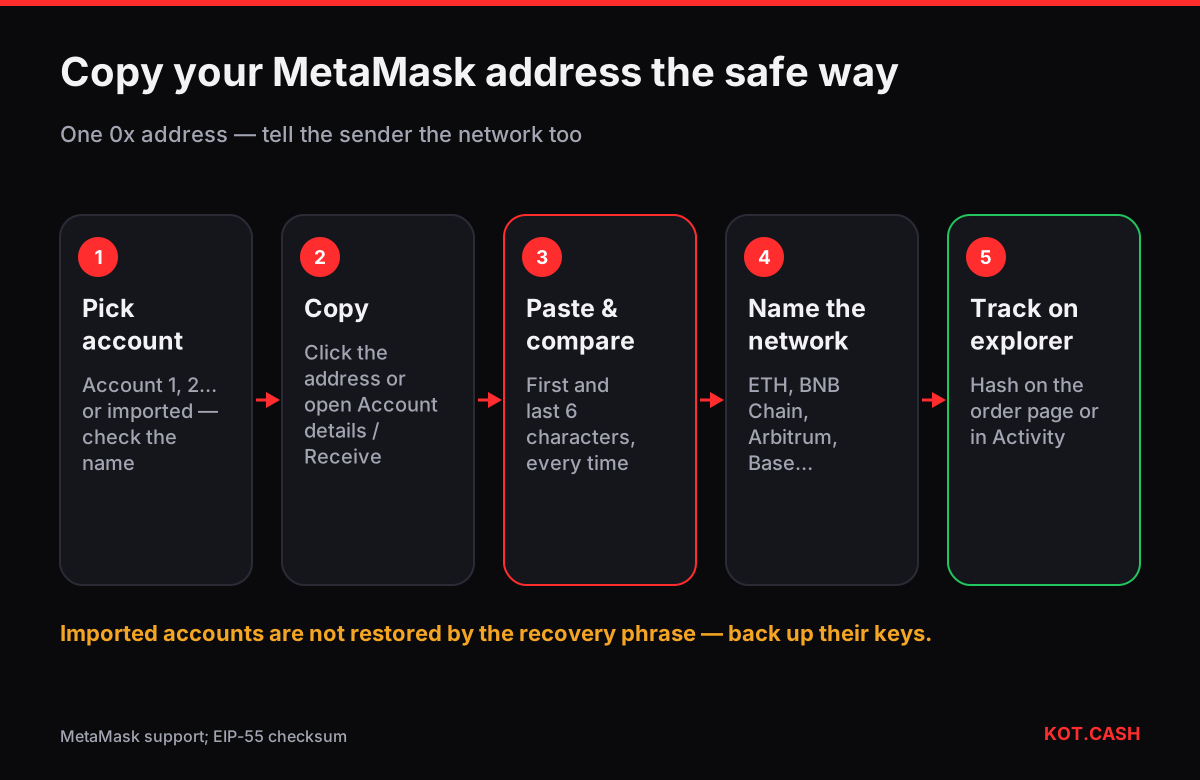
Your MetaMask address is shown under the account name at the top of the wallet: a shortened string like 0x71C7…976F. Click it (or the copy icon next to it) and the full 42-character address is copied to the clipboard. On mobile tap the account name or Receive to see the full address and a QR code. That one 0x address is your address on Ethereum and on every other EVM network you add.
Anatomy of the address
A MetaMask Ethereum address is 0x plus 40 hexadecimal characters. Some letters are upper case and some lower case: that is the EIP-55 checksum. Wallets use it to detect a typo — change one letter and the checksum no longer matches. Lower-case-only addresses are valid too, they just carry no checksum. The address validator checks it.
Because the address is the same on all EVM networks, MetaMask's address never "changes" when you switch from Ethereum to BNB Smart Chain or Base. What changes is the network you are looking at. Before you give the address to someone, tell them which network you expect, or the funds may arrive on a chain you are not watching.
Step by step
- Unlock MetaMask (browser extension or mobile app).
- Check which account is selected at the top — Account 1, Account 2 or a custom name.
- Desktop: click the address under the account name, or open the account menu → Account details to see the full address and QR code. Mobile: tap Receive.
- Paste the address somewhere and compare the first six and last six characters with MetaMask. Do it every time — clipboard hijackers replace addresses silently.
- Tell the sender the network as well, for example "USDT on Arbitrum" or "ETH on Ethereum".
Which account is which
| Account | Where it comes from | Restored by the Secret Recovery Phrase? |
|---|---|---|
| Account 1, 2, 3… | Derived from your 12-word Secret Recovery Phrase | ('Yes', 'green') |
| Imported account | A private key pasted in manually | ('No — back up the key separately', 'red') |
| Hardware account | Ledger, Trezor or another device connected to MetaMask | ("No — restored from the device's own backup", 'amber') |
| Snap or multichain account (recent versions) | Non-EVM networks such as Solana or Bitcoin added in newer versions | Depends on the account; check MetaMask docs |
The imported-account row is where people lose funds. If you once imported a private key and later restore MetaMask on a new device from the recovery phrase, that account does not come back. Label imported accounts clearly and keep their key backed up, or move the funds to a derived account.
MetaMask and non-EVM addresses
Recent MetaMask versions add support for some non-EVM networks, such as Solana and Bitcoin, as separate accounts with their own address formats (a Base58 Solana address, a bc1 Bitcoin address). These are not your 0x address. If a sender asks for a Solana address, do not give them the 0x one; open the matching account. For Tron, MetaMask has no native support, so a USDT TRC20 payout needs a Tron wallet.
Using the address for a swap payout
On KOT.CASH paste your 0x address as the payout address and select the payout network in the widget: ETH on Ethereum, USDT ERC20, USDT BEP20, ETH on Arbitrum or Base, and so on. The same address field accepts all EVM networks, so the network choice in the widget is what decides where the coins arrive. After the payout the order page shows the transaction hash; open it in the explorer of the chosen network if MetaMask has not refreshed.
Sharing the address as a QR code
For in-person payments the QR code under Receive or Account details is safer than reading an address aloud. It encodes only the address, not an amount or a network. Some wallets scan EIP-681 links (ethereum:0x…@56) that can include a chain ID; if you build such a link, check that the sender's wallet understands it. A plain address QR plus a spoken "BNB Chain, USDT" is the least ambiguous option. The QR code generator makes a printable code from any address offline.
When the copied address looks different
If the address you pasted differs from MetaMask even by one character, delete it and copy again. If it changes again, assume malware: stop using that computer for crypto. Address-poisoning scams add a different risk: they send you dust from a look-alike address so it appears in your Activity list. Never copy a recipient from your history; use the address book or the original source. The address poisoning checker compares two addresses character by character.
FAQ
Is my MetaMask address the same on BNB Chain and Ethereum?
Yes. One 0x address works on all EVM networks; balances are separate per network.
Why does my address have upper and lower case letters?
That is the EIP-55 checksum. It helps wallets catch typos. The address is the same in lower case.
I restored MetaMask and an account is missing.
Imported accounts are not restored by the Secret Recovery Phrase. You need the private key you imported originally.
Can I receive USDT TRC20 in MetaMask?
No. TRC20 is on Tron, which MetaMask does not support natively. Use USDT on an EVM network or a Tron wallet.
Can I get a new address in MetaMask?
Yes: create another account. Each derived account has its own address and is restored by the same recovery phrase.