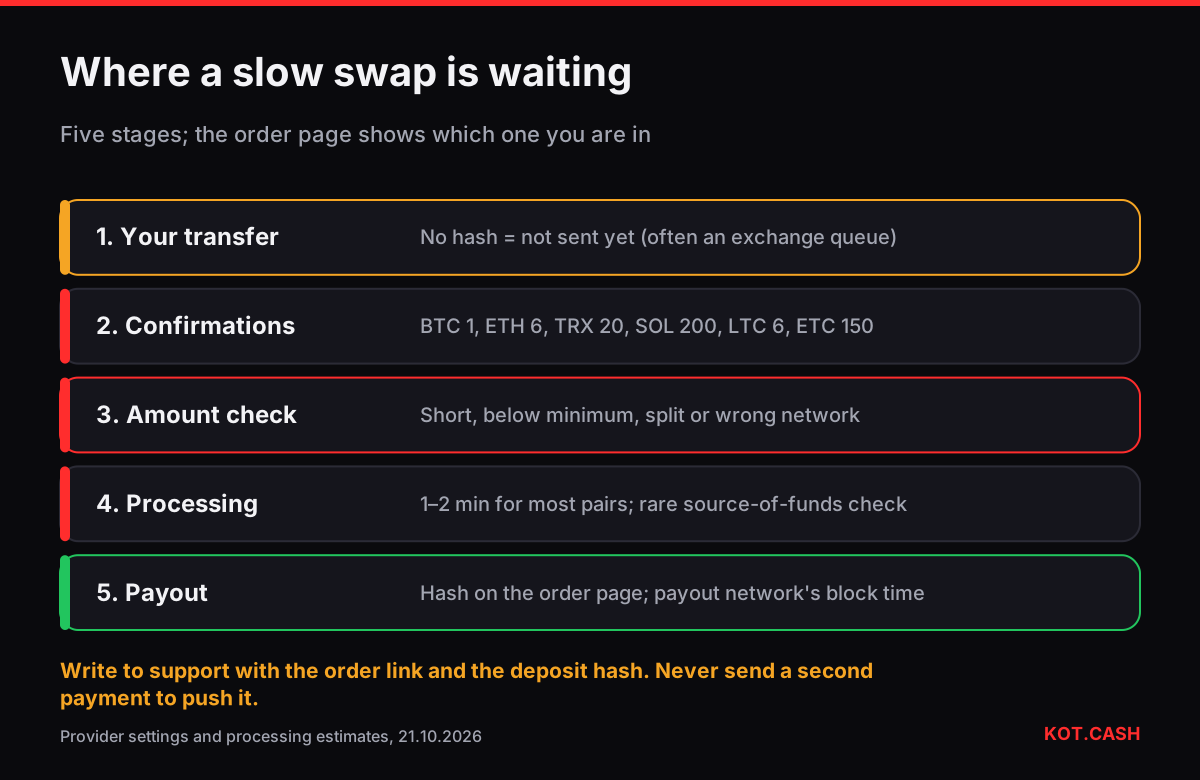
A swap that is taking longer than expected is almost always waiting at one specific stage, and the order page tells you which. On KOT.CASH an order moves through five stages: your transfer reaching the network, the deposit confirmations the provider requires, the amount check, processing, and the payout reaching you. Most delays are confirmations on slow chains or a transfer that never left your wallet or exchange. Identify the stage first; the fix depends entirely on it.
Stage 1: did your transfer actually happen?
If the order page still says it is waiting for a deposit, the provider has not seen a transaction to the deposit address. Open your wallet or exchange history and find the transaction hash. No hash means nothing was sent — exchange withdrawals in particular can sit in 'processing' for minutes or hours before the exchange broadcasts them. A hash that a block explorer does not know means the transaction was not propagated. A hash that the explorer shows going to a different address means it went somewhere else.
The transaction hash identifier tells you which network a hash belongs to and opens the matching explorer — useful when you are not sure whether a withdrawal went out on TRON, BSC or Ethereum.
Stage 2: confirmations
Once the deposit is in a block, the provider waits for a set number of confirmations before treating it as final. That number differs by coin, and on some chains it is the main part of the wait.
| Coin / network | Confirmations | ≈ Wait |
|---|---|---|
| BTC | 1 | ≈ 10 min (random, up to 30+) |
| ETH (ERC20 tokens too) | 6 | ≈ 1–2 min |
| USDT TRC20 / TRX | 20 | ≈ 1 min |
| SOL | 200 | ≈ 1.5 min |
| LTC | 6 | ≈ 15 min |
| DOGE | 12 | ≈ 12 min |
| ADA | 15 | ≈ 5 min |
| ATOM | 65 | ≈ 6–7 min |
| ETC | 150 | ≈ 32–35 min |
| KAS | 1,000 | a couple of minutes at 10 blocks/s |
If the counter on the order page is moving, nothing is wrong — it is just a slow chain. The deposit confirmations lookup has the number for every supported coin, and the confirmation time estimator gives realistic ranges.
Stage 3: the amount
- Less than the order amount. Exchanges subtract their withdrawal fee from what you type, so the deposit can arrive short. Floating-rate orders usually adjust; fixed-rate orders may need manual handling.
- Below the pair's minimum. A deposit under the minimum cannot be processed as a normal swap. Support can advise on a refund.
- Several partial deposits. Two transfers to one order are not always merged automatically. Write to support before sending a top-up.
- Wrong token or network. USDT on BEP20 sent to a TRC20 deposit, or a token that is not the one in the order, is not recognised. See sent crypto to the wrong network.
Stage 4: processing
After confirmation the provider executes the swap. Its own estimates range from 1–2 minutes for most pairs to 15–30 minutes for a few, such as some Bitcoin and Bitcoin Cash routes. Occasionally the provider's compliance team checks a deposit and asks for information about the source of funds before completing it; the AML policy explains when that can happen. In that case the order page shows a status change and support will contact you.
Stage 5: the payout
When the swap is done the order page shows the payout transaction hash. From then on the timing is that of the payout network: seconds on Solana or TRON, a minute on Ethereum, a block on Bitcoin. Your wallet may show the incoming payment as unconfirmed for a while. If the payout hash is there but your wallet shows nothing, check that the address on the order is the one you are looking at and that the wallet is synced to the right network.
When to write to support
- The order page has not moved for longer than the table above suggests for your coin.
- Your transaction is confirmed in an explorer with the deposit address as recipient, but the order still says it is waiting.
- You sent the wrong amount, token or network.
- The order expired after you had already sent funds.
Include the order link and the transaction hash. Do not send another payment to 'push' a stuck order, and do not reuse an old deposit address for a new swap. If you created the order on this device, it is listed under 'My exchanges on this device' on the site, which makes finding the link easy.
FAQ
Why is my swap still waiting for a deposit?
The provider has not seen a transaction to the deposit address yet. Check that your wallet or exchange actually sent it and find the hash.
How long should a swap take?
Most swaps finish in 5–30 minutes. Pairs with slow chains on the deposit side, such as ETC or BTC, take longer.
The confirmations counter is moving slowly. Is something wrong?
No. Each chain has its own block time; the counter follows it.
Can I send more to speed up the order?
No. Additional payments are not merged automatically and do not speed anything up. Contact support instead.
What do I need for a support request?
The order link and the transaction hash of your deposit.