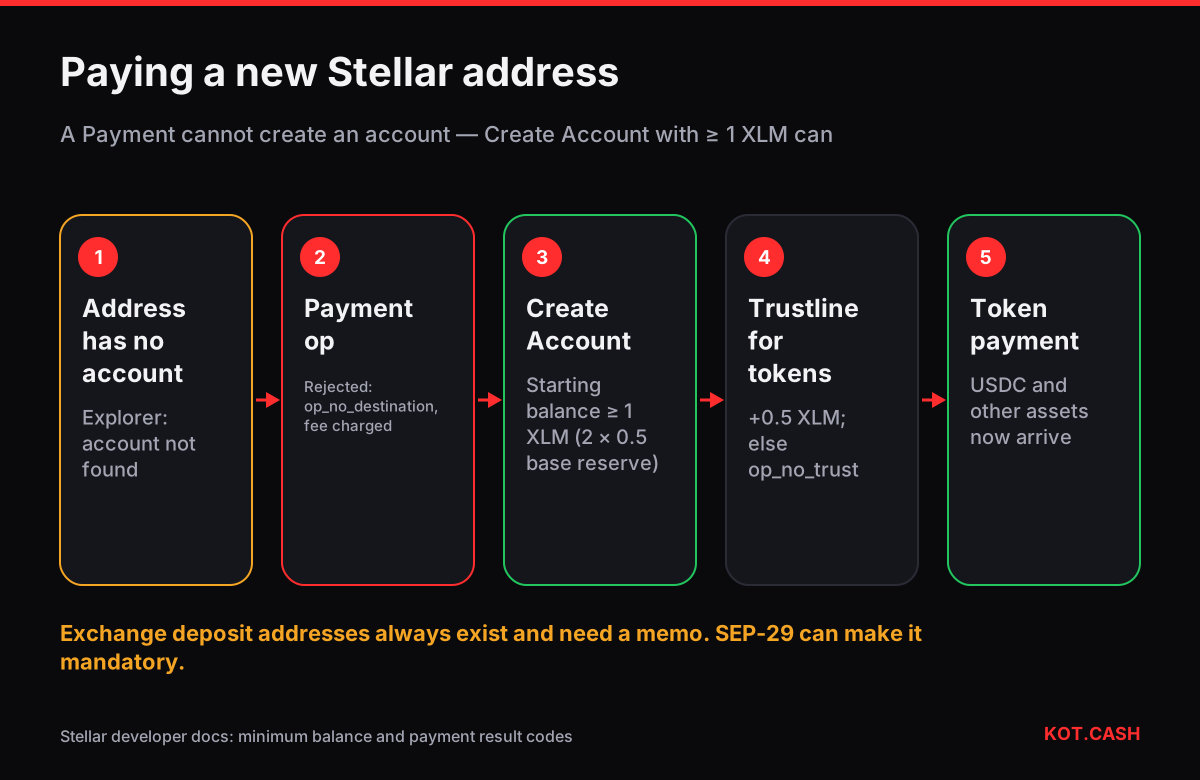
op_no_destination means you tried to make a payment to a Stellar address that has never been created on the network. On Stellar an address only exists after someone funds it with a Create Account operation carrying at least the minimum balance, currently 1 XLM. A plain Payment operation cannot create it, so the network rejects the payment. Your funds stay with you; the transaction fee of a fraction of a cent is still charged because the transaction reached the ledger. To fix it, send XLM using Create Account (most wallets do this automatically when you send XLM), or ask the recipient to activate the address first.
Why Stellar accounts must be created
Like the XRP Ledger, Stellar stores every account as a ledger entry and requires each entry to be backed by a reserve in the native coin. The rule is simple: minimum balance = (2 + number of subentries) × base reserve, and the base reserve is 0.5 XLM. A brand-new account with nothing attached therefore needs 1 XLM. Each trustline, open offer, additional signer or data entry adds a subentry and another 0.5 XLM. The Stellar minimum balance calculator does this arithmetic for your account.
A key generated in a wallet is just a key pair; until 1 XLM arrives via Create Account, explorers show the address as not found. This is why some wallets show 'Activate account' or 'Fund with 1 XLM' on first launch.
The flow that works
For XLM itself the path is short. Most wallets — Lobstr, Freighter, Solar and others — detect that the destination does not exist and switch the payment to Create Account for you, as long as the amount is at least 1 XLM. If you are scripting with the SDK, check whether the destination account loads; if not, use createAccount with a starting balance of at least 1 XLM instead of payment.
For a token such as USDC on Stellar, there are two preconditions: the destination account must exist, and it must hold a trustline to that asset's issuer. Without a trustline the payment fails with op_no_trust. The recipient adds the trustline in their wallet (which raises their minimum balance by 0.5 XLM), then you send the token.
Other Stellar result codes in the same family
| Code | Meaning | What to do |
|---|---|---|
| op_no_destination | Destination account does not exist | Use Create Account with ≥ 1 XLM |
| op_low_reserve | Create Account with a starting balance below the minimum | Send at least 1 XLM |
| op_no_trust | Recipient has no trustline for the asset | Recipient adds the trustline |
| op_not_authorized | Issuer requires authorization of the trustline | Recipient completes the issuer's authorization |
| op_underfunded | Sender lacks the amount above its own minimum balance | Send less or top up |
| tx_insufficient_fee | Fee bid below the current surge price (transaction level) | Resend with a higher fee |
Fees on Stellar are small and quoted in stroops (1 XLM = 10,000,000 stroops). The base fee is 100 stroops per operation, 0.00001 XLM. During surge pricing the fee you bid must beat other transactions for ledger space; wallets handle this automatically.
Memos and exchange addresses
Exchanges usually receive XLM at one shared address and identify you by a memo. Forget the memo and the payment arrives but is not credited. Stellar has a convention for this, SEP-29: an account can publish a config.memo_required flag, and compliant wallets refuse to send to it without a memo. Not every wallet checks it, so always copy the memo with the address. The memo and tag checker lists which coins and networks use one, and the memo guide covers recovery if you forgot it.
Checking a failed transaction
- Paste the transaction hash into a Stellar explorer such as StellarExpert or stellar.expert. Stellar hashes are 64 hex characters; the transaction hash identifier lists the explorers to try.
- Read the result: a failed transaction shows tx_failed with the operation code, for example op_no_destination.
- Open the destination address. 'Account not found' confirms it was never created.
- Resend correctly: Create Account for XLM, or wait for the recipient's trustline for a token.
Getting the reserve back later
The 1 XLM is not spent; it stays in the account as an unspendable minimum. Removing trustlines with zero balance and cancelling offers frees 0.5 XLM each. The base minimum can be recovered by merging the account into another one with the Account Merge operation, which sends the entire remaining balance to the destination and removes the account from the ledger.
One caution about merging: the destination of an Account Merge must already exist, and if it is an exchange address, the merge is credited only if the exchange supports it and you include the memo. Merge into your own existing account first if you are not sure.
FAQ
How much XLM does a new Stellar account need?
At least 1 XLM: two base reserves of 0.5 XLM. Each trustline or offer adds 0.5 XLM.
Did I lose my XLM after op_no_destination?
No. The payment did not execute. Only the transaction fee, 100 stroops per operation, was charged.
Why can't I send USDC on Stellar to a new address?
The recipient must exist and must add a trustline to the USDC issuer before receiving it.
What is SEP-29?
A Stellar convention that lets an account mark itself as requiring a memo, so compliant wallets refuse to send without one.
Can I get the 1 XLM back?
Yes, by merging the account into another one with Account Merge, which sends everything and closes the account.