Your Solana address in Phantom is the string under Receive → Solana: 32 to 44 Base58 characters with no prefix, for example 7xKX…sAsU. That single address receives SOL and every SPL token — USDT, USDC, JUP, BONK and the rest. You never need a separate "USDT address" on Solana: the network creates a token account for each token automatically and links it to your main address.
Where to find it in recent versions
- Open Phantom and check the selected account in the top-left corner.
- Tap Receive. Phantom lists the networks of that account: Solana, Ethereum, Base, Polygon, Bitcoin, Sui (the exact list depends on the version).
- Copy the address next to Solana, or open its QR code.
- For USDT or USDC on Solana use the same Solana address. Do not pick the Ethereum or Base row — those are 0x addresses on other networks.
Phantom's help centre describes the same screen. The multichain layout is convenient but it means one account has several addresses in different formats, and choosing the wrong row is the most common mistake.
How tokens arrive: associated token accounts
On Solana a token balance is not stored on your main account. It lives in a separate token account owned by your address. For each token there is one standard token account at a predictable location, the associated token account, derived from your address and the token's mint. When someone sends you USDT for the first time, their wallet creates that account in the same transaction and pays its deposit.
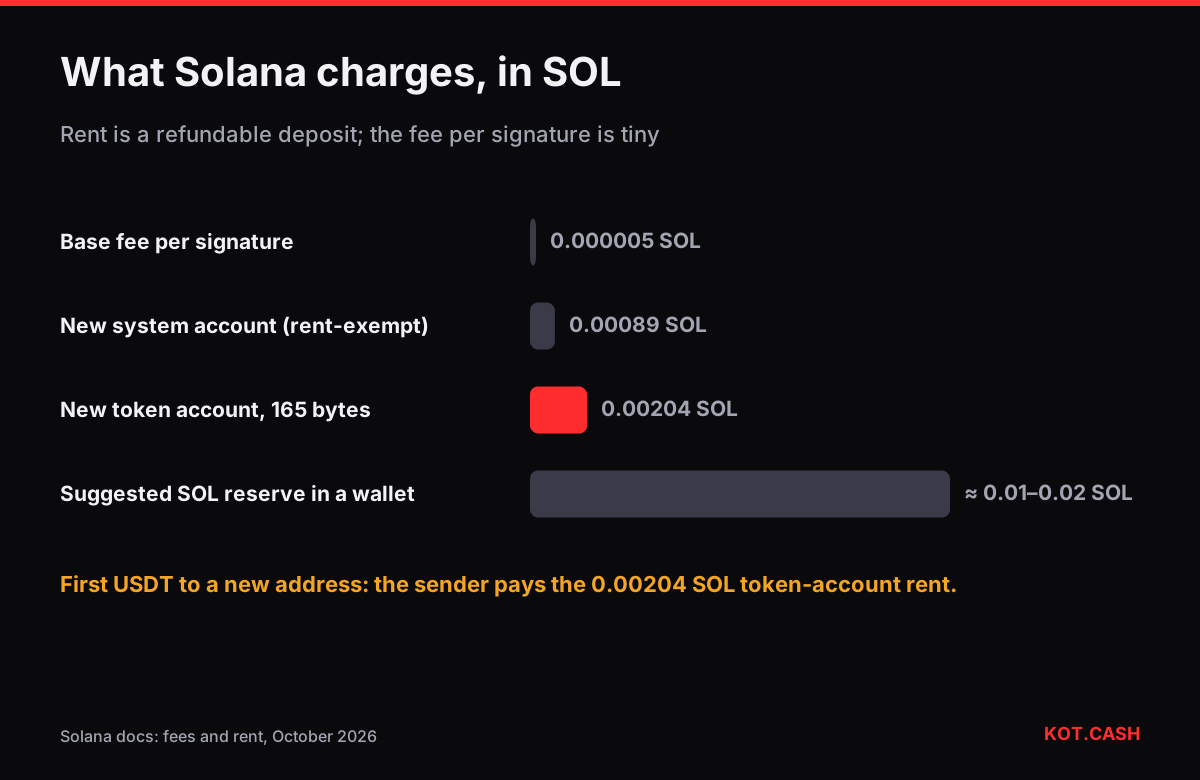
That deposit is rent: every Solana account must hold enough SOL to be rent-exempt. For a token account (165 bytes) it is 0.00203928 SOL; for a plain system account it is 0.00089088 SOL. The formula is (128 + data bytes) × 6,960 lamports, and the rent-exempt calculator runs it for any size. The rent is not a fee: if you later close an empty token account, the SOL comes back to you.
Who pays what on a first USDT transfer to you: the sender pays the network fee and the 0.00203928 SOL rent for your new token account; you pay nothing. On the second and later USDT transfers the account already exists, so the sender pays only the network fee. Phantom shows the rent as part of the fee when you are the sender to a new recipient — that is why sending tokens to a fresh wallet looks more expensive than sending to an old one.
The minimum SOL a new address can receive
A brand-new Solana address with zero balance has no account on-chain yet. The first SOL transfer to it must be at least the rent-exempt minimum of 0.00089088 SOL, otherwise the transaction fails with an "insufficient funds for rent" error. In practice exchanges and swap services send far more than that, so this matters only for tiny test transfers.
For outgoing transfers you need a little SOL as well. Each signature costs a base fee of 5,000 lamports (0.000005 SOL) plus an optional priority fee that wallets add when the network is busy; the priority fee calculator shows how the two add up. Keep around 0.01–0.02 SOL in the wallet so that token transfers and new token accounts never get stuck.
Look-alike tokens and spam
Anyone can create an SPL token named "USDT" or "Tether" and airdrop it to millions of addresses. Phantom hides many of them, but some get through. The genuine token is identified by its mint address, not its name: USDT on Solana is Es9vMFrzaCERmJfrF4H2FYD4KCoNkY11McCe8BenwNYB, USDC is EPjFWdd5AufqSSqeM2qN1xzybapC8G4wEGGkZwyTDt1v. If an unknown token arrives with a website in its name, do not visit it: those sites ask you to sign transactions that drain the wallet.
Receiving a swap payout in Phantom
When KOT.CASH pays out SOL, USDT on Solana or USDC on Solana, paste your Solana address from Phantom. The widget asks for the payout network — choose the Solana option. You do not need to create a token account in advance: the payout transaction creates it if it is missing. The liquidity provider waits for 200 Solana confirmations on deposits, which still takes well under two minutes because blocks come every ~400 ms.
Checking a transfer
Paste your address or the transaction signature into an explorer such as Solscan. A successful transfer shows the token, the amount and whether a token account was created. If Phantom does not show a token you can see on the explorer, it may be hidden as possible spam — check the hidden tokens list rather than assuming the funds are missing.
FAQ
Do I need a separate address for USDT in Phantom?
No. Use your Solana address. The USDT token account is created automatically and linked to it.
Why did the sender pay about 0.002 SOL extra?
That was rent for creating your USDT token account. It is a refundable deposit held by the account, not a network fee.
What is the smallest SOL amount I can send to a new address?
At least 0.00089088 SOL, the rent-exempt minimum of a system account. Smaller first transfers fail.
Is my Phantom Ethereum address the same as my Solana address?
No. Phantom shows a 0x address for EVM networks and a Base58 address for Solana. They are different networks and formats.
Can I recover the rent from token accounts I no longer use?
Yes. Closing an empty token account returns its rent to your wallet. Some wallets offer this as a cleanup option.