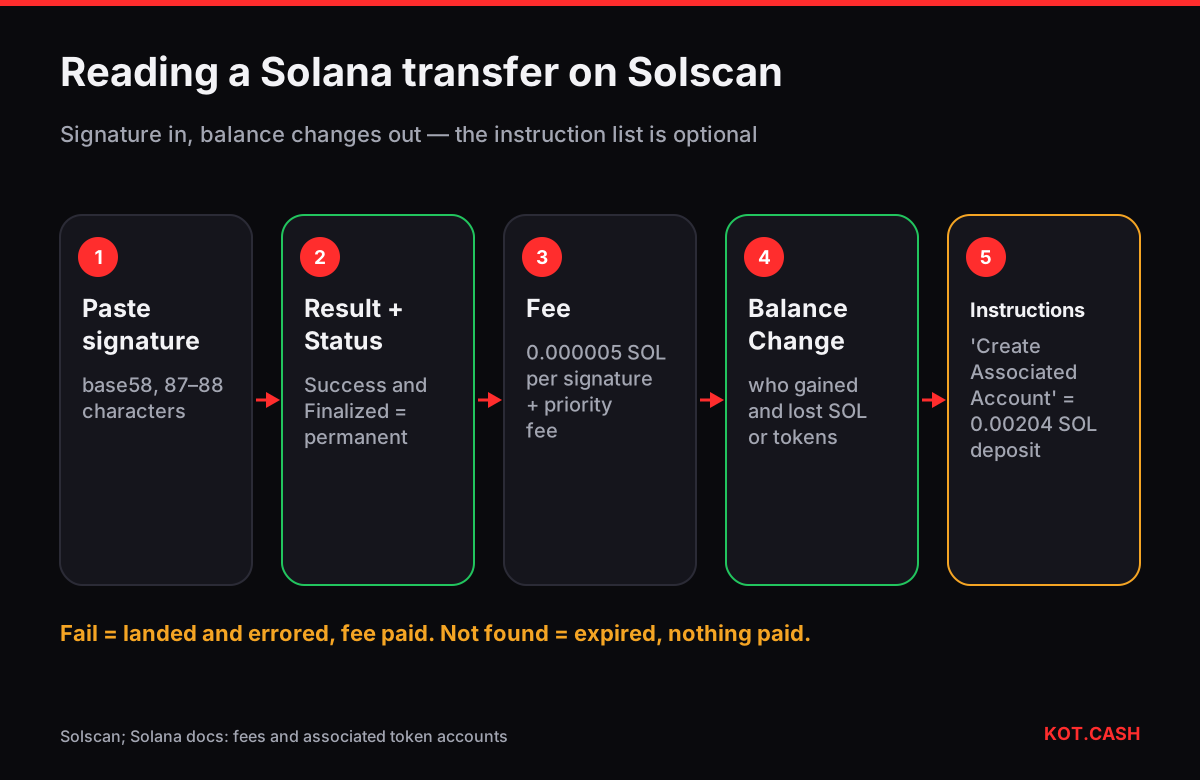
On Solana a transaction is identified by its signature, a base58 string of 87–88 characters, not by a hex hash. Paste it into the search box at solscan.io. The overview tells you the Result (Success or Fail), the Status (Confirmed or Finalized), the fee in SOL and who signed. The most practical tabs are SOL Balance Change and Token Balance Change: they show exactly how much each address gained or lost, which is easier to read than the instruction list.
Step by step through a transfer
- Find the signature. In Phantom or Solflare, open the activity item and choose View on Solscan, or copy the signature. The transaction hash identifier recognises a Solana signature by its length and alphabet.
- Read Result and Status. Success + Finalized means the transfer is permanent. Confirmed means a supermajority has voted on the block; finalized follows a few seconds later.
- Check the fee. A plain transfer pays 0.000005 SOL per signature; anything above that is a priority fee. Solscan also shows compute units consumed.
- Open Balance Change. For a SOL transfer, the SOL tab shows your address down by amount + fee and the recipient up by the amount. For USDT or USDC, the Token tab shows the same for the token.
- Glance at Instructions. A typical token transfer contains a Token Program 'transfer' or 'transferChecked'; sometimes an Associated Token Account Program 'create' precedes it.
Why an extra 0.002 SOL may disappear
Tokens on Solana are held not by your wallet address directly but by a token account derived from it, the associated token account. When someone sends you a token for the first time, the sender's transaction creates that account and pays its rent-exempt deposit, 0.00203928 SOL for a standard SPL token account of 165 bytes. On Solscan this appears as a 'Create Associated Account' instruction and a SOL balance change on the sender's side. The deposit is refundable: closing an empty token account returns it to you. The Solana rent-exempt calculator shows the figure for any account size.
Failed transactions still pay
A transaction with Result: Fail landed in a block but one of its instructions errored — insufficient funds, slippage exceeded, a program error. Its state changes were reverted, but the base and priority fee were charged. Solscan shows the error in the Program Logs, for example custom program error: 0x1. If a signature is not found at all, the transaction never landed, typically because its blockhash expired; see Solana Blockhash not found.
The account page
- Portfolio / Tokens — SOL balance and every token account the address owns, with amounts.
- Transfers — SOL and token transfers, filterable by token, which is the quickest way to find a payment without the signature.
- DeFi activities — swaps and liquidity actions decoded by Solscan.
- Labels — known programs, exchanges and validators carry names.
Versioned transactions and address lookup tables
Many DeFi transactions on Solana are 'versioned' (v0) and reference address lookup tables to fit more accounts into one transaction. On Solscan you will see a Version field and, in the account list, entries marked as loaded from a lookup table. Nothing about that changes how you read the result: the balance changes still show who paid whom. It only explains why a swap can touch dozens of accounts. For a plain wallet-to-wallet transfer you will typically see one or two instructions and three to five accounts.
One more distinction worth knowing: your wallet address and your token account address are different strings. If someone asks for your USDT address on Solana, give the wallet address; senders' wallets derive the token account automatically. Sending to a token account address directly also works in most wallets, but it confuses people when they compare addresses.
Priority fees and compute units on the page
Solscan lists the compute units consumed by the transaction and the priority fee it paid. Priority fee = compute unit price (in micro-lamports) × compute unit limit. During busy periods wallets raise the price so transactions land before their blockhash expires; on quiet days the priority fee is often zero. The Solana priority fee calculator translates micro-lamports per CU into SOL.
Using Solscan with a swap order
When you pay a KOT.CASH order in SOL or in USDT/USDC on Solana, check that the Balance Change shows the deposit address from the order page receiving the full amount. The provider credits Solana deposits after 200 confirmations, roughly a minute and a half. For a payout, open the signature from the order page and look at the Token or SOL Balance Change for your address. If you receive a token to a brand-new wallet, the payout creates your token account; that is normal and you do not pay for it.
FAQ
Where do I find a Solana transaction hash?
Solana uses a signature instead of a hex hash. Copy it from your wallet's activity view and paste it into Solscan.
What is the difference between Confirmed and Finalized?
Confirmed means a supermajority of stake voted on the block; Finalized means the block is rooted and cannot be rolled back, a few seconds later.
Why did a token transfer cost about 0.002 SOL?
It created the recipient's token account, which needs a refundable rent-exempt deposit of 0.00203928 SOL.
Why was I charged a fee for a failed transaction?
It landed in a block and failed during execution. Landed transactions pay the base and priority fee regardless of outcome.
Is Solscan the only Solana explorer?
No. Solana Explorer (explorer.solana.com), SolanaFM and others show the same on-chain data.