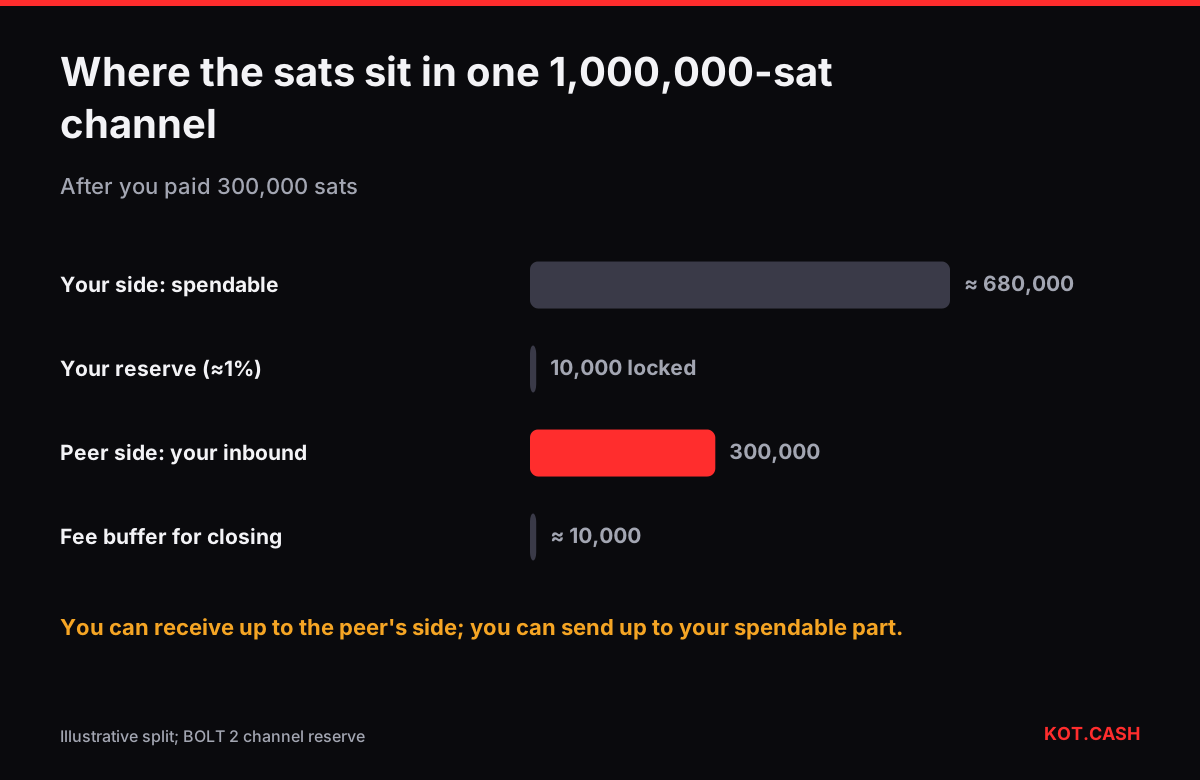
On Lightning you can send only what sits on your side of your channels and receive only as much as sits on the other side. That other side is called inbound liquidity. A wallet with 0.01 BTC in one channel that it funded itself can send up to almost 0.01 BTC but cannot receive anything until it has spent some, or until someone opens a channel towards it. Most “payment failed” and “cannot receive” errors come from this, not from the network being down.
A channel as a bar of fixed length
Think of a channel of 1,000,000 sats between you and a peer as a bar of fixed length. The split between your side (outbound) and theirs (inbound) moves with every payment, but the total stays the same until the channel is spliced or closed. Paying 300,000 sats moves 300,000 to their side; you can now receive up to 300,000 back through this channel.
| Event | Your side (send) | Peer side (you can receive) |
|---|---|---|
| You open and fund the channel | ≈ 990,000 | 0 |
| You pay 300,000 sats | ≈ 690,000 | 300,000 |
| You receive 100,000 sats | ≈ 790,000 | 200,000 |
| Peer opens a channel to you with 500,000 | + 0 | + 500,000 in a second channel |
The numbers start at about 990,000 rather than 1,000,000 because each side keeps a channel reserve, typically 1% of capacity, that it cannot spend. The reserve keeps both parties honest: there is always something to lose if one of them broadcasts an old state. On-chain fees for the eventual closing transaction are also set aside in the commitment.
How wallets get inbound liquidity
- LSP channels on first receipt. Wallets such as Phoenix or Breez let their Lightning service provider open a channel to you when a payment arrives that does not fit. The provider charges a fee, usually a percentage of the amount plus the on-chain cost.
- Buying inbound. Node operators buy channels towards themselves from liquidity marketplaces or LSPs.
- Spending first. Paying for something moves liquidity to the other side and frees inbound capacity.
- Submarine swaps. Swapping Lightning funds out to an on-chain address (a “loop out”) empties your side of the channel and creates inbound liquidity at the same time.
Why big payments fail
A payment must find a route in which every channel has enough liquidity on the right side. Large nodes have big channels, but the last hop to a small wallet is often the bottleneck. Multi-path payments split an amount across several routes, which helps, but each part still needs a path. Each node can also hold only a limited number of payments in flight per channel (483 HTLCs per direction by the protocol limit), which matters only for very busy routing nodes.
- If sending fails, try a smaller amount first to see whether liquidity is the issue.
- Check your wallet's channel view: the spendable balance is less than the total by the reserve and pending fees, and both numbers are usually shown.
- For receiving, ask the wallet for its receive limit; above it, an LSP fee may apply or the payment may need an on-chain fallback.
- For amounts above a few million sats, an on-chain payment is often simpler and cheaper than forcing a route.
Routing nodes also rebalance: they pay themselves in a circle through the network to move liquidity from a full channel to an empty one. That costs routing fees and is part of running a node, not something a mobile wallet user needs to do.
Splicing: resizing without closing
Splicing lets a channel add or remove funds with one on-chain transaction while it stays open and usable. Splicing in adds outbound liquidity; splicing out sends part of your balance to an on-chain address. Phoenix uses splicing to manage a single channel per user; support in other implementations has been arriving gradually. Each splice pays an on-chain fee, so the Bitcoin fee calculator is relevant when mempool fees are high.
Merchants who mostly receive face the opposite problem: their channels fill up on their side and inbound capacity runs out. They regularly move funds out with submarine swaps or splices to keep room for new payments.
Costs to keep in mind
Liquidity is not free. Opening and closing channels pays on-chain fees; LSPs charge for inbound channels; routing nodes charge base and proportional fees for forwarding. For occasional small payments the convenience is worth it; for moving a large amount once, on-chain Bitcoin is usually cheaper. Before you swap BTC on KOT.CASH, which works on-chain only, move it out of Lightning as described in moving bitcoin from Lightning to on-chain.
FAQ
What is inbound liquidity?
The amount on your peers' side of your channels — the maximum you can receive over Lightning.
Why can't I receive a Lightning payment with a new wallet?
A wallet that funded its own channel has no inbound capacity. LSP wallets open one for you on first receipt, for a fee.
What is the channel reserve?
A part of the channel, typically 1%, that each side must keep and cannot spend while the channel is open.
Can I send my whole Lightning balance?
Not exactly: the reserve and fee buffers stay locked until the channel closes or is spliced out.
Is on-chain better for large amounts?
Often yes. A single on-chain transaction avoids routing limits and LSP fees.