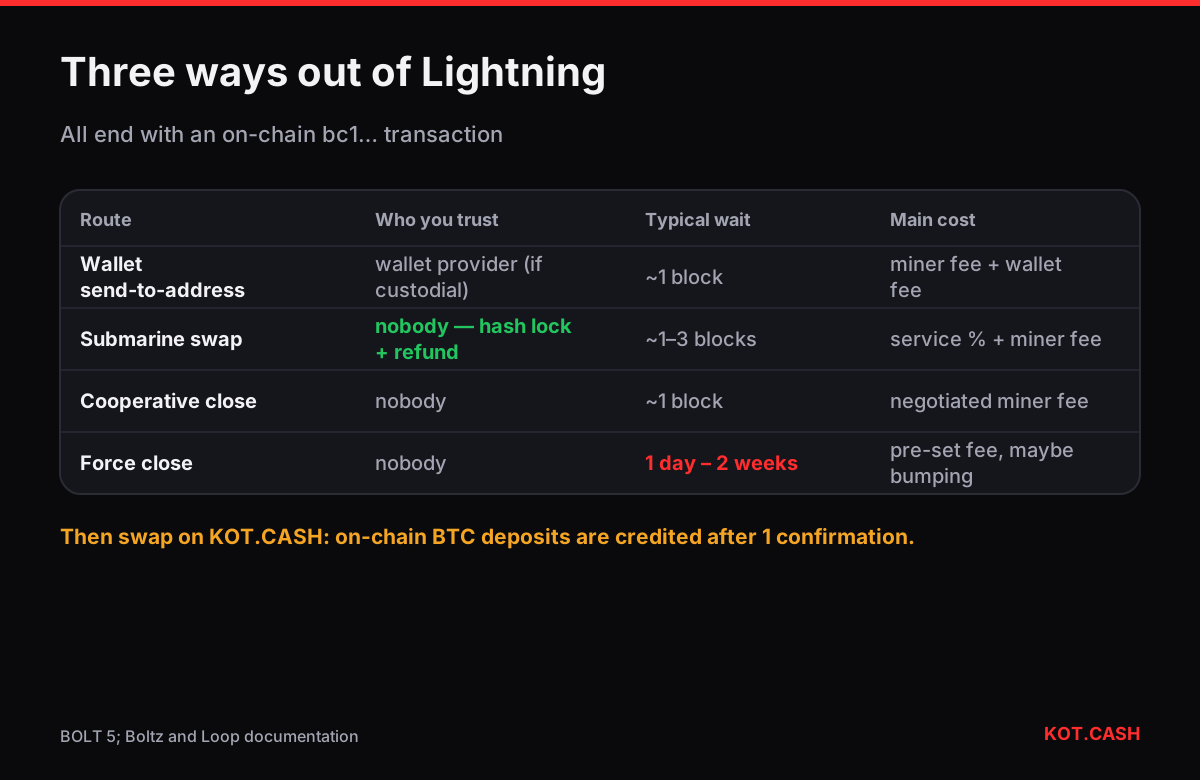
To move bitcoin from Lightning to a normal on-chain address you have three options: use your wallet's built-in send-to-address feature (a swap-out or splice-out), use a submarine swap service such as Boltz or Lightning Loop, or close the channel and let its balance settle to an on-chain address. All three end with an ordinary Bitcoin transaction to a bc1… address, after which you can use the BTC anywhere, including a KOT.CASH swap, which accepts on-chain BTC only.
Option 1: the wallet's send-to-address feature
Most self-custodial mobile wallets can pay an on-chain address directly. Under the hood they either splice funds out of your channel (Phoenix) or perform a swap with their provider (Breez and others). Custodial wallets simply send an on-chain withdrawal from their own funds and debit your account. You paste a bc1… address, the wallet shows the fee, and the BTC arrives in one on-chain transaction.
- Cost: the on-chain miner fee plus the wallet's service fee, if any. When mempool fees are high, this can be several thousand sats.
- Time: the on-chain transaction needs a block, about ten minutes on average.
- Minimums: wallets often require a minimum, because small on-chain outputs are uneconomic.
Option 2: a submarine swap
A submarine swap exchanges Lightning BTC for on-chain BTC without a custodian. You pay a Lightning invoice to the swap service; the service locks on-chain BTC in a hash time-locked output that only you can claim, using the same secret that settles your Lightning payment. If anything goes wrong, a timeout lets each side get its funds back. Services such as Boltz and Lightning Loop (Loop Out) work this way.
- Open the swap service, choose Lightning → Bitcoin and enter the amount.
- Paste your on-chain receive address and save the refund or rescue file the service offers.
- Pay the Lightning invoice from your wallet.
- Wait for the on-chain transaction; the service or your wallet claims it to your address.
Fees are a percentage set by the service (often a fraction of a percent) plus the on-chain miner fee. A side effect: you free inbound liquidity in your channels, which helps if you also receive over Lightning — see channel liquidity explained.
Option 3: closing the channel
| Cooperative close | Force close | |
|---|---|---|
| When | both nodes online and agree | peer offline or unresponsive |
| Transactions | one on-chain transaction | commitment + later sweep |
| When your BTC is spendable | after it confirms | after the to_self_delay, often 144–2,016 blocks (≈ 1 day to 2 weeks) |
| Fee | negotiated, usually moderate | fee set when the commitment was signed; can be high or need bumping |
| Pending payments | settled before closing | HTLCs resolved on-chain, extra transactions |
Closing makes sense when you no longer need the channel or run your own node. For a mobile-wallet user, closing is usually done for you by the wallet when you empty it. Avoid force closes when you can: they lock your funds for the delay period and cost more.
Which option to choose
- Small amount, mobile wallet: the wallet's send-to-address feature.
- Larger amount, you want to keep your channels: a submarine swap.
- You run a node and no longer need a channel: a cooperative close.
- Peer gone for weeks: a force close, accepting the delay.
- Custodial wallet: its withdrawal button — there is no channel of yours to close.
When fees are high
All three routes end in an on-chain transaction, so the mempool decides much of the cost. If moving out is not urgent, wait for a quieter period: weekend fee rates are often lower. Submarine swap services and wallets usually show the miner fee before you confirm; compare it with the amount — paying 3,000 sats to move 50,000 sats is a 6% cost. For small balances it can be cheaper to keep spending them over Lightning and move out only once the balance is larger.
After the BTC is on-chain
Once the transaction has at least one confirmation in your wallet, the BTC behaves like any other on-chain bitcoin. To swap it on KOT.CASH, open for example the BTC to USDT pair, create an order and send from your on-chain wallet to the deposit address shown. The provider credits BTC deposits after 1 confirmation. If you plan to swap right away, you can also enter the KOT.CASH deposit address directly as the on-chain destination of your Lightning withdrawal — but only if the wallet or swap service sends exactly the order amount, after its own fees; otherwise send to your own address first.
FAQ
Can I send Lightning BTC straight to an exchange's on-chain address?
Yes, if your wallet supports sending to on-chain addresses or you use a submarine swap. Make sure the arriving amount matches what the exchange or order expects.
How long does a force close take?
Your funds become spendable after the channel's to_self_delay, commonly between about a day (144 blocks) and two weeks (2,016 blocks).
What is a submarine swap?
A trustless exchange of Lightning BTC for on-chain BTC using the same hash lock on both sides, with a timeout refund.
Why is moving out of Lightning expensive sometimes?
It ends in an on-chain transaction, so you pay the current miner fee, which rises when the mempool is busy.
Does KOT.CASH accept Lightning deposits?
No. Move BTC on-chain first, then send it to the order's deposit address.