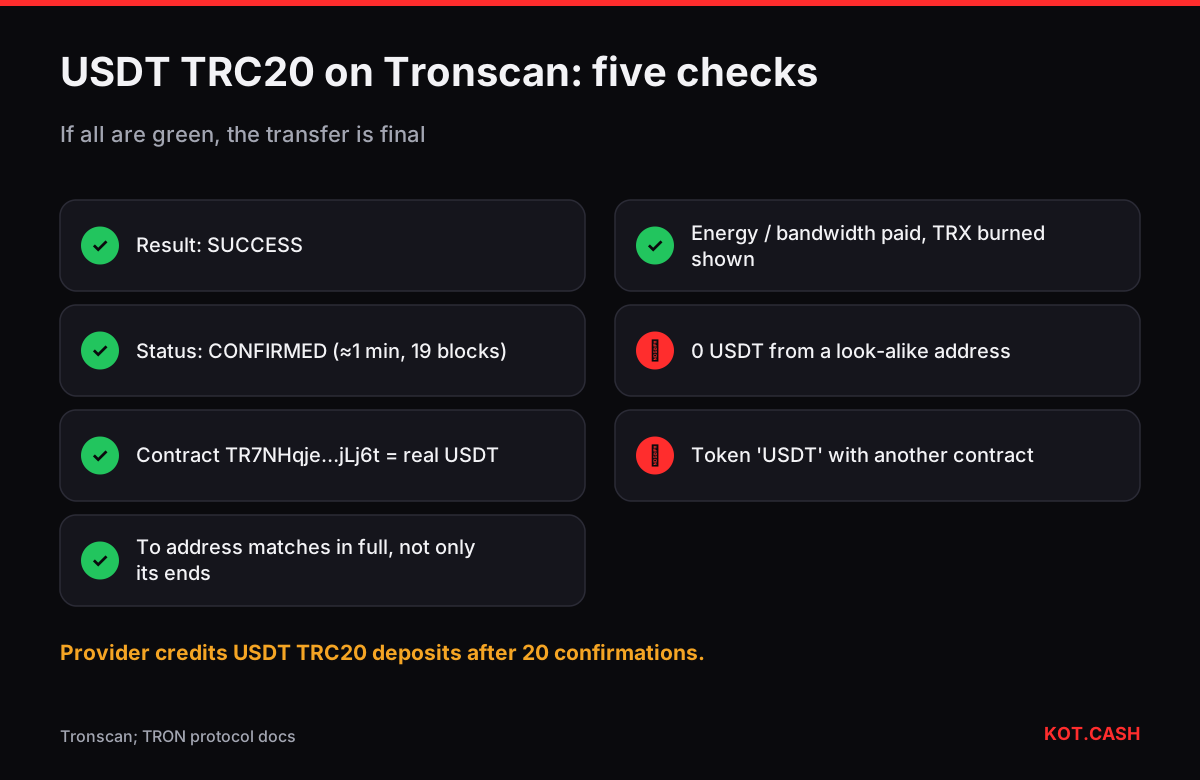
Tronscan is the main block explorer for TRON. To check a USDT TRC20 transfer, paste the transaction hash or your address into the search box at tronscan.org. On the transaction page look at three things: the Result (SUCCESS or a failure code), the status (CONFIRMED once the block is solidified, usually within a minute) and the TRC20 transfer line showing the token, amount, sender and recipient. If those three look right, the transfer is done.
Checklist for a USDT TRC20 transaction page
- Result: SUCCESS. Anything else — REVERT, OUT_OF_ENERGY, FAILED — means the tokens did not move. OUT_OF_ENERGY has its own explanation in TRON OUT_OF_ENERGY.
- Status: CONFIRMED. Unconfirmed means the block is not yet solidified. TRON's 27 super representatives produce a block every 3 seconds, and a block becomes irreversible after 19 of them (two thirds plus one) have built on it — about a minute.
- Token: Tether USD (USDT) with the official contract
TR7NHqjeKQxGTCi8q8ZY4pL8otSzgjLj6t. A token called USDT with another contract is not Tether. - From and To: the To address must be exactly the address you intended, compared character by character, not just by its ends.
- Resources consumed and fee: energy and bandwidth used, and how much TRX was burned if you had no staked or rented energy.
Reading the resources block
TRON does not charge a gas price like Ethereum. A TRC20 transfer consumes energy (for running the contract) and bandwidth (for the bytes of the transaction). Tronscan shows both and how they were paid: from your staked resources, from the free daily bandwidth allowance, from energy delegated by someone else, or by burning TRX. A USDT transfer to an address that already holds USDT uses roughly 65,000 energy; to a new holder roughly twice that. At the October 2026 energy price of 100 sun per unit, that is about 6.5 TRX or 13 TRX burned. The USDT TRC20 fee calculator reproduces the math.
The address page
Open any address to see its TRX balance, token holdings, and the Resources panel with available bandwidth and energy. The Transfers tab lists TRX and TRC20 transfers; filters let you show only USDT. The address page also shows whether the account is activated: a TRON address exists on-chain only after it has received TRX or a token for the first time, and activating it costs the sender an extra fee.
Fake tokens and look-alike transfers
Anyone can deploy a TRC20 token named USDT and send it to you. On Tronscan it will show a different contract, often no verification badge, and sometimes a warning label. Such tokens cannot be sold or swapped; a website that asks you to 'connect' to claim or sell them is a drainer. For address poisoning, the pattern is an incoming transfer of 0 or a fraction of a USDT from an address with the same first and last characters as one you paid recently. The address poisoning checker compares the full addresses for you.
Finding a transaction when you do not have the hash
- Search your own address and open the Transfers tab.
- Filter by token USDT and by date.
- Open the transfer with the right amount and recipient; copy its hash for support or for an order.
If you are not sure whether a hash belongs to TRON at all — TRON hashes are 64 hex characters without 0x, like Bitcoin's — the transaction hash identifier lists which explorers to try.
Contract and token pages
Clicking the token name opens the token page with total supply, number of holders and the contract tab. For USDT you will see a holder count in the tens of millions and the issuer's verified contract. The contract tab also shows whether a token can be frozen: Tether's contract has a blacklist function, and Tronscan lists 'AddedBlackList' events when an address is frozen. If you are about to receive a large amount from an address, checking that it is not blacklisted takes a minute and avoids receiving funds you cannot move.
Tronscan also has a mobile layout that works well on phones, and an app. Bookmarks and watchlists require an account, but searching and reading never do.
Using Tronscan with a swap order
When you pay a KOT.CASH order with USDT TRC20, the provider credits the deposit after 20 confirmations, about a minute after Tronscan shows the block. If Tronscan says SUCCESS and CONFIRMED and the To address equals the order's deposit address, the payment is in. If the order still waits after five minutes, write to support with the order link and the hash. For a USDT payout, the order page shows the payout hash; open it on Tronscan to confirm the transfer to your address.
FAQ
How long until Tronscan shows CONFIRMED?
Usually about a minute: a TRON block is irreversible after 19 more blocks at 3 seconds each.
What is the official USDT TRC20 contract?
TR7NHqjeKQxGTCi8q8ZY4pL8otSzgjLj6t. Any other contract named USDT is not Tether's token.
Why did I receive 0 USDT from an unknown address?
That is usually address poisoning: a look-alike address planted in your history. Do not copy it.
What does 'burned TRX' on a transaction mean?
You had no staked or rented energy, so the network burned TRX to pay for the energy and bandwidth used.
Can Tronscan reverse or cancel a transfer?
No. An explorer only reads the blockchain; it cannot change transactions.