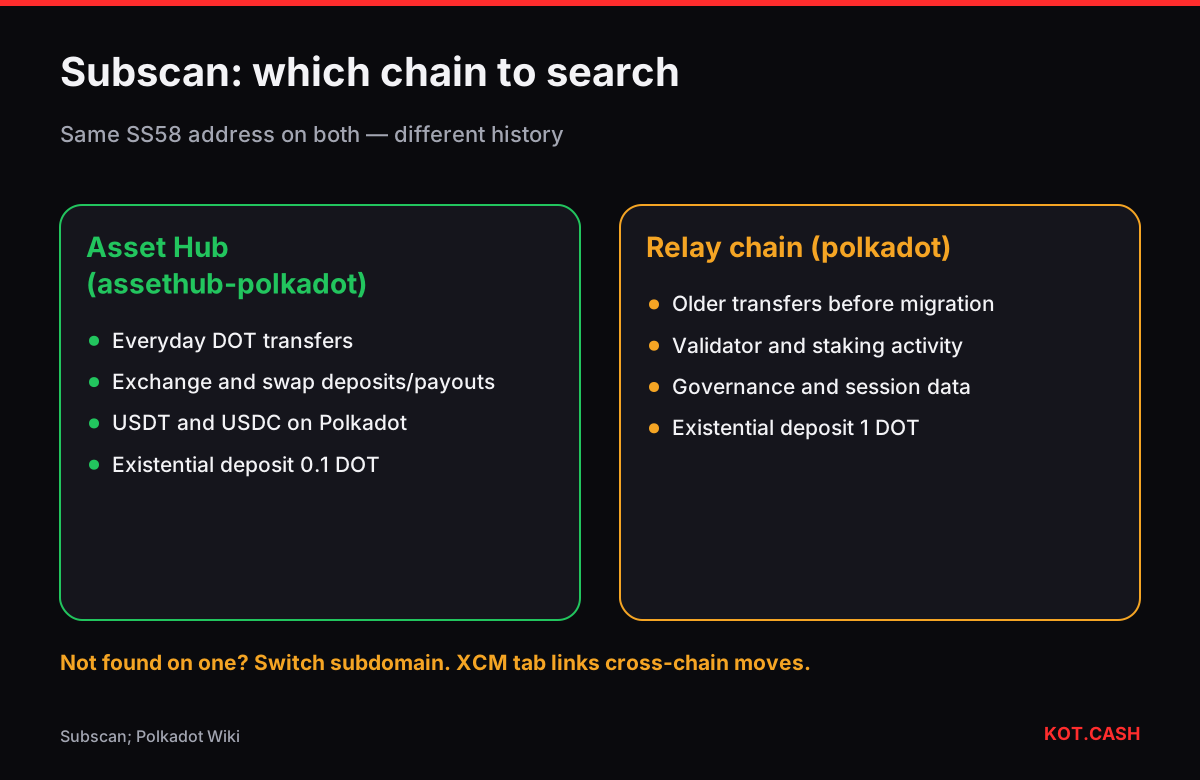
Subscan is the most widely used explorer for Polkadot and other Substrate-based chains. Each chain has its own subdomain: polkadot.subscan.io for the relay chain and assethub-polkadot.subscan.io for Polkadot Asset Hub, where DOT balances and everyday transfers now live. Search your address or the extrinsic hash on the right one. A transfer is an extrinsic (a signed call) that emits events; the events tell you what actually happened, including fees and whether an account was reaped.
Relay chain or Asset Hub: where to look
Most 'transaction not found' moments on Polkadot come from searching the wrong chain. Since DOT balances migrated to Asset Hub, wallets such as Nova, Talisman and SubWallet send DOT on Asset Hub by default, and the KOT.CASH liquidity provider uses Asset Hub for DOT deposits and payouts. Staking and governance activity may still show on the relay chain. If an address shows no history on one subdomain, switch to the other. The address itself is the same SS58 string (starting with 1 on Polkadot) on both.
Reading an extrinsic page
- Extrinsic ID — block number and index, for example 9876543-2, plus the extrinsic hash (0x and 64 hex characters).
- Result — Success or Failed; a failure shows the module error, such as
balances.InsufficientBalance. - Finalized — Polkadot produces blocks every 6 seconds and GRANDPA finalises them, usually within a minute.
- Call — for a transfer,
balances.transfer_keep_aliveorbalances.transfer_allow_death, with the destination and amount. - Fee — paid in DOT; the Events list shows it as
transactionPayment.TransactionFeePaid.
The events list explains the outcome
Under the extrinsic you will find events in order. A plain transfer emits balances.Withdraw (the fee), balances.Transfer (the amount), balances.Deposit and transactionPayment.TransactionFeePaid, then system.ExtrinsicSuccess. If the transfer created the recipient's account you will also see system.NewAccount and balances.Endowed. If it emptied the sender, balances.DustLost and system.KilledAccount appear — the account was reaped because its balance fell below the existential deposit; see Polkadot account reaped.
Balances: transferable, reserved, locked
| Part | Meaning | Can you send it? |
|---|---|---|
| Transferable | Free balance minus anything frozen | Yes |
| Reserved | Held for identity, proxies, multisig deposits | No, until released |
| Locked / bonded | Staking, nomination pools, governance votes | No, until unbonded (28 days for staking) |
| Existential deposit | Minimum to keep the account alive | Only by closing the account |
If a wallet says you have 10 DOT but you cannot send more than 2, the Balance section on Subscan shows why. Unbonding staked DOT takes 28 days on Polkadot; until then the locked part cannot move.
XCM transfers between chains
Moving DOT between the relay chain, Asset Hub and parachains uses XCM messages. Subscan has an XCM tab that links the sending extrinsic on one chain with the receiving event on the other. If a cross-chain transfer seems missing, find the outgoing extrinsic, open its XCM message and check the status on the destination chain. Funds in flight usually arrive within a minute or two.
Checking a DOT deposit to a swap
- Open assethub-polkadot.subscan.io and search the hash from your wallet.
- Confirm Result: Success and a
balances.Transferevent to the deposit address from the order page with the full amount. - Wait for finality; the provider credits DOT after 15 confirmations, typically under two minutes.
- For a payout, search your own address and look for the incoming transfer; the payout hash is also on the order page.
Before sending, the address validator and the deposit confirmations table help avoid the two common problems: a Kusama or generic Substrate address pasted for Polkadot, and expecting a deposit to be credited faster than the provider's confirmation rule.
FAQ
Why can't Subscan find my DOT transfer?
You may be on the wrong chain. DOT transfers now mostly happen on Asset Hub; try assethub-polkadot.subscan.io.
What is an extrinsic?
A signed call submitted to a Substrate chain, such as a transfer. Its events show what happened.
Why is my transferable balance lower than my total?
Part of it is reserved or locked by staking, governance, identity or proxies. Subscan's balance section breaks it down.
How long until a Polkadot transfer is final?
Blocks come every 6 seconds and are usually finalised within a minute.
What does DustLost mean?
The account fell below the existential deposit and was reaped; the leftover was removed.