mempool.space is an open-source Bitcoin explorer built around the mempool, the queue of unconfirmed transactions. Its home page answers 'what fee should I pay right now' with four estimates and a picture of the next blocks. Its transaction page answers 'when will my payment confirm' with the transaction's fee rate in sat/vB, its position in the queue and an ETA. If your Bitcoin payment is stuck, this is the page to open first.
The home page in thirty seconds
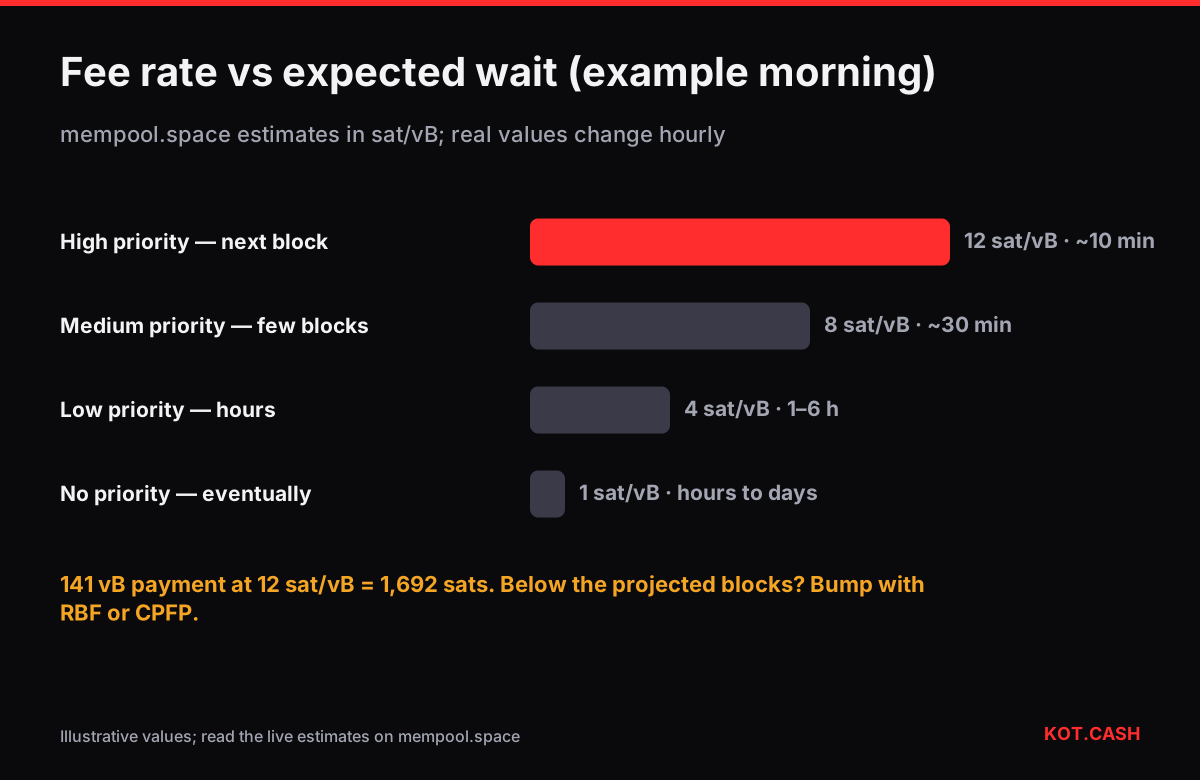
On the left you see projected blocks: stacks of unconfirmed transactions sorted by fee rate, each roughly one block's worth (about 1 million vbytes). On the right, the last mined blocks. Above them, four fee estimates: No Priority, Low Priority, Medium Priority and High Priority. High priority aims for the next block, medium for within a few blocks, low for within a few hours, no priority for 'eventually'. The numbers are in sat/vB and move with demand.
To convert an estimate into money, multiply by your transaction's size: a typical single-input, two-output native SegWit payment is about 141 vB, so 10 sat/vB means 1,410 sats. The Bitcoin transaction fee calculator does that for any number of inputs and address types.
The transaction page
- Status — Unconfirmed with an ETA, or the number of confirmations once mined.
- Fee rate — sat/vB. Compare it with the projected blocks: if your rate is below the bottom of the last projected block, expect a wait.
- Effective fee rate — shown when a child transaction (CPFP) or ancestor changes the package rate miners see.
- Features — badges for SegWit, Taproot and RBF. RBF means you can replace the transaction with a higher fee.
- RBF timeline — if the transaction was replaced, the page shows the chain of replacements and which one confirmed.
- Inputs and outputs — addresses and amounts, including change.
Example: how fee rate maps to waiting time
The diagram for this guide uses an example morning; the real numbers change hourly. The pattern holds: the gap between 'next block' and 'eventually' is often a factor of five to ten, and weekends are usually cheaper than weekday mornings in the US and Europe.
When the ETA keeps slipping
- If the transaction signals RBF, use your wallet's Bump fee to replace it at a rate inside the first projected block.
- If it does not signal RBF but you control an output (usually change), spend that output in a child transaction with a high fee (CPFP). The RBF and CPFP fee bump calculator gives the exact fee needed.
- If you are the recipient, you can CPFP from your output in the same way.
- If nothing is possible, wait: low-fee transactions confirm when demand drops, unless they are dropped after two weeks — see transaction dropped from the mempool.
Two common misreadings: a transaction shown as 'Unconfirmed' for an hour is not failed — Bitcoin transactions do not fail after broadcast. And 'Transaction not found' right after sending often just means your wallet has not broadcast it yet or the site's node has not received it; wait a minute and refresh.
Other useful corners
Reading the projected blocks picture
Each projected block is drawn as a square filled with small tiles, one per transaction, coloured by fee rate. Hover over the block to see its fee range, for example '6–48 sat/vB', and its median. The bottom of that range is what it currently takes to get into that block. Your transaction's page draws a marker showing which projected block it would fall into right now. If the marker sits in the third or fourth block, expect a wait of roughly 30–40 minutes even if nothing changes; if it is beyond the last projected block, there is no estimate until fees drop or you bump.
The difficulty adjustment widget estimates the next change and how fast blocks are coming; when blocks are faster than ten minutes, queues clear sooner. The address page lists every transaction of an address with confirmed and unconfirmed balance. mempool.space also has a Lightning explorer and test-network versions, and because it is open source, anyone can run it on their own node for private lookups.
Checking a BTC deposit to a swap
When you pay a KOT.CASH order in BTC, open the txid on mempool.space. The provider credits Bitcoin deposits after 1 confirmation, so the moment the page switches from Unconfirmed to '1 Confirmation' the order moves on. If your fee rate is far below the projected blocks, bump it rather than waiting, because an unpaid order expires when its countdown ends. For BTC payouts, the order page shows the payout txid; mempool.space shows its ETA.
FAQ
Which fee should I choose on mempool.space?
High priority for the next block, medium for within a few blocks. For non-urgent payments, low priority is usually fine within hours.
What does the ETA on a transaction page mean?
An estimate of when it will be mined based on its fee rate and the current queue. It moves as new transactions arrive.
Why is my fee rate different from what I set?
The page may show an effective rate that includes a parent or child transaction (CPFP), which is what miners actually evaluate.
Is mempool.space's Accelerator required?
No. RBF and CPFP from your wallet raise the fee yourself; the Accelerator is an optional paid service.
Does mempool.space show other coins?
It focuses on Bitcoin, its Lightning network and test networks. For other chains use their own explorers.