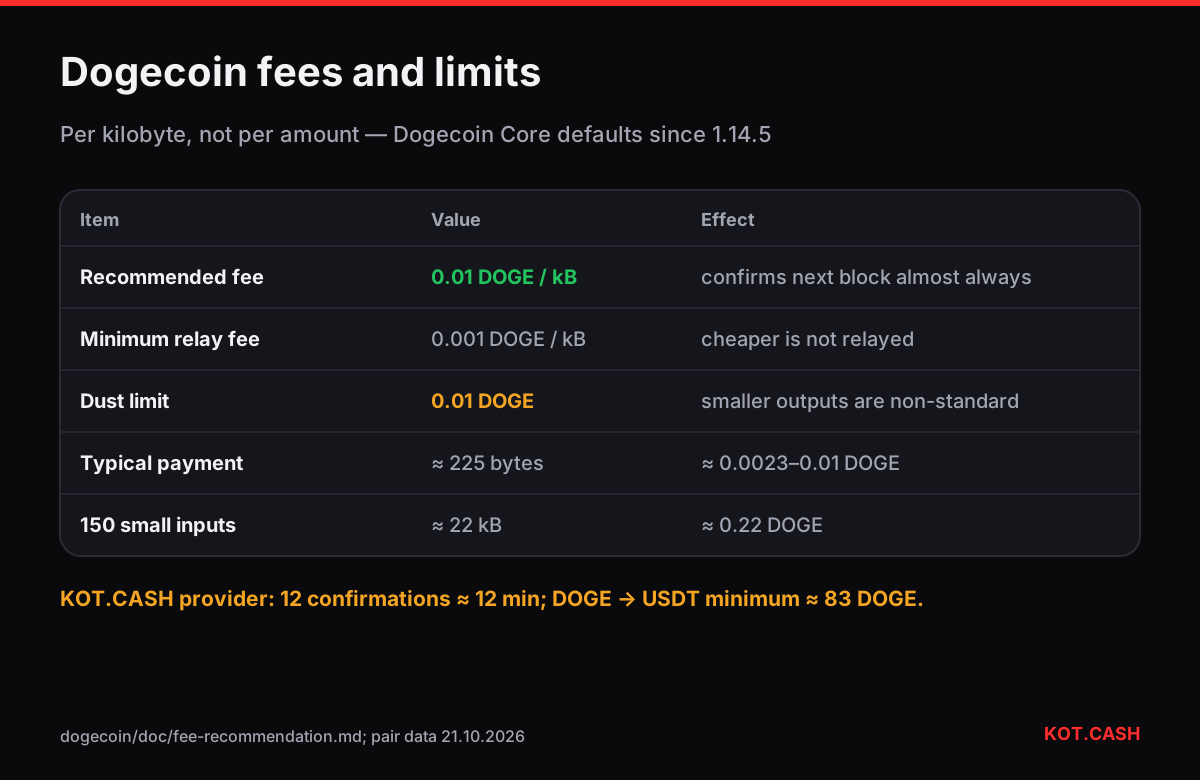
Dogecoin fees are set per kilobyte, not per virtual byte, and the reference wallet's recommendation since version 1.14.4 is 0.01 DOGE per kB. A typical payment of about 225 bytes therefore pays around 0.0023–0.01 DOGE, depending on how the wallet rounds — less than a tenth of a cent with DOGE near $0.081. What makes some Dogecoin transactions expensive is not the rate but the size: a wallet that received many small payments has to spend many inputs, and each one adds about 150 bytes.
The numbers Dogecoin Core uses
In 2021 the Dogecoin developers cut fees and dust limits by a factor of a hundred to keep the network usable as the price rose. The values below are the Dogecoin Core defaults introduced in versions 1.14.4–1.14.5 and used by most wallets since:
| Parameter | Value | What it means |
|---|---|---|
| Recommended fee | 0.01 DOGE per kB | What wallets pay by default |
| Minimum relay fee | 0.001 DOGE per kB | Nodes refuse to relay anything cheaper |
| Dust limit (soft) | 0.01 DOGE | Outputs below it are non-standard |
| Block target | 1 minute | Average time between blocks |
Some wallets round fees up to whole kilobytes, so even a 225-byte transaction may pay a full 0.01 DOGE. That is still about a tenth of a cent. Exchanges usually charge their own fixed withdrawal fee — often several DOGE — which is unrelated to the network fee.
Why size, not amount, decides the fee
Dogecoin uses the same UTXO model as Bitcoin: your balance is a set of separate coins (outputs) you received. Sending spends some of them as inputs and creates new outputs for the recipient and your change. One input with two outputs is about 225 bytes; each extra legacy input adds roughly 148 bytes. A wallet that received 200 tips of 1 DOGE each and now sends 150 DOGE has to include 150 inputs — a transaction of over 20 kB, which at 0.01 DOGE per kB still costs only about 0.2 DOGE, but at exchange-style flat rules or higher wallet settings can cost more.
- Many tiny inputs = large transaction = higher fee.
- Consolidating small inputs during quiet times keeps future fees low.
- Outputs below 0.01 DOGE are dust: nodes treat them as non-standard, and they cost more to spend than they are worth.
Dust and very small payments
The dust limit protects the network from outputs that are uneconomical to ever spend. If you try to send 0.005 DOGE, most wallets refuse. If a service sends you dust deliberately — a tactic used to tag addresses — you can simply ignore it; spending it would cost more than it is worth. For payments to a swap or an exchange there is a separate, much higher limit: the service's minimum amount. On KOT.CASH the minimum for DOGE to USDT is around 83 DOGE at the moment, because the payout network fee and processing costs must be covered.
How long a DOGE transfer takes
Blocks arrive every minute on average, but like Bitcoin the gaps vary randomly: two minutes or five minutes between blocks are normal. Receiving services wait for several confirmations. The provider behind KOT.CASH waits for 12 Dogecoin confirmations, which is about 12 minutes on average and occasionally twenty or more. The confirmation time estimator shows the median and 90% range for any number of blocks.
Practical tips
- Leave the wallet's default fee unless your transaction is unusually large; 0.01 DOGE per kB confirms in the next block almost always.
- If a payment is stuck, the most common reason is a fee below the minimum relay fee set by an old wallet. Update the wallet and resend.
- Use the Dogecoin QR generator to share an address with an amount; it encodes a standard dogecoin: URI.
- When swapping from DOGE, send the exact amount the order shows from a wallet that has enough to cover the network fee on top.
Dogecoin on KOT.CASH
You can swap DOGE to USDT, DOGE to BTC or buy DOGE with USDT. For payouts in DOGE the provider deducts the Dogecoin network fee of the payout (currently about 4 DOGE) in the quote, so the amount you see is what arrives. Dogecoin addresses start with D (P2PKH) or A/9 (P2SH).
Fees in exchange withdrawals vs on chain
If you withdraw DOGE from an exchange, the fee you see is the exchange's, not the network's. Exchanges batch withdrawals and pay network fees from their own hot wallet, then charge users a flat amount that covers their costs and margin — commonly between 1 and 5 DOGE. That is why moving DOGE between two of your own wallets costs almost nothing while an exchange withdrawal of the same amount costs a few cents. Neither is wrong; just compare like with like.
The same distinction applies to swaps: the swap provider sends your DOGE payout from its own wallet and builds the network fee of that payout into the quote, so you see the final amount before you commit.
FAQ
How much does a Dogecoin transaction cost?
About 0.01 DOGE per kB with default settings, so a typical payment costs a fraction of a cent.
What is the Dogecoin dust limit?
0.01 DOGE. Outputs below it are non-standard and not relayed by most nodes.
Why is my Dogecoin fee higher than usual?
Usually because the wallet spends many small inputs, making the transaction large. Consolidating them helps.
How long does a DOGE deposit take?
Blocks average one minute; the provider behind KOT.CASH credits after 12 confirmations, about 12 minutes on average.
Does Dogecoin need a memo?
No. Dogecoin identifies deposits by address only.