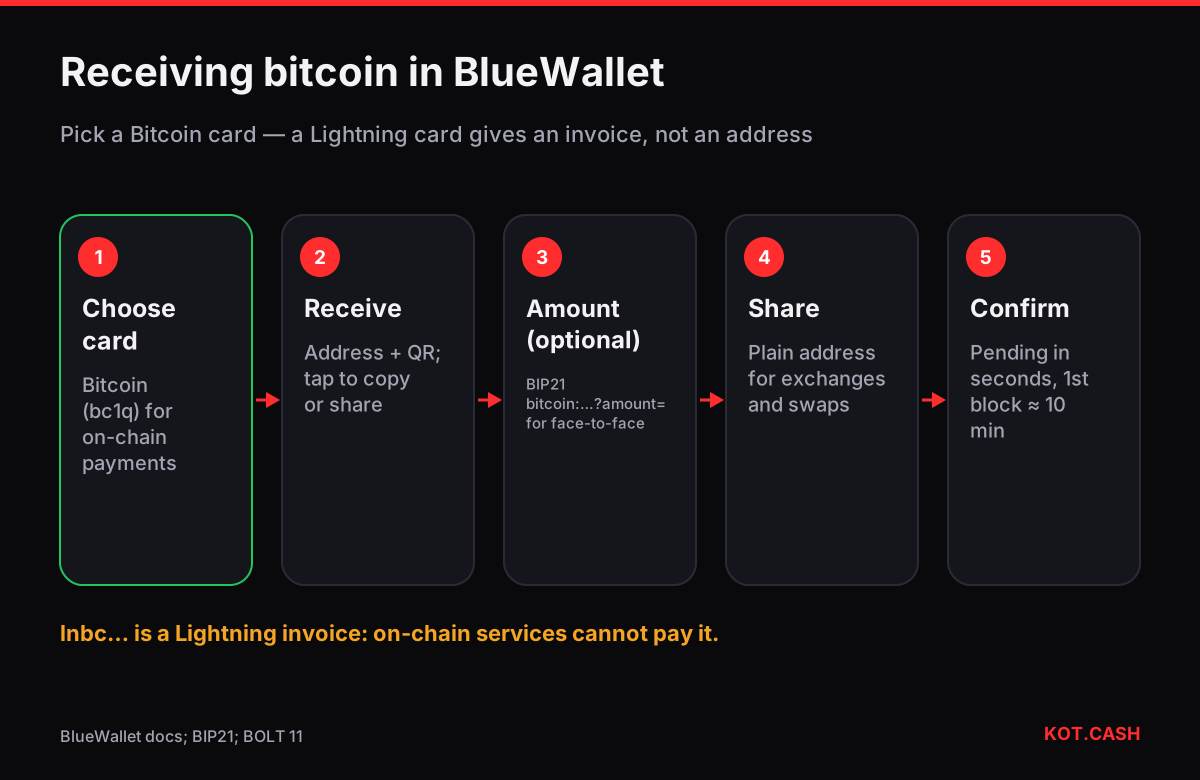
To receive bitcoin in BlueWallet, open the wallet card, tap Receive and the app shows a Bitcoin address with a QR code — for a standard wallet it starts with bc1q. Tap the address to copy it, or use Share. Optionally tap Set amount to turn it into a payment request that encodes the amount in the QR. BlueWallet shows a new address after each one gets used, so every payer can receive a fresh address.
Which kind of wallet you are looking at
BlueWallet can hold several wallets side by side, and they behave differently when you press Receive. Look at the card label before you share anything.
| Card | Receive shows | Can a swap service pay to it? |
|---|---|---|
| Bitcoin (HD SegWit) | bc1q… address | ('Yes', 'green') |
| Bitcoin legacy or nested SegWit (imported) | 1… or 3… address | ('Yes', 'green') |
| Multisig vault | bc1q… address derived from all cosigners | ('Yes — verify on a cosigner device', 'amber') |
| Watch-only (xpub / zpub) | address of a wallet whose keys are elsewhere | ('Yes, but you cannot spend from BlueWallet', 'amber') |
| Lightning (LNDHub) | a Lightning invoice lnbc… | ('No — on-chain services cannot pay invoices', 'red') |
Lightning cards are where people get stuck. A Lightning invoice is not an address: it starts with lnbc, expires (an hour by default) and can only be paid over the Lightning Network. BlueWallet stopped running its own hosted Lightning service, so Lightning cards today are connections to an LNDHub server that you or someone you trust runs. KOT.CASH and most exchanges pay BTC on-chain only — give them a bc1 address from a Bitcoin card. The Lightning invoice decoder shows what an lnbc string contains if you are unsure what you were given.
Receive step by step
- On the home screen swipe to the Bitcoin wallet card you want to receive into.
- Tap Receive. The screen shows the address, a QR code and buttons to copy or share.
- Optional: tap Set amount (or the amount option, depending on the version), enter the amount in BTC or your currency and a description. The QR now contains a BIP21 link such as
bitcoin:bc1q…?amount=0.005. - Send the address or show the QR. For a second payer, come back after the first payment and BlueWallet shows the next unused address.
- The incoming transaction appears as pending within seconds and gains its first confirmation with the next block, on average ten minutes later.
Amount requests: when to use them
A BIP21 request with an amount saves the payer from typing a number, which avoids decimal mistakes. It is useful face to face. For withdrawals from exchanges and for swap payouts, share the plain address instead: those forms have their own amount fields and some reject a full bitcoin: URI. If you generate a QR on another device, the QR code generator builds both plain-address and amount QR codes offline.
Watch-only wallets
BlueWallet can import an extended public key (xpub, ypub or zpub) from a hardware wallet or another app as a watch-only wallet. It derives the same addresses as the original wallet and shows the balance, but holds no private keys. That is handy for checking incoming payments on your phone while the keys stay on a device at home. When you share an address from a watch-only card, still confirm it on the device that holds the keys if the amount matters — BlueWallet cannot verify it for you.
Fees you will pay later
Receiving costs nothing — the sender pays. Spending later costs a fee based on the size of your transaction, not the amount. Every received payment becomes a separate input, so a wallet that received twenty small payments pays for twenty inputs when it spends them together. BlueWallet's coin control screen lets you pick which coins to spend; the Bitcoin fee calculator shows what a transaction with your number of inputs costs at the current sat/vB rate.
Backing up before the first payment
BlueWallet creates a 12- or 24-word BIP39 phrase for new Bitcoin wallets. Write it down before you receive anything: the app can be deleted with the phone, and the phrase is the only way back. Turn on the app's encryption and a device lock. For larger amounts consider a hardware wallet and keep BlueWallet as a watch-only view.
Receiving a swap payout
For a KOT.CASH BTC payout paste a bc1 address from a Bitcoin card into the order form. The payout is a normal on-chain transaction; the order page shows its hash, and BlueWallet lists it as soon as it reaches the mempool.
FAQ
Why does BlueWallet show a new address every time?
After an address receives coins, BlueWallet shows the next unused one so that each payer gets a fresh address. Old addresses keep working.
Can I give my BlueWallet Lightning invoice to an exchange?
Only if the exchange supports Lightning withdrawals. Swap services that pay on-chain, including KOT.CASH, need a bc1 address.
Is BlueWallet's seed phrase compatible with other wallets?
Standard Bitcoin wallets in BlueWallet use BIP39 phrases, which most wallets can restore.
What is a watch-only wallet?
A wallet imported from an xpub: it shows addresses and balance but has no keys, so it cannot spend.
Do I need to add an amount to receive?
No. A plain address is enough; amounts are an optional convenience for the payer.